Premium Category Products

Recurlix – WooCommerce Variation Manager | Bulk Edit, Health Scanner & Rollback

Recurlix – WooCommerce Variation Manager | Bulk Edit, Health Scanner & Rollback

Recurlix – WooCommerce Variation Manager | Bulk Edit, Health Scanner & Rollback

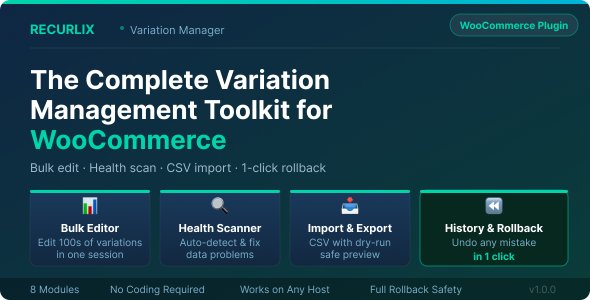
Managing WooCommerce product variations sounds simple — until your store has hundreds of them. The default WooCommerce product editor forces you to open each product individually, scroll to the variations tab, expand it, edit one field at a time, save, and repeat. Need to update prices for 300 variations before a sale? That is an entire day of clicking. Need to import a supplier price list? There is no built-in way to do that. Made a bulk mistake and want to undo it? There is no rollback either. Recurlix – Variation Manager Pro is a complete variation management toolkit that lives inside your WordPress admin and replaces that slow, error-prone workflow. It gives you a spreadsheet-style bulk editor, an automatic data health scanner, CSV import and export with a safe preview step, full image management, duplicate SKU detection, and a complete history log with one-click rollback — all from a single, clean admin interface. No coding required. The Problem With WooCommerce’s Default Variation Editor WooCommerce was built to sell products, not to manage large variation catalogs. As your store grows, you run into problems the default editor was never designed to solve: You cannot edit prices or stock across multiple products at once — every change requires opening each product one by one. There is no built-in way to detect which variations are missing a price, have a duplicate SKU, or are accidentally disabled. Importing a supplier’s CSV price list into WooCommerce variations is not possible without a third-party plugin. If you make a mistake during a bulk operation, there is no undo — every change is permanent. Finding which variations have no image assigned means scrolling through your entire catalog manually. Recurlix – Variation Manager Pro solves every one of these problems with a dedicated tool for each task. Module 1 — Dashboard: Your Store’s Variation Health at a Glance The pain: You have no quick way to know the current state of your variation data. Are there variations with missing prices that customers cannot buy? Are there duplicate SKUs causing inventory problems? You would have to dig through each product manually to find out. The solution: The Dashboard is the first thing you see when you open Variation Manager Pro. It pulls live data from your database and shows you eight key metrics in summary cards: total variable products, total variations, enabled variations, disabled variations, variations missing a price, out-of-stock variations, variations missing an image, and variations with duplicate SKUs. Every number that needs your attention is highlighted in red and links directly to the right tool to fix it. When a count reaches zero, it turns green — giving you an instant visual health check every time you open the plugin. Below the summary cards, a Health Snapshot panel shows the four most actionable issues with live counts and direct links to the right tool for each one. Quick-launch buttons give you one-click access to every module without navigating through the sidebar. Module 2 — Bulk Editor: Edit Hundreds of Variations in Minutes The pain: You need to raise prices by 10% across a product category before a seasonal sale. Or a supplier changed their wholesale prices and you need to update 200 variations. In the default WooCommerce editor, this means opening every product, scrolling to the variations tab, editing each field, saving, and moving to the next one. For a store with hundreds of variations, this takes hours. The solution: The Bulk Editor loads all your variations into a spreadsheet-style grid where every row is one variation and every column is a field. You can click any cell to edit it directly, or check the boxes on multiple rows and apply the same value to all of them at once using bulk actions. The full list of editable fields includes: SKU, regular price, sale price, stock quantity, stock status (In Stock / Out of Stock / On Backorder), enabled or disabled status, weight, dimensions (length, width, height), shipping class, tax class, and variation description. Bulk actions let you set a price, set a stock quantity, set a stock status, enable or disable multiple variations, clear sale prices, or add a prefix or suffix to SKUs — all in one operation. Before saving, a preview modal shows you every pending change with the old value and the new value side by side, so you can review exactly what will be written to the database. Every save session is grouped into a single batch in History so you can roll back the entire session with one click if anything looks wrong. Filters let you narrow the grid to exactly the rows you need: filter by product category, stock status, enabled or disabled state, and problem filters for missing price, missing SKU, missing image, duplicate SKU, or on-sale status.    

(Only For Premium Category Products !)

1. All digital products are the most recent version, with no possibility of free updates. After payment, you can request an update to the most recent version for 5 days if a new version is released. We free support within 5 days.

2. If a license is required (Excludes WHMCS license , we provide only method not license), please contact us via email or ticket for assistance with activation. Our license is only valid for activation and does not include support.

3. We provide Mobile, PHP script installation services for $19.90 / ₹1700. Please create a backup after installation as we do not support re-installation. For mobile app source code, we do not offer installation services.

4. If you have any questions, please contact us by email  or create a ticket on this page

5. Please note that any digital products presented on the website do not contain malicious code, viruses or advertising. You will receive the original files from the developers. We do not sell any products that have been downloaded from other websites.

6. The response time can last up to 6 hours.

(Only For Membership Category Products !)

Benefits of our Membership Plans

  • Instant access to all plugins and all themes including all future releases
  • Unlimited domain usage
  • Regular Updates as of when available. Usually, updates are released daily.
  • Before purchasing, please read the Terms and Conditions & Refund Policy.
  • If you have any questions, please first read the FAQs.
  • If you haven’t found the answer to your question, please contact us, and we will respond ASAP.
  • Please note that any digital products on the website do not contain malicious code, viruses, or advertising. We buy the original files from the developers. We do not sell any products downloaded from other sites.
  • Buy or download for FREE by subscribing to our VIP Membership Plan. Join the club of more than 1100+ happy members. This is the same theme as sold by the developer.

Updates:

  • We offer frequent updates for one year from the date of purchase. After this period, you have to purchase the item again to receive further updates, we also offer lifetime updates as a second option.
  • We regularly update products as soon as we are notified about an update, we go and download it from the author and update it on our site, but In case the current version of the product is not the latest, You can request an update for the product by contact form.
  • We send regular emails advising when products have been updated so please be sure to provide an active email address when you sign up.

Support:

  • Our support team is available 24/7, if you have any questions or need help in installing or configuring digital products purchased on the website, please don’t hesitate to contact form.
  • Please note that we are not developers of the provided products, so our technical support capabilities are limited. We do not change product functionality and do not fix developer bugs.

For more information please read FAQs & About Us.

(Only For WHMCS Category Products !)

  • We Only provide WHMCS Module, how you can  nulled any module step only !
  • Instant access to all plugins and all themes 
  • Unlimited domain usage
  • Regular Updates as of when available. Usually, updates are released daily.
  • Before purchasing, please read the Terms and Conditions & Refund Policy.
  • If you have any questions, please first read the FAQs.
  • If you haven’t found the answer to your question, please contact us, and we will respond ASAP.
  • Please note that any digital products on the website do not contain malicious code, viruses, or advertising. We buy the original files from the developers. We do not sell any products downloaded from other sites.

More Like This Products