
Premium Category Products
Reverse Image Search
Last Updated :
Current Version :
Reverse Image Search
✨ Latest Version
- Safety, Guarantees Files
- Malware-Free (Clean) Files
- License: GPL Preactivated
- Unlimited Site & Domain Usage
A) Reverse Introduction
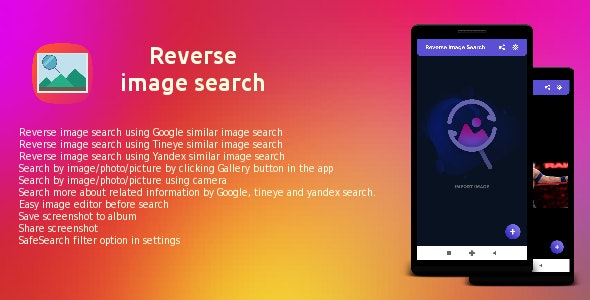
This app lets you search by images using ( Google, tineye and yandex, Engines ) instead of keywords Reverse Image Search is useful for verifying the source of photographs, WhatsApp images, screenshots and memes. Tinder and Facebook users have used “Search by Image” to research profile pictures of their potential dates while use it for finding the photo’s locationMain Features
- Reverse image search using Google similar image search
- Reverse image search using Tineye similar image search
- Reverse image search using Yandex similar image search
- Search by image/photo/picture by clicking Gallery button in the app
- Search by image/photo/picture using camera
- Search more about related information by Google, tineye and yandex search.
- Share image to Facebook, Twitter, Line, Google+, Google Drive, Hangouts, WhatsApp, Email, Messages, Bluetooth, Picasa and etc
- Easy image editor before search
- Save screenshot to album
- Share screenshot
- SafeSearch filter option in settings
C) Download APK
https://drive.google.com/file/d/1zoc1CaIMLdTucbHx9MKZOCm-PhjAbKVw/view?usp=sharingMore items by
How Reverse Image Search Works
- Image Matching: When you upload an image (or provide a URL), the search engine analyzes key features of the image, such as colors, shapes, and patterns, and then compares it to its indexed database of images.
- Results: The search engine returns visually similar images, links to the pages where the image appears, and sometimes other information related to the image (e.g., context, usage, or copyright details).
- Algorithms: Advanced image recognition algorithms are used to match patterns and features across the web, even if the image has been resized or altered. The engine may also utilize metadata (EXIF data) embedded in the image, although this is less common for public search engines.
Common Uses of Reverse Image Search
- Identify the Origin of an Image: Find where the image first appeared on the web or who originally created it.
- Check Image Authenticity: Verify whether an image has been manipulated or whether it's being used out of context.
- Find Higher-Resolution Versions: Discover a higher-quality version of an image or find similar images.
- Discover Copyright Violations: If you are a photographer or creator, reverse image search can help you track where your images are being used without permission.
- Find Similar Images: For research, inspiration, or just curiosity, users may want to find similar-looking images or explore a specific visual concept.
How to Perform a Reverse Image Search
There are several popular tools and services to perform a reverse image search. Here are a few:1. Google Images (Desktop & Mobile)
- Desktop:
- Go to Google Images.
- Click on the camera icon in the search bar.
- Upload the image by either dragging and dropping it or pasting the image URL.
- Google will display a set of similar images and related web pages.
- Mobile: On mobile devices, the process is slightly different. You can use the Google Chrome app:
- Open Chrome and go to Google Images.
- Tap the three dots in the top-right corner and select Request Desktop Site.
- Then, click the camera icon in the search bar to upload the image.
2. TinEye
- TinEye is a dedicated reverse image search engine.
- Go to TinEye.
- Upload the image or paste the image URL.
- TinEye will show a list of websites where the image appears, as well as the option to sort results by the newest or the oldest.
3. Bing Visual Search
- Bing also offers reverse image search capabilities:
- Go to Bing.
- Click on the camera icon in the search bar.
- Upload your image or paste the image URL.
- Bing will show similar images and sources where the image appears.
4. Yandex Images
- Yandex, the Russian search engine, is known for its advanced image search features, often offering better results for certain types of images.
- Visit Yandex Images.
- Click on the camera icon.
- Upload the image or paste its URL.
- Yandex will show similar images and webpages related to the uploaded image.
5. Social Media Image Search
- Some social platforms, like Pinterest, have built-in reverse image search features:
- On Pinterest, for instance, you can click on an image and use the “Search Visual Similarities” feature.
- Similarly, platforms like Instagram do not have a built-in reverse image search, but third-party tools can sometimes assist in finding the origin of images shared on these platforms.
Popular Reverse Image Search Apps
There are also apps available that allow reverse image search directly from your phone:- Google Lens: Google Lens is a powerful tool that can perform reverse image searches. It's integrated into Google Photos and the Google app on Android and iOS.
- Simply open the app or Google Photos, select an image, and tap the Google Lens icon to search for related information.
- CamFind: An app that lets you take a photo or upload an image to find similar images, products, and details online.
- Veracity: An iOS app that allows you to perform reverse image searches from your phone.
Tips for Best Results
- Clear & High-Quality Image: The better the image quality and clarity, the better the results. Images that are blurry or highly compressed may not produce accurate results.
- Use Multiple Engines: Since no engine is perfect, it's a good idea to try more than one reverse image search tool to compare results and get a more accurate match.
- Metadata: Images with EXIF data (e.g., taken with a specific camera) might return more specific results if that information is searchable.
Limitations
- Privacy Issues: If you're searching for an image that contains personal or private information, keep in mind that reverse image searches can expose that data on public platforms.
- Accuracy: Not all reverse image search tools are equal. Some may produce more relevant or accurate results than others, depending on the database and search algorithms they use.
- Non-Indexed Images: Images that are hosted on private websites, or that are newly uploaded and not yet indexed by search engines, may not appear in results.
(Only For Premium Category Products !)
1. All digital products are the most recent version, with no possibility of free updates. After payment, you can request an update to the most recent version for 5 days if a new version is released. We free support within 5 days.
2. If a license is required (Excludes WHMCS license , we provide only method not license), please contact us via email or ticket for assistance with activation. Our license is only valid for activation and does not include support.
3. We provide Mobile, PHP script installation services for $19.90 / ₹1700. Please create a backup after installation as we do not support re-installation. For mobile app source code, we do not offer installation services.
4. If you have any questions, please contact us by email [email protected] or create a ticket on this page
5. Please note that any digital products presented on the website do not contain malicious code, viruses or advertising. You will receive the original files from the developers. We do not sell any products that have been downloaded from other websites.
6. The response time can last up to 6 hours.
(Only For Membership Category Products !)
Benefits of our Membership Plans
- Instant access to all plugins and all themes including all future releases
- Unlimited domain usage
- Regular Updates as of when available. Usually, updates are released daily.
- Before purchasing, please read the Terms and Conditions & Refund Policy.
- If you have any questions, please first read the FAQs.
- If you haven’t found the answer to your question, please contact us, and we will respond ASAP.
- Please note that any digital products on the website do not contain malicious code, viruses, or advertising. We buy the original files from the developers. We do not sell any products downloaded from other sites.
- Buy or download for FREE by subscribing to our VIP Membership Plan. Join the club of more than 1100+ happy members. This is the same theme as sold by the developer.
Updates:
- We offer frequent updates for one year from the date of purchase. After this period, you have to purchase the item again to receive further updates, we also offer lifetime updates as a second option.
- We regularly update products as soon as we are notified about an update, we go and download it from the author and update it on our site, but In case the current version of the product is not the latest, You can request an update for the product by contact form.
- We send regular emails advising when products have been updated so please be sure to provide an active email address when you sign up.
Support:
- Our support team is available 24/7, if you have any questions or need help in installing or configuring digital products purchased on the website, please don’t hesitate to contact form.
- Please note that we are not developers of the provided products, so our technical support capabilities are limited. We do not change product functionality and do not fix developer bugs.
(Only For WHMCS Category Products !)
- We Only provide WHMCS Module, how you can nulled any module step only !
- Instant access to all plugins and all themes
- Unlimited domain usage
- Regular Updates as of when available. Usually, updates are released daily.
- Before purchasing, please read the Terms and Conditions & Refund Policy.
- If you have any questions, please first read the FAQs.
- If you haven’t found the answer to your question, please contact us, and we will respond ASAP.
- Please note that any digital products on the website do not contain malicious code, viruses, or advertising. We buy the original files from the developers. We do not sell any products downloaded from other sites.

Full Ionic 5 Mobile App for WordPress – Admob, Analytics, Rewards ads, Cloudflare – Hala News Pro
Rs5,727.00Original price was: Rs5,727.00.Rs249.00Current price is: Rs249.00.