
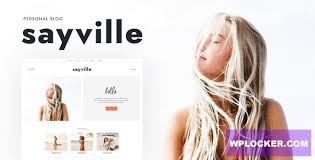

Sayville - WordPress Blog Theme is a clean, modern, and highly customizable WordPress theme designed specifically for bloggers, content creators, and writers. Whether you’re running a personal blog, lifestyle blog, travel blog, or niche blog, Sayville provides the tools and flexibility to create a stylish and engaging website that highlights your content in an attractive way. It’s designed to focus on readability and provide an excellent user experience, ensuring your readers enjoy exploring your posts.
Key Features of Sayville - WordPress Blog Theme:
- Elegant and Minimalist Design:
- Sayville offers a minimalist design that prioritizes readability and clean aesthetics. The theme focuses on providing a distraction-free environment for readers, allowing your content to take center stage. Its elegant layout helps you create a professional-looking blog without the need for complex designs or coding.
- Fully Responsive:
- The theme is fully responsive, meaning it adapts seamlessly to different screen sizes. Whether visitors are browsing from a desktop, tablet, or smartphone, they will enjoy a smooth and optimized experience, improving both user engagement and SEO.
- Multiple Blog Layouts:
- Sayville comes with a variety of pre-designed blog layouts, including grid, list, and classic blog styles. You can easily switch between these layouts based on your preference or the type of content you’re publishing. Each layout is designed to help present your content in an organized and visually appealing way.
- Easy Customization:
- With the WordPress Customizer integration, you can easily modify colors, typography, header and footer settings, and more without touching any code. Customization is intuitive and gives you the flexibility to make the theme fit your personal or brand style.
- Header and Footer Options:
- The theme provides different header and footer options, allowing you to customize the way your site looks and feels. You can choose from a variety of header styles, including minimalist and sticky options, as well as flexible footer settings that can include widgets, links, or a clean design.
- Support for Featured Images:
- Sayville allows you to use large, eye-catching featured images for each blog post, making your content more visually engaging. The theme supports high-quality image display, perfect for blogs focused on photography, travel, food, or lifestyle.
- Typography and Google Fonts:
- The theme is compatible with Google Fonts, giving you access to hundreds of typography options. You can customize the fonts to suit your brand's tone, whether you prefer a classic serif font for a professional feel or a more casual sans-serif for a fun, modern vibe.
- Related Posts Section:
- Sayville includes a Related Posts feature, which automatically displays other relevant blog posts at the bottom of each article. This encourages readers to stay on your site longer and explore more of your content, improving engagement and time on page.
- SEO Optimized:
- The theme is built with SEO best practices in mind, helping your site rank better in search engines. The clean, semantic code structure and fast loading times contribute to improved SEO performance, making it easier for readers to find your blog online.
- Social Media Integration:
- The theme supports social media integration, allowing you to easily link your blog to platforms like Instagram, Facebook, Twitter, and Pinterest. This can help you grow your following, increase traffic to your site, and engage with your audience across multiple platforms.
- RTL Support:
- Sayville offers RTL (Right-to-Left) language support, making it suitable for international bloggers who need to write in languages such as Arabic, Hebrew, or Persian.
- Sticky Sidebar:
- The theme features a sticky sidebar that allows important content, such as your biography, popular posts, or social media links, to stay visible as users scroll down your blog. This can improve user engagement and navigation on your site.
- One-Click Demo Import:
- Sayville includes a one-click demo import feature, which allows you to quickly import the demo content to your site. This makes it easy to set up your blog and get started with your content without having to manually configure everything.
- Optimized for Speed:
- The theme is optimized for fast performance, ensuring that your blog loads quickly and provides a smooth user experience. Faster load times lead to better user engagement and lower bounce rates, which can improve your SEO ranking.
- Widget Areas:
- Sayville provides several widget areas for you to add additional content, such as recent posts, popular posts, social media feeds, or custom widgets. This helps keep your site dynamic and engaging while adding functionality.
- Easy-to-Use Blog Post Layouts:
- Sayville includes multiple layouts for your blog posts, including standard posts, video posts, audio posts, and galleries. This allows you to tailor the layout based on the type of content you’re publishing, making it ideal for a variety of blog types.
- Support for Custom Logos and Favicon:
- The theme allows you to easily upload a custom logo and favicon, helping you brand your blog in a professional manner.
- Premium Support:
- Sayville comes with premium support, ensuring you get assistance when needed. Whether you have questions about theme setup, customization, or troubleshooting, the support team is there to help.
Benefits of Using Sayville - WordPress Blog Theme:
- Clean and Focused Design:
- The minimalist design of Sayville ensures that your content remains the focal point. It’s perfect for bloggers who want their articles, photos, and other content to shine without distractions.
- Time-Saving Setup:
- With the one-click demo import feature and intuitive customization options, you can set up your blog quickly without having to spend too much time on configuration.
- Improved User Engagement:
- Features like Related Posts, a sticky sidebar, and easy social media integration encourage visitors to interact with your site, explore more posts, and share your content, leading to better engagement.
- Fast Loading Times:
- The theme’s speed optimization ensures that your blog loads quickly, which is important for user experience, SEO, and keeping bounce rates low.
- Flexible Layout Options:
- With multiple blog layouts, customizable headers, and flexible widget areas, Sayville offers great flexibility in how you present your content, making it suitable for different types of blogs.
- SEO-Friendly:
- With built-in SEO features and optimized code, Sayville helps improve your chances of ranking well in search engines, attracting more organic traffic to your blog.
- Mobile-Friendly:
- Since Sayville is fully responsive, your readers will enjoy a smooth browsing experience on any device, whether it’s a smartphone, tablet, or desktop. This improves user experience and can increase your mobile traffic.
- Supports Multiple Languages:
- If you’re blogging in multiple languages, the theme’s RTL support and potential for translation make it easier to reach a global audience.
- Ideal for a Variety of Blogs:
- Whether you’re focusing on personal blogging, lifestyle, travel, fashion, food, or niche topics, Sayville provides versatile and engaging design elements that suit all types of blogs.
How to Set Up Sayville - WordPress Blog Theme:
- Install the Theme:
- From your WordPress dashboard, navigate to Appearance > Themes, click Add New, and upload the Sayville theme zip file. Once installed, click Activate.
- Import Demo Content:
- After activating the theme, use the one-click demo import feature to import demo content, such as pages, posts, and settings. This will help you get started with a ready-made design.
- Customize the Theme:
- Go to Appearance > Customize to adjust theme settings, including colors, fonts, and layouts. You can also use the Elementor page builder (if compatible) or WordPress's default editor to further customize your site.
- Add Your Content:
- Start creating blog posts, adding images, and customizing the layout to suit your needs. You can use featured images, multimedia content, and galleries to enhance your posts.
- Configure Widgets:
- Set up widgets in the available widget areas, such as your sidebar and footer. You can add social media links, recent posts, popular posts, or any other custom widgets you’d like.
- Optimize for SEO:
- Set up SEO-friendly titles, descriptions, and metadata for each page and post. You can also install an SEO plugin like Yoast SEO to help with optimization.
- Launch Your Blog:
- Once you’re satisfied with the customization and content, publish your blog posts, and promote your site on social media and other channels to drive traffic.






























