
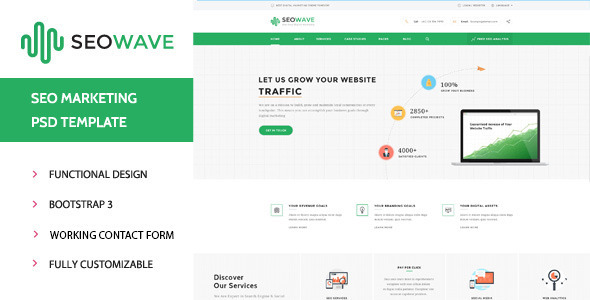


SEO Wave - WordPress Theme for SEO is a specialized WordPress theme designed with SEO professionals, digital marketers, and agencies in mind. This theme is optimized to help users improve their website’s SEO performance and create a high-converting online presence. Whether you're running a personal SEO blog, an agency website, or a portfolio, SEO Wave is crafted to meet the needs of SEO experts and those looking to enhance their site’s visibility in search engines.
Key Features of SEO Wave - WordPress Theme for SEO:
1. SEO Optimized:
- As expected from an SEO-focused theme, SEO Wave comes with built-in SEO optimization to enhance your website's visibility in search engines. It adheres to best practices, ensuring clean code and proper use of HTML tags, schema markup, and meta tags, all of which contribute to improving your rankings.
2. Responsive and Mobile-Friendly Design:
- The theme is fully responsive, ensuring that your website is easily accessible and looks great on any device. Whether users visit your site from a desktop, tablet, or smartphone, the design adapts seamlessly to the screen size, improving user experience and SEO rankings.
3. Speed Optimization:
- SEO Wave is designed with speed in mind. It is lightweight and optimized for fast loading times, which is crucial for both user experience and SEO. A faster website not only retains visitors but also ranks better in search engine results, as page speed is a ranking factor for Google.
4. Schema Markup Integration:
- The theme includes schema markup integration, which helps search engines understand the content of your pages better and display rich snippets in search results. Rich snippets can lead to higher click-through rates (CTR) and improve your website’s visibility in search engines.
5. Pre-Built Demos for Quick Setup:
- SEO Wave comes with a variety of pre-built demo layouts, allowing you to quickly set up a professional-looking website. With just a one-click demo import, you can replicate the theme's demo content and structure, which can save time during the website setup process.
6. Customizable Homepages:
- The theme includes customizable homepage layouts that allow you to tailor the look and feel of your website. You can easily change the layout by dragging and dropping widgets, creating a unique homepage that suits your needs.
7. SEO-Focused Widgets:
- SEO Wave offers custom widgets that enhance the functionality of your website, such as displaying recent posts, popular posts, social media links, and contact details. These widgets are designed to help you organize content efficiently and improve the user experience.
8. Fully Customizable:
- With the Theme Customizer, you can change various aspects of the theme, such as colors, fonts, headers, and footers, to match your branding. The theme is highly customizable, so you can create a unique design without any coding knowledge.
9. WooCommerce Compatibility:
- SEO Wave is compatible with WooCommerce, so you can easily turn your website into an eCommerce store if needed. Whether you're selling SEO-related products, services, or digital downloads, this compatibility makes the transition to an online store easy and straightforward.
10. SEO Tools and Plugins Compatibility:
- The theme works seamlessly with popular SEO plugins like Yoast SEO, Rank Math, and All in One SEO, giving you extra control over your website’s search engine optimization. These plugins offer advanced features for optimizing on-page SEO, such as meta tags, sitemaps, and social media integration.
11. Social Media Integration:
- SEO Wave allows you to integrate social media icons and share buttons easily. This can improve user engagement, increase traffic from social networks, and contribute to better SEO through social signals.
12. Regular Updates and Dedicated Support:
- The theme includes regular updates to stay compatible with the latest version of WordPress, ensuring that your website remains secure and functional. Additionally, you’ll receive dedicated support from the theme developers to help resolve any issues or questions you may have.
13. Mobile-First Design:
- Given the importance of mobile-friendliness in SEO rankings, SEO Wave is designed with a mobile-first approach. This ensures that the theme is not only responsive but optimized for mobile users, improving both SEO and user experience.
Benefits of Using SEO Wave - WordPress Theme for SEO:
- Better SEO Performance:
- The built-in SEO features such as schema markup, optimized page speed, and clean code contribute to improving the overall SEO performance of your site. These elements make it easier for search engines to crawl and index your content, increasing your chances of ranking higher.
- Increased Conversions and Lead Generation:
- SEO Wave is not just focused on SEO but also on improving user engagement and conversion rates. The clean, well-organized design and easy navigation help visitors find what they are looking for, improving the likelihood of lead generation and conversions.
- Mobile Optimization:
- With more users browsing from mobile devices, the mobile-first design of SEO Wave ensures that your site looks great and functions smoothly on smartphones and tablets, which also helps with SEO rankings.
- Time-Saving with One-Click Demo Import:
- The demo import feature allows you to import pre-built demo content and layouts with just a single click, saving you time when setting up your website.
- Enhanced User Experience:
- SEO Wave prioritizes user experience (UX) by providing fast-loading pages, easy navigation, and mobile responsiveness, which not only makes your site more engaging but also improves its SEO ranking.
- Customization Flexibility:
- The theme’s high degree of customizability means you can design your website exactly the way you want without having to write code. Whether you're an SEO professional or a business owner, you can create a site that reflects your brand and goals.
How to Set Up SEO Wave - WordPress Theme for SEO:
- Purchase and Download:
- After purchasing the theme, download the theme package from the theme provider.
- Install the Theme:
- Go to your WordPress dashboard, navigate to Appearance > Themes > Add New, and click Upload Theme. Select the theme zip file you downloaded and click Install Now.
- Activate the Theme:
- After installation, click Activate to make SEO Wave your active theme.
- Import Demo Content (Optional):
- If you want to speed up the process, you can import the demo content by using the one-click demo import feature. This will set up your website with pre-configured pages, posts, and widgets similar to the theme demo.
- Customize the Theme:
- Go to Appearance > Customize to start adjusting the design of your website. You can change the colors, typography, logo, header, and footer, among other settings.
- Install Recommended Plugins:
- Install and configure recommended plugins, such as Yoast SEO or Rank Math, to enhance your SEO efforts. These plugins will help you further optimize your content for search engines.
- Create Content:
- Start adding content to your website by creating posts, pages, and categories. You can organize your content into different sections and use custom widgets to display important information.
- Set Up Social Media Integration:
- Integrate your social media profiles into the theme and display social sharing buttons on your posts and pages to encourage user engagement and social sharing.
- Optimize SEO Settings:
- Use the built-in SEO settings or SEO plugins like Yoast SEO to optimize your pages and posts. Set meta tags, focus keywords, and descriptions to help search engines index your content properly.






























