
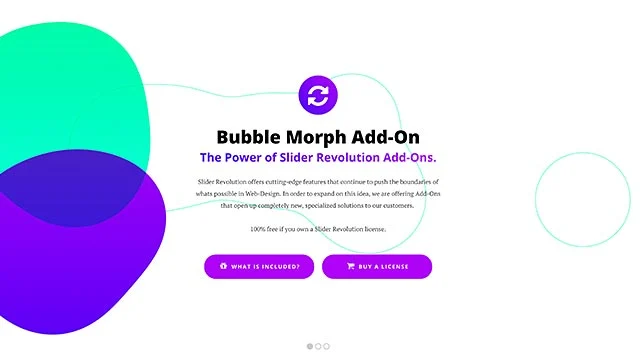

Slider Revolution Bubblemorph is a premium feature or style within the Slider Revolution plugin, which is a popular WordPress plugin for creating responsive sliders, carousels, and other dynamic visual elements on websites. Slider Revolution is known for its vast array of customization options, and Bubblemorph is a specific visual effect that can be applied to the sliders and elements within the plugin to create a unique, interactive, and animated look.
Key Features of Slider Revolution Bubblemorph
- Interactive Bubbly Animation:
- Bubblemorph gives a dynamic, playful, and modern look to sliders by incorporating bubbles that morph in shape and size as they interact with the user or as part of the background animations.
- The bubbles appear to shift, grow, and move in a smooth manner, offering a visually engaging experience for visitors.
- Morphing Effects:
- One of the signature aspects of Bubblemorph is its morphing effect, where the bubbles can change shape as part of the animation sequence, creating a fluid, organic transition between different stages or states.
- This morphing could include the transformation of bubbles into various forms (such as circles to squares) or other creative visual effects, enhancing the visual interest of the slide.
- Customizable Bubble Sizes and Shapes:
- Users can customize the size, shape, and number of the bubbles to match the desired aesthetic and style. This allows for fine-tuning of the bubble effect based on the site’s design theme.
- Responsive Design:
- The Bubblemorph effect in Slider Revolution is fully responsive, ensuring that the bubbles and animations look great across all screen sizes, from desktop to mobile devices.
- The effect adapts to different screen resolutions, which is crucial for providing a consistent user experience.
- Smooth Transitions:
- The Bubblemorph animation typically involves smooth transitions between different states, making the page feel more interactive and alive. These transitions can be applied to other elements in the slider as well, such as text, images, and backgrounds.
- Compatibility with Other Effects:
- Bubblemorph is often used in combination with other Slider Revolution features, like parallax effects, image overlays, text animations, and background video integration. This compatibility allows you to create multi-layered, complex animations that enhance the user experience.
- Multiple Animation Triggers:
- The plugin allows you to define different triggers for the bubble animation, such as when a slide is loaded, when an item enters the viewport, or when a user interacts with certain elements on the page.
- You can set animations to happen automatically or trigger them based on user actions like scrolling, clicking, or hovering.
Benefits of Using Slider Revolution Bubblemorph
- Unique Visual Appeal:
- The Bubblemorph effect adds a distinctive, fun, and modern look to your website. This kind of visual engagement can capture the user’s attention and make your site stand out.
- Enhanced User Interaction:
- By offering a playful and engaging element like morphing bubbles, users may feel more inclined to interact with the content on the page. This interaction can help increase engagement time and decrease bounce rates.
- Versatility:
- Bubblemorph can be applied to a variety of design elements, whether it's a background effect, an image overlay, or part of a complex animation. This flexibility allows it to work seamlessly with different types of content and website designs.
- Customization for Branding:
- Customizing the effect to suit the branding of your site is easy. Whether you want a subtle, soft bubble effect or something more pronounced, you can adjust the intensity, colors, and size of the bubbles to fit your site's theme.
- Improved Aesthetics:
- With the addition of fluid, morphing bubbles, your website can achieve a more polished, futuristic, or artistic look, depending on how it’s used within the overall design.
- Improved Conversion:
- Engaging, visually stimulating elements can increase user retention and improve overall conversions. This could be beneficial if the bubbles are part of a call-to-action (CTA), encouraging visitors to take a specific action like filling out a form, making a purchase, or signing up for a newsletter.
How to Use Slider Revolution Bubblemorph
- Install Slider Revolution:
- First, ensure you have the Slider Revolution plugin installed on your WordPress site. It is a premium plugin, so you’ll need to purchase and activate it.
- Create a New Slider:
- After activating Slider Revolution, go to the Slider Revolution dashboard in the WordPress admin area.
- Click Create New Slider, and select the layout and size of the slider you wish to use for your page.
- Apply the Bubblemorph Effect:
- After creating the slider, navigate to the slide settings.
- In the background settings or animation section, look for the Bubblemorph effect. You can apply this effect to the background or specific elements within the slider.
- Customize the bubble sizes, shapes, and colors. You can also adjust the morphing speed, transition timing, and other parameters to suit your design.
- Customize Other Settings:
- Combine the Bubblemorph effect with other animations or visual elements, such as adding text animations, image movements, or background transitions.
- You can set triggers to control when the Bubblemorph animation starts (e.g., when the page loads or when the user scrolls to the section).
- Preview and Publish:
- Once your slider is configured, preview it to make sure the Bubblemorph effect is functioning as expected.
- Adjust any settings if necessary, and once you’re satisfied, publish the slider and place it on your desired pages.
Example Use Cases for Bubblemorph
- Creative Agency Websites:
- Creative businesses often need visually engaging websites to showcase their work. The Bubblemorph effect could be used as part of the homepage or portfolio section to add a unique, modern touch.
- Technology or Futuristic Websites:
- Bubblemorph can be perfect for websites in the tech, science, or innovation industries, where a futuristic or high-tech look is desired. It enhances the overall feel of modernity and fluidity.
- E-commerce Sites:
- For e-commerce stores, the Bubblemorph effect can be used to highlight specific product categories, promotions, or calls to action (CTAs), making them more visually appealing and interactive.
- Event Websites:
- Websites for events such as music festivals, conferences, or exhibitions can use the Bubblemorph effect to add an element of fun and intrigue, making the site feel more dynamic and alive.
- Portfolio Websites for Artists or Designers:
- Artists and designers can use the Bubblemorph effect to create a more immersive, interactive experience when showcasing their creative work, such as designs, illustrations, or photography.







![Booknetic - Appointment Booking & Appointment Scheduling & Calendar reservation [SaaS]](https://gplpixel.com/wp-content/uploads/2024/06/Booknetic-Appointment-Booking-Appointment-Scheduling-Calendar-reservation-SaaS-400x203.jpg)






















