
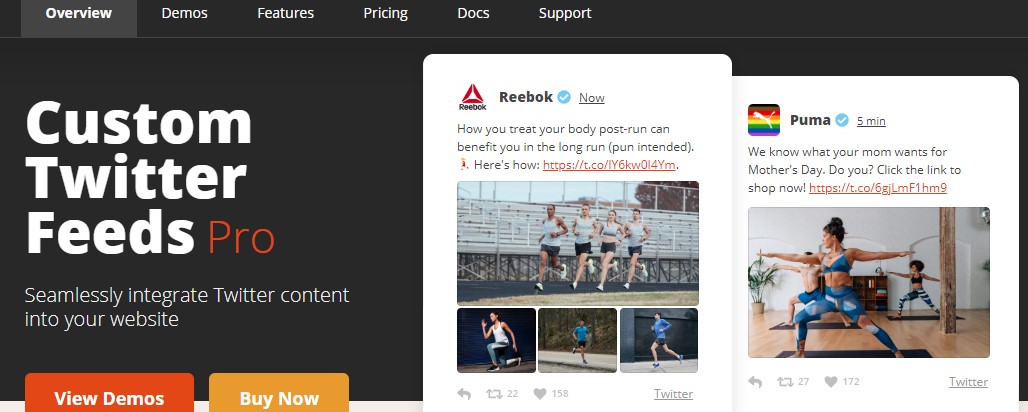


Smash Balloon Custom Twitter Feeds Pro (previously known as Custom Twitter Feeds Pro by Smash Balloon) is a popular WordPress plugin designed to seamlessly integrate Twitter feeds into your website, allowing you to display your Twitter content in a highly customizable and visually appealing way. This plugin helps you showcase Twitter posts directly on your website, enhancing engagement and bringing dynamic content to your pages.
Key Features of Smash Balloon Custom Twitter Feeds Pro:
- Customizable Twitter Feed Layouts:
- The plugin allows you to display Twitter feeds in various layouts, including a grid or list format. You can choose between displaying your own tweets, tweets from specific users, or hashtags.
- It also supports multiple Twitter accounts, so you can show feeds from more than one account on the same page or across different sections of your site.
- Live Twitter Feed:
- Smash Balloon allows you to show live, real-time Twitter updates directly on your website. This ensures that your visitors see the latest tweets as soon as they are posted.
- Fully Responsive:
- The plugin is fully responsive, meaning the Twitter feed will automatically adjust to different screen sizes. Whether users visit your website on desktop, tablet, or mobile, the feed will look great and function well across devices.
- Highly Customizable Design:
- You can customize various aspects of the Twitter feed’s appearance. Change the layout, color scheme, fonts, and more to match your website’s design.
- You can also customize individual elements like the tweet text, media (images/videos), user handles, and other visual aspects of the feed.
- Multiple Feed Display Options:
- You can display multiple Twitter feeds on your website, each with different settings. For example, you could show one feed with your own tweets and another feed for a specific hashtag or a different account.
- The plugin provides flexibility in how you show content, whether it’s showing tweets in a single feed, multiple columns, or across different sections of your site.
- Hashtag and Search Feed:
- You can display tweets related to a specific hashtag or search term. This is especially useful for showcasing event hashtags, promotional campaigns, or user-generated content.
- Hashtag feeds are a great way to aggregate Twitter conversations around a particular topic, product, or event.
- Tweet Moderation and Filters:
- The Pro version allows you to filter out tweets you don't want to display, such as removing tweets that contain certain keywords, media types, or user handles.
- This feature ensures that only the relevant and appropriate content is shown on your site.
- Customizable Tweet Display:
- You can control the appearance of individual tweets. You can show or hide elements such as retweets, likes, tweet time, and the author’s profile picture. This helps you tailor the feed to display just the most important or relevant details.
- Caching and Performance Optimization:
- Smash Balloon Custom Twitter Feeds Pro includes caching capabilities to ensure that the Twitter feed loads quickly and doesn’t impact your site’s performance. The plugin stores a cache of recent tweets, reducing the number of requests made to Twitter’s servers.
- The caching feature enhances speed, especially on larger sites or sites with high traffic.
- Security:
- The plugin is designed with security in mind. Twitter API authentication is handled securely, and you don’t have to worry about exposing sensitive data on your website.
- SEO-Friendly:
- The plugin ensures that the Twitter feed is SEO-friendly, making the content indexable by search engines. This can help increase the visibility of your website and drive more organic traffic.
- Easy Installation and Setup:
- Smash Balloon makes it easy to install and configure the plugin. There’s no need for complex coding or technical expertise. After installing the plugin, you can connect your Twitter account and set up the feed within a few clicks.
- It comes with a user-friendly settings panel where you can manage and customize your Twitter feed display with ease.
- Support for Tweets with Media:
- The plugin supports tweets that include images, videos, GIFs, or polls. This ensures that your Twitter feed looks rich and engaging, and media files are properly displayed on your site.
- Widget and Shortcode Support:
- You can add your Twitter feeds to any page, post, or widget area of your website using simple shortcodes. This makes it easy to display the feed in various sections of your site (e.g., sidebar, footer, or content area).
- Custom CSS:
- For advanced users, the plugin allows you to add custom CSS to further customize the look of your Twitter feed. This gives you even more flexibility in adapting the feed’s design to your brand or website’s theme.
- Regular Updates and Support:
- As a premium plugin, Smash Balloon Custom Twitter Feeds Pro includes regular updates to ensure compatibility with the latest version of WordPress and the Twitter API. Additionally, users get access to dedicated customer support.
Benefits of Using Smash Balloon Custom Twitter Feeds Pro:
- Increased Engagement:
- Displaying live Twitter feeds helps increase engagement on your website by making it more dynamic and interactive. Visitors can see your latest tweets, interact with them directly from your site, and feel more connected to your brand.
- Real-Time Social Proof:
- Twitter feeds serve as a form of social proof by showing live interactions, retweets, and engagement. This helps build trust with your audience and makes your brand appear more active and engaging.
- Easy Integration with Your Website:
- With customizable styles and shortcodes, integrating Twitter feeds into your website is seamless. You can place the feed exactly where you want it, whether in posts, pages, or sidebars, without disrupting your website’s layout.
- Showcase User-Generated Content:
- If you’re running a hashtag campaign or event, displaying tweets with the event hashtag on your website can encourage more users to participate. It allows you to feature user-generated content, which can increase interaction with your brand.
- Boost Brand Visibility:
- By displaying your Twitter feed, you make your social media presence visible to your website visitors. This can lead to more followers on Twitter and more engagement with your social media posts.
- No Need for Manual Updates:
- Since the feed is dynamic and pulls live content from Twitter, you don’t need to manually update your website with new tweets. This automation saves time and keeps the content fresh.
Use Cases for Smash Balloon Custom Twitter Feeds Pro:
- Business Websites:
- Show your latest company tweets, news, promotions, or customer testimonials in a visually appealing way. This can help visitors stay up-to-date with your brand’s activities.
- Event Websites:
- Display tweets related to an event using specific event hashtags. This can help create buzz around an event and showcase real-time attendee interactions.
- Marketing Campaigns:
- Use the Twitter feed to highlight your campaign tweets, special offers, or product promotions. Displaying these on your website can increase visibility and drive conversions.
- Personal Blogs:
- Bloggers can use the plugin to showcase personal tweets, thoughts, and updates directly on their blogs, creating more opportunities for engagement with readers.
- News Websites:
- News outlets can use the plugin to show the latest trending tweets related to specific stories, providing their visitors with real-time updates from social media.
- E-commerce Websites:
- For WooCommerce stores, displaying tweets about products or customer reviews can help boost social proof and build trust with potential buyers.
How to Set Up Smash Balloon Custom Twitter Feeds Pro:
- Install the Plugin:
- Install and activate Smash Balloon Custom Twitter Feeds Pro via the WordPress dashboard. You can upload the plugin ZIP file if you purchased the Pro version.
- Connect Your Twitter Account:
- After activation, you need to connect your Twitter account by going to the plugin’s settings page and authenticating with your Twitter credentials.
- Customize Your Twitter Feed:
- Go to the settings panel to customize the feed’s appearance. You can adjust colors, fonts, and layout options to match your website's design.
- Add the Feed to Your Site:
- Use the generated shortcode to add the Twitter feed to any page, post, or widget area. Alternatively, you can use the provided widget to display the feed in your site's sidebar or footer.
- Test the Feed:
- After configuring the feed, visit the page where you embedded it to ensure that the Twitter feed displays correctly and updates in real time.






























