
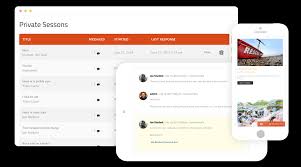

SnapOrbital – LearnDash Private Sessions is a plugin designed to enhance the LearnDash Learning Management System (LMS) by adding a feature that enables private, one-on-one sessions between instructors and students. This plugin is especially useful for online learning environments that want to offer personalized learning experiences, such as private tutoring, mentorship, or one-on-one coaching sessions.
The LearnDash Private Sessions feature allows instructors to schedule and manage these private sessions with students, ensuring a more personalized and effective learning experience.
Key Features of SnapOrbital – LearnDash Private Sessions:
- One-on-One Sessions:
- This plugin enables private one-on-one sessions between instructors and students. It is perfect for those who want to offer additional support or personalized coaching to learners beyond regular course content.
- Session Scheduling:
- Instructors can schedule private sessions with students directly from the LearnDash dashboard. This makes it easy to arrange appointments that fit both the instructor's and the student’s availability.
- Integration with LearnDash:
- The plugin seamlessly integrates with the LearnDash LMS, allowing instructors and students to schedule and manage sessions without leaving the LearnDash environment. Students can access the private session booking feature directly from their course dashboard.
- Automatic Notifications:
- Both students and instructors receive email notifications about upcoming sessions. This ensures that both parties are reminded of the session time, helping to reduce the risk of missed appointments.
- Flexible Session Time Slots:
- Instructors can set flexible session time slots, allowing them to determine the duration of each session. Whether it’s 15 minutes or 60 minutes, the instructor has full control over session length.
- Booking Form Customization:
- The plugin provides a customizable booking form where students can provide relevant information before the session. Instructors can ask for specific details, such as topics of interest or questions they would like to cover during the private session.
- Payment Integration:
- If private sessions are paid, the plugin can integrate with payment gateways to handle payments for the sessions. This is especially useful for coaches, tutors, or anyone who charges a fee for one-on-one lessons.
- Session Confirmation and Reminders:
- Once a session is booked, students and instructors receive confirmation emails. Additionally, the plugin sends out reminder emails before the session starts, reducing the likelihood of missed sessions.
- Zoom or Video Call Integration:
- SnapOrbital LearnDash Private Sessions can integrate with video conferencing tools like Zoom or other third-party video platforms. This allows instructors and students to hold virtual face-to-face sessions within the plugin, providing a seamless online learning experience.
- Student Dashboard Access:
- Students can view their scheduled private sessions in their LearnDash dashboard, making it easy to track upcoming sessions and manage their learning schedule.
- Customizable Availability:
- Instructors can set their availability directly in the system, choosing specific days and times when they are available for private sessions. This ensures that only those time slots are made available to students for booking.
- Manage Multiple Sessions:
- The plugin allows instructors to manage multiple private sessions across various students, making it simple for educators to stay organized and keep track of their appointments.
- Calendar Integration:
- The plugin can integrate with Google Calendar or other calendar systems, allowing both instructors and students to sync their sessions with their personal calendars for easier time management.
- Record and Track Session History:
- Both instructors and students can track the history of their private sessions, including details like session dates, topics covered, and follow-up actions. This helps ensure that both parties are aligned and can keep a record of all learning interactions.
- Student Session Feedback:
- After a private session, students may be asked to provide feedback or ratings on the session. This allows instructors to improve their one-on-one teaching methods and helps build a better learning experience.
Benefits of Using SnapOrbital – LearnDash Private Sessions:
- Personalized Learning: One of the most significant advantages of private sessions is the ability to offer personalized learning experiences. Whether it’s answering specific questions, providing tailored instruction, or offering individualized coaching, this plugin allows instructors to meet students' unique learning needs.
- Better Engagement: Private sessions encourage deeper student engagement because learners get more focused time with their instructor. They can ask questions in real-time and get immediate feedback, which boosts motivation and satisfaction.
- Convenient Scheduling: Instructors and students can manage session scheduling easily through the plugin. With automatic reminders and calendar integration, scheduling becomes much more convenient and reduces the chance of missed appointments.
- Seamless Integration: Since it integrates directly with LearnDash, there is no need for instructors or students to leave the LearnDash LMS to schedule, book, or attend sessions. Everything is managed within the same platform, providing a seamless user experience.
- Monetization Opportunity: For instructors offering paid one-on-one sessions, this plugin provides a great way to monetize private coaching, tutoring, or consultation services. Payment integration streamlines the process, making it easy for instructors to charge for their time.
- Professional Teaching Experience: Offering private sessions elevates the professionalism of your LearnDash courses by providing a more comprehensive and hands-on learning experience. This can enhance the value of the courses you offer and help attract more students.
- Convenience for Students: Students can easily book private sessions at their convenience, track upcoming sessions, and receive reminders. This user-friendly process makes it easier for students to engage with instructors outside of the normal course materials.
- Time Management: By setting availability and managing sessions through a scheduling interface, both instructors and students can better manage their time. Instructors can avoid double-booking and ensure they have sufficient time between sessions.
- Improved Learning Outcomes: With more personalized attention, students are more likely to succeed in their learning goals. The ability to address specific concerns or areas of struggle in a private setting can help students improve more quickly and effectively.
How to Use SnapOrbital – LearnDash Private Sessions:
- Install the Plugin:
- Install the SnapOrbital LearnDash Private Sessions plugin on your WordPress site. After installation, activate the plugin to integrate it into the LearnDash LMS.
- Set Instructor Availability:
- Instructors should set their availability for private sessions. This includes choosing days and time slots when they are available for one-on-one sessions with students.
- Enable Private Sessions in LearnDash:
- Course administrators can enable the private sessions feature for specific courses or lessons. This ensures that students in those courses can book sessions with their instructors.
- Students Book Sessions:
- Students can browse available time slots and book private sessions with instructors through their LearnDash dashboard. The system will automatically check the instructor’s availability to ensure that no conflicts arise.
- Session Confirmation and Reminders:
- Once a session is booked, both the student and instructor will receive email confirmations. The plugin will send reminder emails before the session to reduce no-shows.
- Hold the Private Session:
- When the time comes for the private session, instructors and students can join via Zoom or another integrated video conferencing tool. Sessions can be conducted live, and the plugin helps track attendance and progress.
- Provide Feedback:
- After the session, students can provide feedback or a rating about the session, which can help instructors refine their teaching methods.
- Track Session History:
- Instructors and students can review session history through the LearnDash dashboard, making it easy to track progress and follow up on past sessions.






![Booknetic - Appointment Booking & Appointment Scheduling & Calendar reservation [SaaS]](https://gplpixel.com/wp-content/uploads/2024/06/Booknetic-Appointment-Booking-Appointment-Scheduling-Calendar-reservation-SaaS-400x203.jpg)























