Premium Category Products
Social Downloader | Admob Ads | Control Ads Dynamically through Firebase
Last Updated :
Current Version :
Social Downloader | Admob Ads | Control Ads Dynamically through Firebase
✨ Latest Version
- Safety, Guarantees Files
- Malware-Free (Clean) Files
- License: GPL Preactivated
- Unlimited Site & Domain Usage
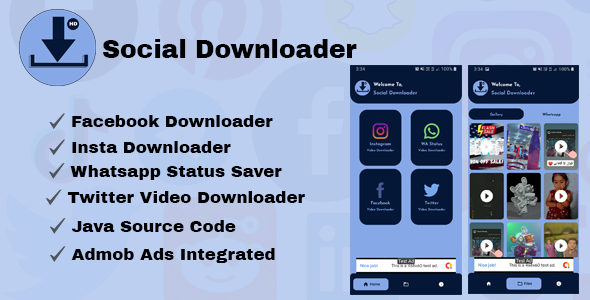
- Whatsapp status saver
- Facebook videos and stories downloader
- Insta Downloader
- Twitter downloader
- Java Source Code
- Android studio
- Admob ads
- Control Ads remotely through Firebase
More items by androhive
Creating a Social Downloader app that integrates with AdMob ads and allows you to control ads dynamically through Firebase involves several key steps. Here’s an overview of how to implement such an app:1. Social Downloader App Overview
A Social Downloader app allows users to download media from various social media platforms (like Instagram, Facebook, YouTube, etc.) directly to their devices. These apps are popular but can also be monetized effectively with ad networks like AdMob. To keep users engaged without overwhelming them with ads, controlling when and where ads appear dynamically (e.g., using Firebase) is a good strategy.2. Key Components
- AdMob Integration: To display ads (banner, interstitial, or rewarded ads).
- Firebase: To dynamically control ad behavior (e.g., show ads only after certain actions or hide ads for certain users).
- Social Media Downloading Functionality: For downloading videos, images, and other media from social networks.
3. Steps to Implement the Social Downloader with AdMob and Firebase Dynamic Ad Control
Step 1: Setting Up Firebase
Firebase will be used to control when ads are shown. You can configure different ad behaviors based on parameters you set in Firebase, like showing ads only after a certain number of downloads or when the app is used for a certain amount of time.- Add Firebase to Your Project
- Go to the Firebase Console.
- Create a new project or use an existing one.
- Follow the Firebase setup instructions to add Firebase SDK to your app (for Android/iOS).
- Add Firebase SDK to your app via Gradle or CocoaPods (for iOS).
- Enable Firebase Remote Config
- Go to the Firebase Console > Remote Config.
- Create parameters that control the behavior of ads (e.g.,
ads_enabled,ad_frequency,interstitial_ads). - Set default values, and later you can update these values dynamically without app updates.
- Firebase Analytics (optional)
- If you want to analyze how users are interacting with ads, enable Firebase Analytics to track events like app opens, button clicks, and media downloads.
Step 2: Implement AdMob
Google's AdMob platform will help you integrate ads. You can show banner ads, interstitial ads, and rewarded ads within your app.- Set Up AdMob Account
- Go to AdMob, create an account, and add your app.
- After adding your app, get your App ID and Ad Unit IDs for banners, interstitials, and rewarded ads.
- Integrate AdMob SDK into Your App
-
- Dynamically Update Ads:
- If you want to show or hide ads based on user actions (e.g., after downloading 5 videos), track the download count and change the behavior of ads using the Firebase parameters.
Step 4: Social Media Download Functionality
To allow users to download media, integrate the downloading logic for each supported social media platform (Instagram, Facebook, YouTube, etc.):- Web Scraping / API Access: Use appropriate APIs or scraping techniques to fetch media URLs from social networks.
- Download Manager: Handle downloading via the Android or iOS download manager, ensuring that downloaded media is saved to the device's storage.
4. Example Flow for Dynamic Ad Control
- Initial State: When the app is launched, fetch ad settings from Firebase (like
ads_enabledorad_frequency). - During Usage: After a user performs certain actions (e.g., downloading media), decide whether to show an interstitial ad or not, based on the dynamic parameters from Firebase.
- Ad Display: Show banner ads continuously or show interstitial/rewarded ads based on the conditions defined in the Firebase configuration.
5. Monetization and User Experience
- Avoid Overloading: Ensure that ads don’t overwhelm the user experience, as this could lead to app uninstalls.
- Rewarded Ads: Provide rewards (e.g., premium features or ad-free experience for a day) for users who watch a rewarded ad.
- Testing and Optimization: Use Firebase A/B testing to experiment with different ad placements and frequency to maximize revenue without compromising user experience.
Conclusion
By integrating AdMob ads with Firebase Remote Config, you can effectively manage ad behavior in your Social Downloader app. This gives you the flexibility to show ads only under specific conditions, enhancing the user experience while still monetizing the app. Make sure to keep testing and optimizing the ad strategies to find the balance between revenue generation and user satisfaction. - Dynamically Update Ads:
-
(Only For Premium Category Products !)
1. All digital products are the most recent version, with no possibility of free updates. After payment, you can request an update to the most recent version for 5 days if a new version is released. We free support within 5 days.
2. If a license is required (Excludes WHMCS license , we provide only method not license), please contact us via email or ticket for assistance with activation. Our license is only valid for activation and does not include support.
3. We provide Mobile, PHP script installation services for $19.90 / ₹1700. Please create a backup after installation as we do not support re-installation. For mobile app source code, we do not offer installation services.
4. If you have any questions, please contact us by email [email protected] or create a ticket on this page
5. Please note that any digital products presented on the website do not contain malicious code, viruses or advertising. You will receive the original files from the developers. We do not sell any products that have been downloaded from other websites.
6. The response time can last up to 6 hours.
(Only For Membership Category Products !)
Benefits of our Membership Plans
- Instant access to all plugins and all themes including all future releases
- Unlimited domain usage
- Regular Updates as of when available. Usually, updates are released daily.
- Before purchasing, please read the Terms and Conditions & Refund Policy.
- If you have any questions, please first read the FAQs.
- If you haven’t found the answer to your question, please contact us, and we will respond ASAP.
- Please note that any digital products on the website do not contain malicious code, viruses, or advertising. We buy the original files from the developers. We do not sell any products downloaded from other sites.
- Buy or download for FREE by subscribing to our VIP Membership Plan. Join the club of more than 1100+ happy members. This is the same theme as sold by the developer.
Updates:
- We offer frequent updates for one year from the date of purchase. After this period, you have to purchase the item again to receive further updates, we also offer lifetime updates as a second option.
- We regularly update products as soon as we are notified about an update, we go and download it from the author and update it on our site, but In case the current version of the product is not the latest, You can request an update for the product by contact form.
- We send regular emails advising when products have been updated so please be sure to provide an active email address when you sign up.
Support:
- Our support team is available 24/7, if you have any questions or need help in installing or configuring digital products purchased on the website, please don’t hesitate to contact form.
- Please note that we are not developers of the provided products, so our technical support capabilities are limited. We do not change product functionality and do not fix developer bugs.
(Only For WHMCS Category Products !)
- We Only provide WHMCS Module, how you can nulled any module step only !
- Instant access to all plugins and all themes
- Unlimited domain usage
- Regular Updates as of when available. Usually, updates are released daily.
- Before purchasing, please read the Terms and Conditions & Refund Policy.
- If you have any questions, please first read the FAQs.
- If you haven’t found the answer to your question, please contact us, and we will respond ASAP.
- Please note that any digital products on the website do not contain malicious code, viruses, or advertising. We buy the original files from the developers. We do not sell any products downloaded from other sites.