
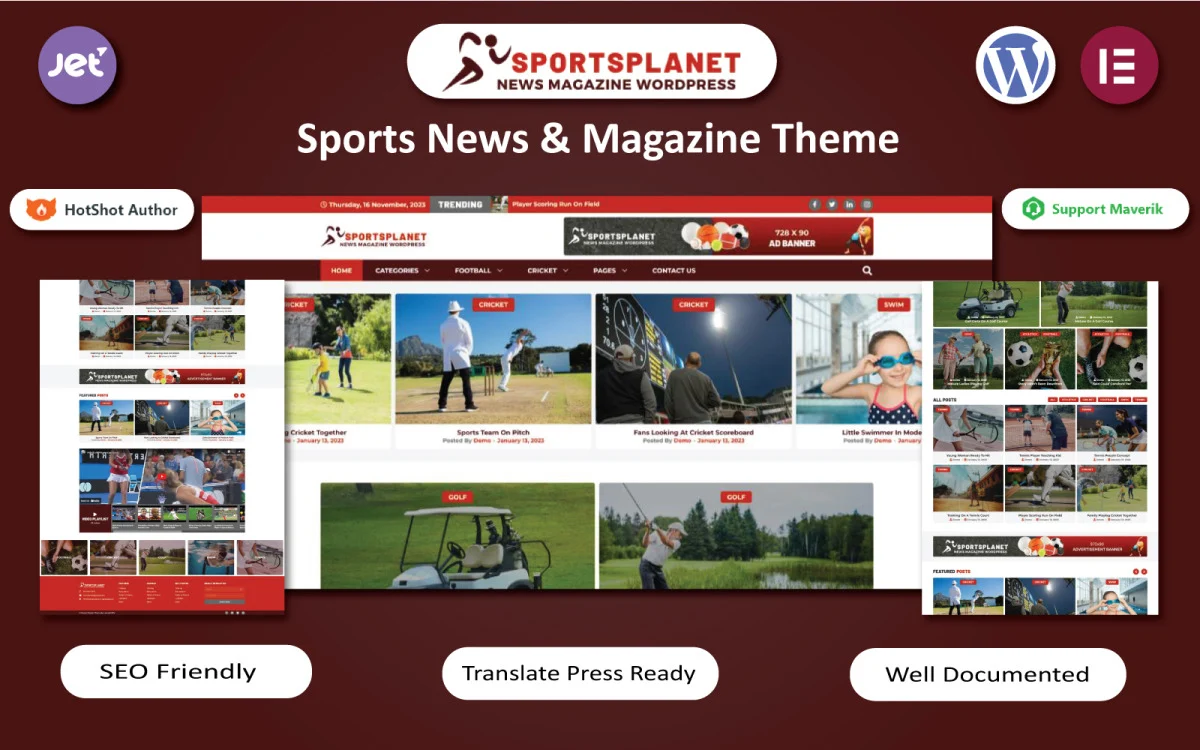


Sports Planet - News & Magazine WordPress Theme is a versatile and modern theme designed specifically for sports-related websites, blogs, and news platforms. Whether you run a sports news website, a magazine about athletics, or a blog dedicated to specific sports, this theme offers the features and flexibility needed to create a professional and engaging online presence.
Key Features of Sports Planet - News & Magazine WordPress Theme:
- Sports-Focused Design: Sports Planet is tailored for sports-related content. Its design emphasizes bold imagery, dynamic typography, and easy navigation, making it ideal for publishing sports news, match reports, and team updates. The theme's layout is built to highlight visual content such as images, videos, and match statistics.
- Responsive and Mobile-Friendly: The theme is fully responsive, ensuring that your site looks great on any device, whether it's a smartphone, tablet, or desktop computer. This feature is crucial as sports fans often access content on-the-go, making a mobile-friendly design essential for engaging a wide audience.
- Multiple Layouts for Posts and Pages: Sports Planet offers various layout options for blog posts, magazine articles, and homepage designs. You can choose from grid layouts, list-style layouts, and traditional blog formats, allowing you to create a layout that fits your content and audience needs.
- Powerful Theme Customizer: Customize the look and feel of your website with the WordPress Customizer. With options for colors, fonts, headers, and more, Sports Planet makes it easy to match your site's design to your brand or personal style.
- One-Click Demo Import: Sports Planet comes with demo content that you can import with a single click. This gives you a fully designed website layout to start with, making it easier to set up your site quickly. You can then customize the content to fit your needs.
- Live Score and Match Updates: For sports news websites, keeping your audience updated with live scores and match updates is critical. While this feature may require additional plugins or integration, the theme's layout is designed to showcase these types of real-time updates in an engaging way.
- Category Management: Whether you're covering multiple sports or focusing on one, Sports Planet offers advanced category management. You can organize your content by sport (football, basketball, tennis, etc.), creating dedicated sections for each type of sport and allowing visitors to easily navigate through your content.
- Built-In Social Sharing: Encourage your readers to share articles and posts on social media platforms with built-in social sharing buttons. This feature helps increase visibility, drive traffic to your site, and build a social following.
- SEO Optimized: Sports Planet is built with SEO best practices in mind. By using clean code, fast loading speeds, and SEO-friendly content structures, the theme helps improve your site's rankings in search engines, making it easier for sports fans to find your content.
- Speed Optimization: The theme is optimized for speed, ensuring that your website loads quickly, even with rich multimedia content like images and videos. Fast-loading pages are essential for user experience, especially for sports sites with time-sensitive content.
- Newsletter Subscription: Keep your audience engaged by adding a newsletter subscription feature. This allows visitors to subscribe to your site and receive updates on new posts, breaking news, and exclusive content directly in their inbox.
- Post Formats Support: Sports Planet supports various post formats such as standard posts, video posts, audio posts, and more. This feature is ideal for websites that publish a variety of content, including match highlights, player interviews, podcasts, or analysis.
- Mega Menu Support: The theme includes support for a mega menu, which is especially useful for content-rich sites like sports news websites. You can display a large number of categories, sports, and sections in a clear, easy-to-navigate dropdown menu.
- Related Posts and Trending Articles: Engage your visitors by displaying related posts and trending articles. This feature keeps users on your site longer by recommending other relevant content, encouraging them to explore more of your website.
- Integration with Popular Plugins: Sports Planet is compatible with many popular WordPress plugins such as WPForms (for creating contact forms), Yoast SEO (for SEO optimization), and Jetpack (for security and performance). This flexibility ensures you can add additional functionality to your site as needed.
- Custom Widgets: The theme includes several custom widgets, including a recent posts widget, popular posts widget, and social media feed widget. These widgets enhance your site's functionality and allow you to display additional content in the sidebar or footer.
- Translation Ready: If you want to reach a global audience, Sports Planet is translation-ready. You can easily translate the theme into any language using plugins like WPML or Polylang, helping you engage sports fans from around the world.
- Regular Updates and Support: Sports Planet offers regular theme updates to ensure compatibility with the latest version of WordPress. The theme also comes with dedicated customer support to help resolve any issues or answer any questions.
How to Use Sports Planet - News & Magazine WordPress Theme:
- Install WordPress: Set up WordPress on your hosting provider. Many hosting platforms offer one-click installations to make the process easier.
- Install Sports Planet Theme: Upload and activate the Sports Planet theme through the WordPress dashboard (Appearance > Themes > Add New > Upload Theme). Once installed, you can activate it and start customizing.
- Import Demo Content: Use the One-Click Demo Import feature to quickly import demo content. This will populate your website with sample posts, categories, and layout designs.
- Customize Your Site: Head to the WordPress Customizer to tweak the theme’s settings, such as site colors, fonts, logos, and header layout. You can also customize your homepage to feature categories like sports news, videos, and upcoming matches.
- Add Content: Begin adding your own content, including sports news, articles, match reports, and images. Organize content into categories such as specific sports (e.g., football, basketball, etc.) and update the homepage layout accordingly.
- Set Up Social Media Integration: Link your social media accounts to your website by adding social media icons to the header or footer. You can also display live social media feeds, such as Instagram or Twitter, on your site.
- Optimize for SEO: Install an SEO plugin like Yoast SEO to optimize your website for search engines. Focus on optimizing your articles with proper headings, meta descriptions, and alt text for images.
- Add Newsletter Subscription: Integrate a newsletter subscription form to allow visitors to stay updated on new posts and breaking news. This feature is crucial for building a loyal audience.
- Launch Your Site: Once you're satisfied with the design and content, launch your sports news site. Share it on social media and other platforms to attract visitors.
Why Choose Sports Planet - News & Magazine WordPress Theme?
- Ideal for Sports Content: Sports Planet is specifically designed for sports news and magazine websites, with a focus on showcasing sports content in an engaging and visually appealing way.
- Customizable Layouts: With a variety of layouts and design options, you can tailor your website to meet your specific needs and match your brand identity.
- Fast and SEO-Friendly: The theme is optimized for performance and search engine visibility, helping your site load quickly and rank better in search engine results.
- Mobile-Friendly: With the increasing use of mobile devices for browsing, Sports Planet ensures your site looks great on any screen size.
- Comprehensive Features: The theme offers a wide range of features including live score updates, social media integration, custom widgets, and more, making it easy to build a professional sports news website.






























