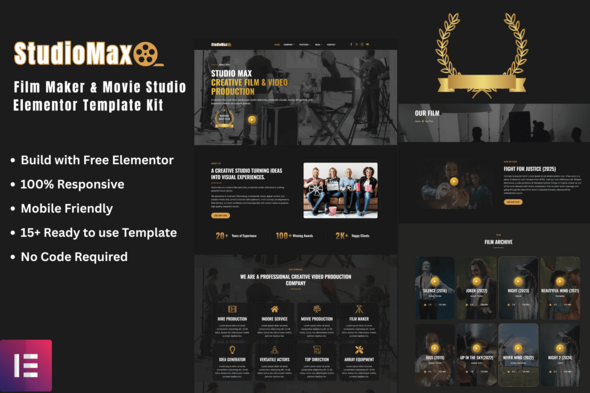


StudioMax – Film Maker & Movie Studio Elementor Template Kit
Original price was: Rs1,653.00.Rs413.25Current price is: Rs413.25.
StudioMax – Film Maker & Movie Studio Elementor Template Kit
StudioMax is a modern and clean Film Maker & Movie Studio Elementor Template Kit designed for Film Maker, Movie Studio, Production House, Videography, Photography, Creative Agency, and any related business. StudioMax has a beautiful and unique design with a 100% responsive layout and retina-ready. With its professional layout and fully responsive design, StudioMax helps you create a powerful and visually appealing website without writing a single line of code.
Built specifically for Elementor and the Hello Elementor theme, this template kit is easy to use, lightweight, and optimized for fast performance. Each page is thoughtfully crafted to highlight your company’s expertise in Film Maker & Movie Studio House.
Whether you’re launching a new website or refreshing your existing one, StudioMax provides all the essential pages and elements you need to build a professional online presence effortlessly.
Template Features:
- Unique Home Page
- Modern & Professional Design
- 100% Responsive & Mobile-Friendly
- 15 Ready-to-Use Templates
- Fully Customizable with Drag & Drop
- Compatible with the Free Elementor Plugin (No Elementor Pro required)
- Built for the Hello Elementor Theme
- Retina Ready & High-Quality Layout
- Cross-Browser Compatibility: Chrome, Firefox, Safari, Edge, Opera
- Global Style Settings for Colors and Typography
- Fast Loading & SEO-Friendly Structure
- Clean, Well-Organized Layout for Easy Editing
- No Coding Knowledge Required
Templates Include:
- Global Theme Style
- Header v1
- Footer v1
- Home
- About Company
- Our Film
- Services
- Our Team
- Pricing
- FAQ
- 404 Page
- Blog
- Single Post
- Contact
- Metform Contact
- Metform Subscribe
Plugins installed with kit:
- Elementor Free
- ElementsKit Lite
- MetForm
- Jeg Elementor Kit
How to Use Template Kits:
This is not a WordPress Theme. Template kits contain the design data for Elementor only and are installed using the envato Template Kit Import plugin for WordPress or directly through Elementor.
How to setup header in Jeg Elementor Kit plugin
If you have Elementor Pro, setup headers and footers in Theme Builder. Pages you create with Elementor must have the Page Layout set to Elementor Full width for the global header and footer to appear.
- Go to Jeg Elementor Kit menu item > Header Template
- Click Add New Header
- Add condition > All Site and click Create
- Click the pencil icon to Edit and elementor will appear
- Click gray folder icon to access My Templates tab
- Insert the header template.
- Customize and Save.
How to Import MetForm Custom Form:
- While edititing a page where a form should appear, open the Elementor navigator to locate the Metform widget.
- Click Edit Form in the builder panel.
- Select New, leave blank selected then click Edit Form button.
- Click ‘Add Template’ grey folder button.
- Click ‘My Templates’ tab.
- Choose your imported MetForm template, then click ‘Insert’.
- Once the template is loaded, click ‘Update’.
How to Import Metforms:
- Import the metform block templates
- Import the page template where the form appears and right-click to enable the Navigator
- Locate and select the Metform widget and click Edit Form. Choose New, then Edit Form. The builder will appear
- Click ‘Add Template’ grey folder icon.
- Click ‘My Templates’ tab.
- Choose your imported metform template, then click ‘Insert’ (click No for page settings).
- Once the template is loaded, make any desired customizations and click ‘Update & Close’ The form will appear in the template
- Click Update
Setup Global Header and Footer in ElementsKit:
- Import the header and footer template
- Go to ElementsKit > Header Footer select Header and click Add New
- Give it a title, leave Entire Site selected and toggle Activation to On
- Click the template title and Edit Content
- Click the gray folder icon and select the header template to import and Update
- Repeat for Footer
Images:
This Template Kit uses demo images from Envato Elements. You will need to license these images from Envato Elements to use them on your website, or you can substitute them with your own.