
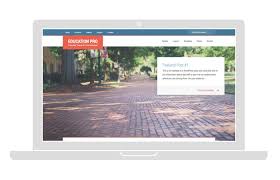


StudioPress The StudioPress Education Pro Genesis WordPress Theme is a premium theme designed specifically for educational websites, schools, online courses, learning centers, and any site that needs to showcase educational content in a professional and engaging way. Built on the powerful Genesis Framework, Education Pro provides a robust foundation that combines flexibility, speed, and security with a user-friendly design tailored to educational institutions and e-learning platforms.
StudioPress Key Features of StudioPress Education Pro Genesis WordPress Theme:
- StudioPress Built on the Genesis Framework:
- Education Pro is built on the Genesis Framework, ensuring that it is fast, secure, and SEO-friendly. Genesis is one of the most well-known WordPress frameworks, providing a stable and reliable base for building any WordPress website.
- Responsive and Mobile-Friendly:
- Education Pro is fully responsive, meaning it adapts seamlessly to different screen sizes, from desktop monitors to mobile devices. This mobile-first approach ensures that your educational website is accessible and looks great on all devices.
- Customizable Homepage Layout:
- The theme offers a customizable homepage layout, making it easy to create a landing page that highlights important content. You can add widgets, course offerings, testimonials, or any content you want to feature prominently on the homepage.
- Pre-built Widgets:
- Education Pro comes with several pre-built widgets that make it easier to add important sections to your website. For example, you can use widgets to feature recent blog posts, courses, testimonials, events, and more.
- Education-Focused Design:
- The design of Education Pro is specifically tailored for educational websites. It includes clean layouts, easy navigation, and clear calls-to-action that help users find the information they need, whether it's course listings, resources, or contact details.
- Theme Customizer Support:
- You can easily customize the theme via the WordPress Customizer, allowing you to adjust the site's colors, typography, header, footer, and more without writing any code. This intuitive interface makes it easy for users of all skill levels to modify the theme's appearance.
- SEO Optimized:
- Education Pro comes with built-in SEO optimization to help your educational website rank higher in search engine results. With clean and optimized code, this theme follows the best SEO practices, which is crucial for any website looking to attract organic traffic.
- Fast and Lightweight:
- Education Pro is designed for speed. The theme's clean and optimized code ensures that your site loads quickly, which not only improves user experience but can also positively impact your SEO rankings. A fast website is especially important for keeping potential students or visitors engaged.
- WooCommerce Support:
- Education Pro is compatible with WooCommerce, making it easy to sell courses, educational materials, memberships, or other products directly from your website. The seamless WooCommerce integration allows you to build an online store alongside your educational content.
- Customizable Header and Footer:
- The theme allows for extensive customization of the header and footer areas. You can add logos, navigation menus, contact details, or even social media links to make your website more functional and user-friendly.
- Call to Action Buttons:
- Built-in call-to-action buttons help guide your users toward specific actions, such as signing up for courses, joining a newsletter, or contacting the institution. These buttons are strategically placed for maximum impact.
- Pre-designed Page Templates:
- Education Pro comes with pre-designed templates for pages like About Us, Contact, and Testimonials, making it easy to create well-structured pages that are consistent with the theme's overall design.
- Customizable Color Scheme:
- With Education Pro, you can easily adjust the theme's color scheme to match your institution's branding. This level of customization ensures that your site reflects the unique identity of your school or learning platform.
- Social Media Integration:
- The theme supports social media integration, allowing you to easily link your social media profiles and display social media feeds directly on your website. This helps increase engagement and helps your visitors stay connected with your educational institution on platforms like Facebook, Twitter, LinkedIn, and Instagram.
- Accessibility Ready:
- Education Pro is designed with accessibility in mind, ensuring that users with disabilities can navigate your site easily. Accessibility features include well-organized content, readable fonts, and keyboard navigability.
- Translation Ready:
- The theme is translation-ready, meaning you can easily translate the theme into different languages for a global audience. This is especially useful for institutions that offer online courses or educational content to students worldwide.
- Regular Updates and Support:
- As part of the Genesis Framework ecosystem, Education Pro receives regular updates and comes with support from StudioPress. You can always stay up-to-date with the latest features and improvements for your theme.
How to Use the StudioPress Education Pro Genesis Theme:
- Install the Genesis Framework:
- Before using Education Pro, you will need to install the Genesis Framework, which is available for purchase from the StudioPress website. After purchasing and installing Genesis, you can then install Education Pro on top of it.
- Customize the Theme:
- Use the WordPress Customizer to tweak the theme's settings, such as colors, fonts, and layout. You can also use the theme’s built-in widgets to add content sections like course listings, testimonials, and contact forms.
- Add Educational Content:
- Once you have customized the theme, begin adding your educational content. This may include courses, instructors, testimonials, and resources. Use the pre-designed page templates for essential pages like About, Contact, and Testimonials.
- Set Up WooCommerce (Optional):
- If you plan to sell courses or educational products on your site, set up WooCommerce and add your products. Education Pro is fully compatible with WooCommerce, allowing you to sell products or manage online classes seamlessly.
- Promote Your Courses:
- Use the homepage layout to feature your courses, programs, and other offerings prominently. Add call-to-action buttons to encourage visitors to register for courses or join your community.
- Social Media and Marketing Integration:
- Integrate social media buttons and email marketing tools to increase engagement. You can also add a blog to provide additional educational content to your audience and keep them updated.
- Optimize and Launch:
- Once your content is added and your design is ready, test everything thoroughly. Ensure your site is mobile-friendly, and check all links and forms to ensure they’re functioning. After testing, you can launch your educational website.






























