
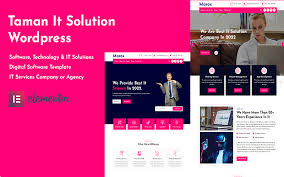


Taman - Technology and IT Solutions Theme is a modern, professional, and fully responsive WordPress theme designed for businesses in the technology, IT, software, and digital services sectors. Whether you run an IT consultancy, a tech startup, a software development company, or any other tech-based business, Taman provides the ideal features and design elements to create a successful online presence.
Key Features of Taman - Technology and IT Solutions Theme:
- Modern, Clean, and Professional Design: Taman comes with a clean and sleek design tailored to tech and IT businesses. The theme focuses on a modern and professional look to ensure that your website appeals to potential clients and partners, highlighting your services and expertise.
- Pre-Built Demo Content: Taman includes multiple pre-built demo templates designed for different types of tech businesses. You can easily import these demo templates with one click, saving you time and effort when setting up your website. These demos include layouts for software companies, IT consultancies, tech services, and more.
- Service Pages: The theme allows you to create dedicated service pages where you can showcase your IT services and solutions in detail. You can list services like software development, IT consulting, cloud solutions, tech support, and more, with clear descriptions and images that highlight your expertise.
- Portfolio and Case Studies: Taman includes a portfolio section where you can display your previous projects, case studies, and client work. This feature is essential for tech businesses to show off their capabilities and successful collaborations with clients.
- Fully Responsive and Mobile-Friendly: The theme is responsive and adapts perfectly to all screen sizes, including desktops, tablets, and smartphones. Given the growing trend of mobile browsing, having a mobile-optimized website ensures a smooth experience for all visitors.
- Multiple Header Styles: Taman comes with different header styles, so you can choose the one that best fits your brand and business. Whether you prefer a minimalist header with a logo and navigation or a more feature-rich header with contact details and call-to-action buttons, Taman has you covered.
- Drag-and-Drop Page Builder Compatibility: Taman is fully compatible with popular page builders like Elementor and WPBakery (if included). This means you can easily drag and drop elements to create your own layouts without needing coding knowledge. The page builder functionality makes customization a breeze.
- SEO Optimized: Taman is built with SEO best practices in mind, helping your website rank higher in search engines. The theme includes clean code, fast loading times, and optimized meta tags, all of which contribute to better search engine rankings.
- Blog Section: The theme includes a blog section where you can post articles about industry trends, company updates, tech tips, or any other content that will help engage your audience and improve SEO. A blog is also an excellent tool for establishing authority in the technology space.
- Call-to-Action (CTA) Buttons: Taman features strategically placed CTA buttons throughout the design to encourage visitors to take action, whether it's requesting a quote, scheduling a consultation, or contacting your company for more information.
- Contact Forms and Google Maps Integration: The theme offers contact forms to make it easy for potential clients to reach out to you. You can also integrate Google Maps to display your office location, which is particularly useful if you have a physical office.
- Pricing Tables: If your business offers tech services or software products with tiered pricing, Taman includes pricing table templates. You can create clear and easy-to-read pricing tables for different service packages or software solutions.
- Customizable Design: The theme is highly customizable, allowing you to adjust colors, fonts, and layout options using the WordPress Customizer or page builders like Elementor. You can create a unique look and feel that aligns with your brand.
- Speed and Performance Optimized: Taman is built for fast loading speeds, which is crucial for user experience and SEO. Optimized images, clean code, and efficient resource loading all contribute to faster page load times.
- Multilingual and RTL Support: Taman supports WPML for creating multilingual websites, so you can offer your content in different languages and cater to an international audience. Additionally, the theme supports RTL (Right-to-Left) languages, making it suitable for Middle Eastern regions.
- One-Click Demo Import: With the one-click demo import feature, you can quickly set up your website with pre-built demo content. This saves you time during the initial setup process and allows you to focus on customizing your site to meet your needs.
- Regular Updates and Support: Taman comes with regular theme updates, ensuring that you stay up-to-date with the latest WordPress features and security patches. You’ll also have access to customer support to help with any setup or technical issues.
How to Use Taman - Technology and IT Solutions Theme:
- Install WordPress: Start by installing WordPress on your hosting platform. Many hosting providers offer a one-click installation process for WordPress.
- Install Taman Theme: Once WordPress is installed, upload and activate the Taman theme from the WordPress dashboard (Appearance > Themes > Add New).
- Import Demo Content: After activating the theme, use the One-Click Demo Import feature to quickly import the demo content. This will give you a fully designed site with all the necessary pages, layouts, and content pre-configured, which you can then personalize.
- Customize Design: Customize your website’s design using the WordPress Customizer or a drag-and-drop page builder like Elementor. Adjust colors, fonts, layouts, and add your logo to make the site fit your brand.
- Create Service Pages: Use the service page templates to add details about your IT solutions, software products, consulting services, or other tech-related offerings. Include images, service descriptions, and CTAs to encourage visitors to inquire further.
- Set Up Portfolio or Case Studies: If you have past projects or case studies, use the portfolio section to showcase your work. Include client logos, descriptions of the projects, and outcomes to build trust and demonstrate your expertise.
- Add Blog Content: Create a blog to share industry insights, company news, and valuable content for your audience. This helps with SEO and can drive traffic to your website.
- Enable Contact Forms and Appointment Scheduling: Set up contact forms so potential clients can easily reach out to you. You can also enable appointment scheduling or integrate your calendar for consultations.
- Add Testimonials and Client Reviews: Display testimonials from satisfied clients to build credibility. This is a great way to instill trust in your visitors and show how your tech solutions have helped others.
- Optimize for SEO: Ensure that your content is optimized for search engines by using SEO plugins like Yoast SEO. Focus on optimizing meta descriptions, headings, and content for relevant keywords.
- Promote on Social Media: Share your work and insights on social media platforms like LinkedIn, Twitter, and Facebook to expand your reach and attract more potential clients.
- Monitor Performance: Keep track of your website’s performance using analytics tools like Google Analytics. This helps you understand how users interact with your website and identify areas for improvement.
Why Choose Taman?
- Tailored for Tech & IT Businesses: Taman is built specifically for tech companies, IT consultants, software developers, and other digital services providers. It includes all the features needed to present your services professionally and effectively.
- Pre-Built Templates: With pre-built demo content and customizable templates, you can quickly create a beautiful and functional website that suits your business needs.
- Responsive Design: Taman is mobile-friendly, ensuring that your website performs well across all devices.
- Customization Options: Whether you're a small startup or a large IT firm, Taman offers the flexibility to customize the design and features to meet your business goals.
- SEO-Friendly: With built-in SEO optimization and fast loading speeds, Taman helps you rank higher on search engines and improve user experience.
- Great Support and Updates: Taman is regularly updated, ensuring your website stays up-to-date with the latest WordPress features. Plus, you get access to customer support if you need assistance.






























