Premium Category Products

Teachflex – Online Education & Bootcamp Elementor Template Kit

Last Updated :

Current Version :

Teachflex – Online Education & Bootcamp Elementor Template Kit

Teachflex - Online Education & Bootcamp Elementor Template Kit

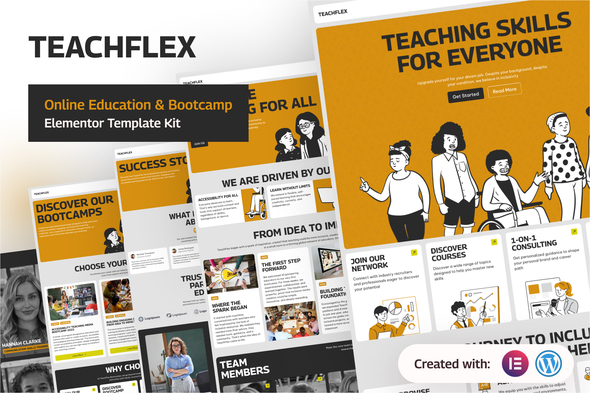
TeachFlex is a clean, flexible, and accessibility-minded template kit for online learning platforms, bootcamps, training centers, and educators. Built to help you design online education, bootcamps and learning experiences that look Teachflex professional and include every learner, TeachFlex combines modern layouts, thoughtful UX, and ready-to-use sections that speed up your launch. Why Choose TeachFlex TeachFlex is purpose-built for educators and training teams who need a fast, reliable way to publish inclusive bootcamp sites. Rather than shipping a generic design, this kit provides bootcamp-first templates, pricing and testimonial layouts, and accessibility-minded patterns so your site communicates trust and supports every learner. You get modular sections that are easy to customize with Elementor, consistent visual language for brand clarity, and practical UX that guides visitors from discovery to enrollment. Key Features
  • Inclusive by Design – patterns and components created with accessibility best practices in mind.
  • Flexible Layout System – modular sections that let you mix, match, and scale quickly.
  • Bootcamp-First UX – templates optimized for bootcamp, single bootcamp pages, testimonials, pricing and contact pages.
  • Responsive & Fast – mobile-ready layouts with careful typography and spacing for readability.
  • Visual Consistency – energetic yet professional style that supports education brands.
  • Easy to Customize – built for Elementor; edit colors, type, sections, and content with no code.
Perfect For
  • Online Bootcamp creators and instructors
  • Bootcamps and training programs
  • Schools, academies, and education startups
  • Corporate learning teams and L&D professionals
Templates Included This kit includes a full set of page templates and blocks used across the demo. The list below reflects the pages provided: Fonts: This template kit uses free Google Fonts: Georama and Be Vietnam Pro. Both fonts are web-safe and easy to customize via Elementor’s typography settings. Required Plugins: To import and use the kit as shown in the demo, the following plugins are required (these are the minimum suggested plugins):
  • Elementor
  • ElementsKit Lite
  • Jeg Elementor Kit
  • MetForm
  • Skyboot Custom Icons for Elementor – Elementor Icons library
How to Use Template Kits: This is not a WordPress theme. Template kits contain the design data for Elementor only and are installed using the Envato Template Kit Import plugin for WordPress or directly through Elementor. For further support, go to Elementor > Get Help in the WordPress admin menu after importing the kit. How to Import Header, Footer and Block The imported templates are automatically categorized by Elementor in the Page or Section type. But not all categorization is appropriate, you need to adjust it to fit when used. One type of Section that needs to be adjusted is a template built using ElementsKit. The simple way to import Header and Footer templates is directly through the ElementsKit menu. If you have Elementor Pro, setup headers and footers in Theme Builder
  1. Go to ElementsKit > Header Footer.
  2. Add a template title, then set it as Header or Footer, then activate the template, and click Edit Content.
  3. Click the Add Template button.
  4. Open the My Templates tab, then click Insert on the appropriate form template.
  5. Click the Update button, the form template should be successfully imported.
How to import Metform custom form:
  1. Import Metform section templates first, then import the pages the forms appear in.
  2. Use the Elementor navigator to select the Metform Widget and click Edit Form in the builder panel.
  3. Select New and click Edit Form button at the bottom.
  4. Click the gray folder icon “Add Template”.
  5. Click My Templates tab.
  6. Choose your imported form template, then click Insert.
  7. Once the template is loaded, customize the form settings, then click Update & Close.
What should I do if the icons don’t appear? This template kit uses the Skyboot Custom Icons for Elementor — Elementor Icons Library plugin. If icons are missing after import, please follow these steps:
  1. Go to Skyboot Icons > Manage Icons in your WordPress dashboard.
  2. We recommend disabling all icon packs and enabling only “Material Design Icons”.
  3. Click Save Changes.
  4. Refresh your website (hard refresh recommended). The icons should now appear.
Images This Template Kit uses demo images from Envato Elements. You will need to license these images from Envato Elements to use them on your website, or you can substitute them with your own.  

(Only For Premium Category Products !)

1. All digital products are the most recent version, with no possibility of free updates. After payment, you can request an update to the most recent version for 5 days if a new version is released. We free support within 5 days.

2. If a license is required (Excludes WHMCS license , we provide only method not license), please contact us via email or ticket for assistance with activation. Our license is only valid for activation and does not include support.

3. We provide Mobile, PHP script installation services for $19.90 / ₹1700. Please create a backup after installation as we do not support re-installation. For mobile app source code, we do not offer installation services.

4. If you have any questions, please contact us by email  or create a ticket on this page

5. Please note that any digital products presented on the website do not contain malicious code, viruses or advertising. You will receive the original files from the developers. We do not sell any products that have been downloaded from other websites.

6. The response time can last up to 6 hours.

(Only For Membership Category Products !)

Benefits of our Membership Plans

  • Instant access to all plugins and all themes including all future releases
  • Unlimited domain usage
  • Regular Updates as of when available. Usually, updates are released daily.
  • Before purchasing, please read the Terms and Conditions & Refund Policy.
  • If you have any questions, please first read the FAQs.
  • If you haven’t found the answer to your question, please contact us, and we will respond ASAP.
  • Please note that any digital products on the website do not contain malicious code, viruses, or advertising. We buy the original files from the developers. We do not sell any products downloaded from other sites.
  • Buy or download for FREE by subscribing to our VIP Membership Plan. Join the club of more than 1100+ happy members. This is the same theme as sold by the developer.

Updates:

  • We offer frequent updates for one year from the date of purchase. After this period, you have to purchase the item again to receive further updates, we also offer lifetime updates as a second option.
  • We regularly update products as soon as we are notified about an update, we go and download it from the author and update it on our site, but In case the current version of the product is not the latest, You can request an update for the product by contact form.
  • We send regular emails advising when products have been updated so please be sure to provide an active email address when you sign up.

Support:

  • Our support team is available 24/7, if you have any questions or need help in installing or configuring digital products purchased on the website, please don’t hesitate to contact form.
  • Please note that we are not developers of the provided products, so our technical support capabilities are limited. We do not change product functionality and do not fix developer bugs.

For more information please read FAQs & About Us.

(Only For WHMCS Category Products !)

  • We Only provide WHMCS Module, how you can  nulled any module step only !
  • Instant access to all plugins and all themes 
  • Unlimited domain usage
  • Regular Updates as of when available. Usually, updates are released daily.
  • Before purchasing, please read the Terms and Conditions & Refund Policy.
  • If you have any questions, please first read the FAQs.
  • If you haven’t found the answer to your question, please contact us, and we will respond ASAP.
  • Please note that any digital products on the website do not contain malicious code, viruses, or advertising. We buy the original files from the developers. We do not sell any products downloaded from other sites.

More Like This Products