
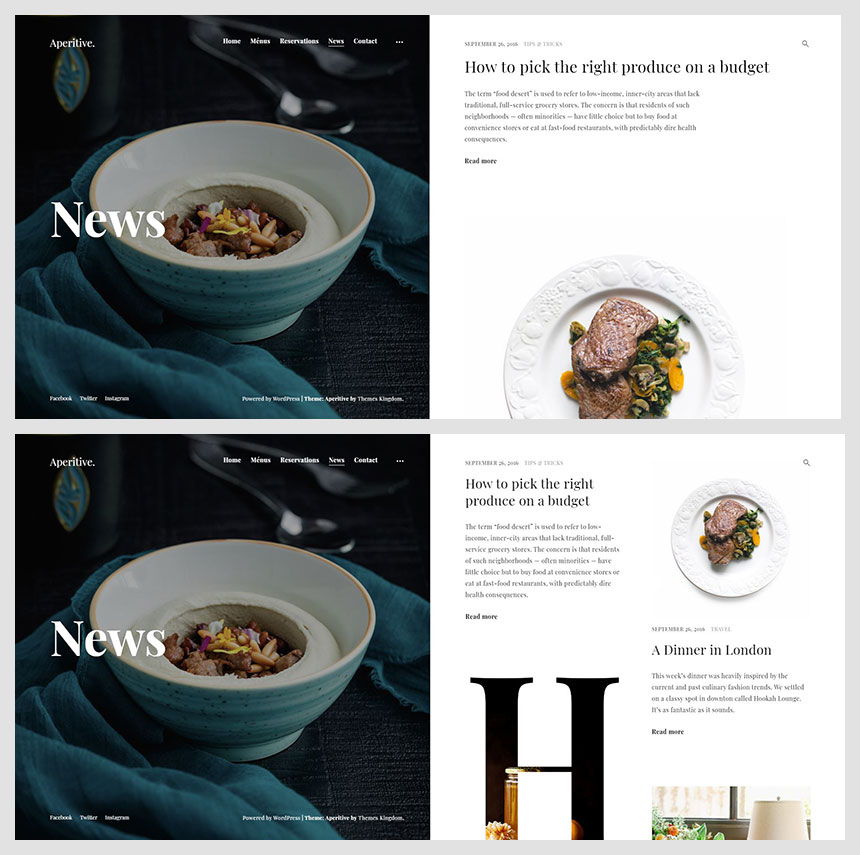


The Aperitive WordPress Theme by Themes Kingdom is a modern, elegant, and highly customizable theme designed specifically for restaurants, cafes, bars, and other food-related businesses. It offers a clean, visually appealing design with a focus on usability and mobile responsiveness, making it perfect for establishments in the food and beverage industry that want to create an online presence.
Key Features of the Aperitive WordPress Theme:
- Stylish and Modern Design:
- The Aperitive theme features a sleek and modern design, showcasing your restaurant or café in a visually appealing way. With a strong emphasis on images, typography, and clean layout, it creates an attractive environment for potential customers to explore.
- One-Click Demo Import:
- With one-click demo import, you can quickly get your website up and running. The demo content will import pages, posts, and settings, giving you a solid foundation for your restaurant site that can be customized as per your brand.
- Fully Responsive:
- Aperitive is fully responsive, meaning your website will look great on all devices, from desktops to mobile phones. This is crucial as more people access restaurant information via their mobile devices, especially when looking for menus or making reservations.
- Menu Showcase:
- A standout feature of the Aperitive theme is its menu showcase functionality. The theme allows you to present your restaurant's menu in a visually pleasing way. You can create a menu page with beautiful layouts that display food items, ingredients, prices, and even images.
- Restaurant Reservation System:
- Aperitive integrates well with reservation plugins (like OpenTable or WooCommerce Bookings), enabling customers to make reservations directly from the website. This feature helps restaurants streamline their booking process.
- Event Management:
- If your restaurant hosts events such as wine tasting, live music, or special dinners, the theme supports event management. You can easily create and promote events, including event dates, details, and RSVP options.
- Customizable Layouts:
- Aperitive provides several layout options for your pages. You can choose between multiple layouts for the homepage, menu, and individual pages. You also have flexibility in placing content, which is useful for creating a unique design.
- Drag-and-Drop Page Builder:
- The theme is compatible with popular page builders like Elementor or WPBakery (formerly known as Visual Composer), allowing you to design custom pages by simply dragging and dropping elements without the need for coding knowledge.
- Custom Widgets:
- Aperitive includes a set of custom widgets that can be added to various sections of your site, such as the sidebar or footer. These widgets include social media feeds, recent posts, contact information, and more.
- SEO Optimized:
- The Aperitive theme is built with SEO in mind, ensuring that your restaurant website has a strong foundation for ranking well in search engines. This includes optimized code, clean structure, and fast-loading pages.
- WooCommerce Compatibility:
- If you plan to sell products or services online (like gift cards, branded merchandise, or even take-out food), Aperitive integrates with WooCommerce. This allows you to set up an online shop and manage orders seamlessly.
- Online Ordering Integration:
- Aperitive can easily integrate with online ordering plugins like WooCommerce or third-party services. This is essential for restaurants that want to allow customers to place orders for delivery or pick-up directly from the website.
- Customizable Header and Footer:
- The theme allows you to customize the header and footer with elements like logos, social media icons, navigation menus, and contact details. This provides flexibility in presenting your restaurant’s branding and navigation.
- Social Media Integration:
- Aperitive provides easy social media integration, allowing you to add links to your social media profiles and even display live social media feeds on your website. This helps engage customers and drive traffic from your social channels.
- Multilingual Support:
- If your restaurant caters to a global audience or operates in multilingual regions, Aperitive is translation-ready and supports RTL (Right-to-Left) languages. You can easily translate your content with plugins like WPML or Polylang.
- Regular Updates and Support:
- The theme comes with regular updates to ensure compatibility with the latest WordPress versions and security fixes. In addition, Themes Kingdom provides customer support, ensuring assistance is available if you encounter any issues.
How to Set Up the Aperitive WordPress Theme:
- Install the Theme:
- To get started, install the Aperitive theme by going to your WordPress Dashboard > Appearance > Themes > Add New. Upload the theme file you downloaded from Themes Kingdom or the theme marketplace.
- Import Demo Content:
- After installation, you can use the One-Click Demo Import feature to quickly import the demo content. This will provide you with a pre-designed layout, including all pages, images, and settings, that you can customize as needed.
- Customize with Page Builders:
- Aperitive is compatible with Elementor and WPBakery. Use the drag-and-drop interface of these page builders to customize your pages without touching any code. You can create custom pages for your menu, about us, events, or other sections.
- Set Up Menu and Reservation System:
- Add your restaurant’s menu to the site using the theme’s built-in features. Present your dishes attractively with descriptions, prices, and photos. Integrate a reservation system to allow customers to book tables online.
- Promote Events:
- If your restaurant hosts events, you can easily create and promote these using the event management feature. Add event details, locations, and RSVP options so customers can book their spots.
- Add Custom Widgets:
- Enhance your site by adding custom widgets such as social media links, customer testimonials, opening hours, or recent blog posts to your sidebar or footer.
- Optimize and Launch:
- Before launching your site, ensure it is SEO optimized and ready for mobile users. Test all forms, links, and reservations to ensure everything works as expected. Once satisfied, go ahead and publish your site.






























