Premium Category Products
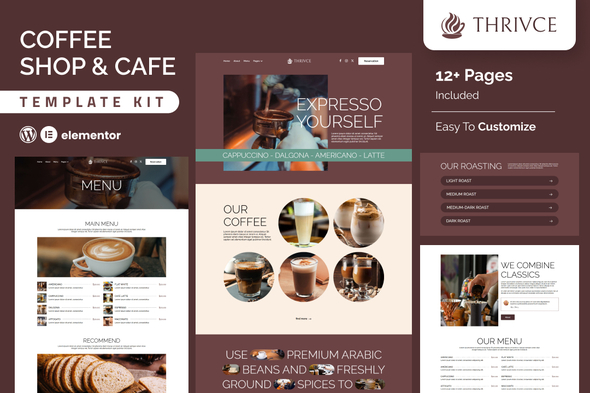
Thrivce – Coffee Shop & Cafe Elementor Template Kit
⨠Latest Version
- Safety, Guarantees Files
- Malware-Free (Clean) Files
- License: GPL Preactivated
- Unlimited Site & Domain Usage
Thrivce - Coffee Shop & Cafe Elementor Template Kit
Thrivce is a sleek and modern Elementor template kit designed for coffee shops, cafĆ©s, and bistros. Perfect for showcasing your menu, sharing your story, and attracting coffee lovers, this kit features stunning layouts, intuitive navigation, and seamless customization. With pre-designed pages for menus, reservations, blogs, and contact info, Thrivce makes creating a stylish and functional coffee shop website effortless. Elevate your online presence and let your cafĆ© thrive with Thrivce!FeatureThrivce Individual elements can be fine-tuned or fonts and colors can be changed all in one spot. Drag-and-drop visual builder for true no-code customization. Design that is both contemporary and professional. Fast-loading. Most Elementor themes are compatible with this templatekits.Templates Include:Home About Menu Resevation Blog Blog Detail Pricing Team Contact Testimonials Coming Soon 404Sections and Blocks:Header Footer Contact Form Newsletter FormRequired Plugins Pre-Installed With the KitElementor Jeg Elementor Kit Happy Elementor Addons MetFormTemplate Kits: How to Use ThemeInstall and activate the āEnvato Elementsā plugin in WordPress by going to Plugins > Add New. Donāt unzip your kit file after downloading it. Click the Upload Template Kit button in Elements > Installed Kits. You can also import automatically by linking your Elements membership with Connect Account, then importing under Elements > Template Kits.Check the top of the page for an orange banner, then click Install Requirements to load any plugins the kit requires. First, import the Global Kit Styles. One template at a time, click Import. These can be found under Elementorās Templates > Saved Templates section. Create a new page in Pages and then click Edit with Elementor.To view page options, click the gear icon in the lower-left corner of the builder and select Elementor Full Width and Hide Page Title. To get to the My Templates tab, click the grey folder icon, then Import the page you want to alter.Theme Builder allows you to alter the headers and footers if you have Elementor Pro. Visit for more detail guidance: https://help.market.envato.com/hc/en-us/articles/900000842846-How-to-use-the-Envato-Elements-WordPress-Plugin-v2-0 To get further help, go to the WordPress menu and select Elementor > Get Help. Importing Metforms: What You Need to KnowThe metform block templates should be imported. Import the page template with the form on it and enable the Navigator by right-clicking. Click Edit Form after locating and selecting the Metform widget. Then select New and Edit Form from the drop-down menu. The function Object() { [native code] } will show up. Select the grey folder icon that says āAdd Templateā.Select the āMy Templatesā option from the drop-down menu. Then click āInsertā after selecting your imported metform template (click No for page settings). After youāve finished customizing the template, click āUpdate & Close.ā In the template, the form will appear. Update the information by clicking the button.In Jeg Elementor Kit, Configure The Global Header and FooterImport the template for the header and footer. Navigate to Jeg Elementor Kit > Theme Builder and select Add New (if prompted with a wizard, you may click Next through it without taking any action). Enable the Display Condition, title the header, and leave Entire Site selected.To open the builder, click the Edit with Elementor button. Select the header template to import by clicking the grey folder icon, then select your menu in the nav element and click Update. Repeat for the footer.Envato Elements demo pictures are used in this Template Kit. To use these photos on your website, youāll need to purchase a license from Envato Elements, or you can use your own.https://elements.envato.com/collections/4ZPLK8JXNE(Only For Premium Category Products !)
1. All digital products are the most recent version, with no possibility of free updates. After payment, you can request an update to the most recent version for 5 days if a new version is released. We free support within 5 days.
2. If a license is required (Excludes WHMCS license , we provide only method not license), please contact us via email or ticket for assistance with activation. Our license is only valid for activation and does not include support.
3. We provide Mobile, PHP script installation services for $19.90 / ā¹1700. Please create a backup after installation as we do not support re-installation. For mobile app source code, we do not offer installation services.
4. If you have any questions, please contact us by email [email protected]Ā orĀ create a ticketĀ on this page
5. Please note that any digital products presented on the website do not contain malicious code, viruses or advertising. You will receive the original files from the developers. We do not sell any products that have been downloaded from other websites.
6. The response time can last up to 6 hours.
(Only For Membership Category Products !)
Benefits of our Membership Plans
- Instant access to all plugins and all themes including all future releases
- Unlimited domain usage
- Regular Updates as of when available. Usually, updates are released daily.
- Before purchasing, please read theĀ Terms and ConditionsĀ &Ā Refund Policy.
- If you have any questions, please first read theĀ FAQs.
- If you havenāt found the answer to your question, pleaseĀ contact us, and we will respond ASAP.
- Please note that any digital products on the website do not contain malicious code, viruses, or advertising.Ā We buy the original files from the developers. We do not sell any products downloaded from other sites.
- Buy or download for FREE by subscribing to ourĀ VIP Membership Plan. Join the club of more than 1100+ happy members. This is the same theme as sold by the developer.
Updates:
- We offer frequent updates for one year from the date of purchase. After this period, you have to purchase the item again to receive further updates, we also offer lifetime updates as a second option.
- We regularly update products as soon as we are notified about an update, we go and download it from the author and update it on our site, but In case the current version of the product is not the latest, You can request an update for the product byĀ contact form.
- We send regular emails advising when products have been updated so please be sure to provide an active email address when you sign up.
Support:
- Our support team is available 24/7, if you have any questions or need help in installing or configuring digital products purchased on the website, please donāt hesitate toĀ contact form.
- Please note that we are not developers of the provided products, so our technical support capabilities are limited. We do not change product functionality and do not fix developer bugs.
(Only For WHMCS Category Products !)
- We Only provide WHMCS Module, how you canĀ nulled any module step only !
- Instant access to all plugins and all themesĀ
- Unlimited domain usage
- Regular Updates as of when available. Usually, updates are released daily.
- Before purchasing, please read theĀ Terms and ConditionsĀ &Ā Refund Policy.
- If you have any questions, please first read theĀ FAQs.
- If you havenāt found the answer to your question, pleaseĀ contact us, and we will respond ASAP.
- Please note that any digital products on the website do not contain malicious code, viruses, or advertising.Ā We buy the original files from the developers. We do not sell any products downloaded from other sites.