
Premium Category Products

TinyMCE4 Album Image Manager

TinyMCE4 Album Image Manager

TinyMCE4 Album Image Manager

Live Demo: TinyMCE4 Album Image Manager Live Demo

TinyMCE4 Album Image Manager is a powerful WordPress plugin designed to simplify image management within your TinyMCE editor. This plugin allows you to organize images into albums, manage them by user, and seamlessly integrate them into your WordPress content. With its intuitive interface and robust features, the TinyMCE4 Album Image Manager empowers you to streamline your image workflow and enhance your content creation process.

Product Overview

The TinyMCE4 Album Image Manager plugin extends the functionality of the popular TinyMCE editor, providing a dedicated interface for managing images within your WordPress site. It allows you to create albums, categorize images, and easily insert them into your content. This plugin is perfect for users who work with a high volume of images, as it simplifies the process of organization and retrieval.

Modern Design and User Experience

The plugin boasts a modern and user-friendly interface that seamlessly integrates with the WordPress dashboard. You can effortlessly navigate through albums, view images, and manage their attributes with ease. The intuitive design ensures a smooth and efficient workflow, making image management a breeze.

Main Features and Capabilities

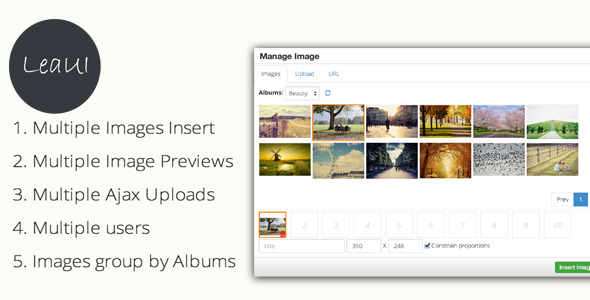
  • Multiple Image Insert: Select and insert multiple images into your editor simultaneously. Edit individual image attributes like title, width, and height for precise control.

  • Multiple Image Previews: When adding images from links, the plugin retrieves and displays previews, ensuring you choose the correct image before insertion.

  • Multiple Uploads: Upload multiple images at once by selecting them or using drag-and-drop functionality. Streamline your image upload process for increased efficiency.

  • Multiple Users: Images and albums are organized by user, providing individual spaces for each user to manage their content. This feature enhances collaboration and organization within a team environment.

  • Albums Manager: Create, update, and delete albums to categorize your images effectively. Organize your visual content for easy access and retrieval.

  • Ajax Upload: Utilize Ajax-powered uploads for a seamless experience. Upload images without interrupting your workflow or refreshing the page.

  • Quick Search: Search for images by title to quickly locate specific content. Save time and effort when searching for the right image for your needs.

  • Quick Install: Install the plugin with ease by executing the provided SQL script and configuring the included PHP file. A simple and straightforward setup process.

  • Source Code: The plugin's source code is readily available, allowing for customization and modifications to suit your specific requirements.

Responsive Design

While the plugin primarily focuses on image management within the TinyMCE editor, it integrates seamlessly with WordPress themes that utilize responsive design principles. Your images will adapt to various screen sizes, ensuring optimal viewing experiences across devices.

Pages, Components, or Modules

The TinyMCE4 Album Image Manager plugin does not include specific pages or modules. It functions as an extension to the TinyMCE editor, enhancing its functionality for image management.

Integration and Compatibility

The plugin is designed to work with WordPress and its default TinyMCE editor. It utilizes PHP and MySQL for data storage and management.

SEO and Performance Considerations

The plugin itself does not directly impact your website's SEO performance. However, proper image optimization practices, such as using descriptive filenames and alt tags, are essential for improving search engine visibility. The plugin's efficient image management features can indirectly contribute to improved website performance by streamlining image retrieval and display.

Ideal Use Cases

The TinyMCE4 Album Image Manager is ideal for:

  • Bloggers: Organize images for blog posts and create visual content libraries.

  • E-commerce Websites: Manage product images, create galleries, and enhance product presentations.

  • Portfolio Websites: Showcase your work with organized image galleries and portfolios.

  • News Websites: Efficiently manage images for news articles and create multimedia content.

Who Should Use This Product?

This plugin is perfect for WordPress users who:

  • Frequently work with images in their content.

  • Need a way to organize and categorize images.

  • Want a streamlined workflow for image management.

  • Value the convenience of a user-friendly interface.

Installation and Setup Guide

  1. Execute SQL Script: Run the data.sql script in your MySQL database to create the necessary tables (leaui_albums and leaui_files) and populate them with initial data.
  2. Update Configuration File: Open the config.php file and update the database connection settings (hostname, username, password, database name) to match your WordPress installation.
  3. Upload Plugin Files: Copy all the files from the plugin folder to your WordPress plugins directory (/wp-content/plugins/).
  4. Activate Plugin: Navigate to the Plugins page in your WordPress dashboard, and activate the "TinyMCE4 Album Image Manager" plugin.
  5. Configure TinyMCE: In your WordPress settings, under "Writing," go to the "TinyMCE Editor" tab and add the leaui_image plugin to your available plugins.

Important Product Information

  • Server Requirements: This plugin requires a server with PHP and MySQL installed.
  • License: Please refer to the included license file for details regarding usage rights and restrictions.

Category: Premium

(Only For Premium Category Products !)

1. All digital products are the most recent version, with no possibility of free updates. After payment, you can request an update to the most recent version for 5 days if a new version is released. We free support within 5 days.

2. If a license is required (Excludes WHMCS license , we provide only method not license), please contact us via email or ticket for assistance with activation. Our license is only valid for activation and does not include support.

3. We provide Mobile, PHP script installation services for $19.90 / ₹1700. Please create a backup after installation as we do not support re-installation. For mobile app source code, we do not offer installation services.

4. If you have any questions, please contact us by email  or create a ticket on this page

5. Please note that any digital products presented on the website do not contain malicious code, viruses or advertising. You will receive the original files from the developers. We do not sell any products that have been downloaded from other websites.

6. The response time can last up to 6 hours.

(Only For Membership Category Products !)

Benefits of our Membership Plans

  • Instant access to all plugins and all themes including all future releases
  • Unlimited domain usage
  • Regular Updates as of when available. Usually, updates are released daily.
  • Before purchasing, please read the Terms and Conditions & Refund Policy.
  • If you have any questions, please first read the FAQs.
  • If you haven’t found the answer to your question, please contact us, and we will respond ASAP.
  • Please note that any digital products on the website do not contain malicious code, viruses, or advertising. We buy the original files from the developers. We do not sell any products downloaded from other sites.
  • Buy or download for FREE by subscribing to our VIP Membership Plan. Join the club of more than 1100+ happy members. This is the same theme as sold by the developer.

Updates:

  • We offer frequent updates for one year from the date of purchase. After this period, you have to purchase the item again to receive further updates, we also offer lifetime updates as a second option.
  • We regularly update products as soon as we are notified about an update, we go and download it from the author and update it on our site, but In case the current version of the product is not the latest, You can request an update for the product by contact form.
  • We send regular emails advising when products have been updated so please be sure to provide an active email address when you sign up.

Support:

  • Our support team is available 24/7, if you have any questions or need help in installing or configuring digital products purchased on the website, please don’t hesitate to contact form.
  • Please note that we are not developers of the provided products, so our technical support capabilities are limited. We do not change product functionality and do not fix developer bugs.

For more information please read FAQs & About Us.

(Only For WHMCS Category Products !)

  • We Only provide WHMCS Module, how you can  nulled any module step only !
  • Instant access to all plugins and all themes 
  • Unlimited domain usage
  • Regular Updates as of when available. Usually, updates are released daily.
  • Before purchasing, please read the Terms and Conditions & Refund Policy.
  • If you have any questions, please first read the FAQs.
  • If you haven’t found the answer to your question, please contact us, and we will respond ASAP.
  • Please note that any digital products on the website do not contain malicious code, viruses, or advertising. We buy the original files from the developers. We do not sell any products downloaded from other sites.

More Like This Products