
TinyMCE4 Code Editor
✨ Latest Version
- Safety, Guarantees Files
- Malware-Free (Clean) Files
- License: GPL Preactivated
- Unlimited Site & Domain Usage
TinyMCE4 Code Editor
Live Demo: TinyMCE4 Code Editor Live Demo
TinyMCE4 Code Editor is a powerful plugin designed to enhance the capabilities of the popular TinyMCE WYSIWYG editor. This plugin seamlessly integrates a code editor into your TinyMCE editor, empowering users to effortlessly toggle between visual editing and code view modes. Whether you're a developer, content creator, or website administrator, the TinyMCE4 Code Editor provides a streamlined and intuitive way to manage HTML content.
Integrated Code View
The TinyMCE4 Code Editor's core feature is its integrated code view mode. With a simple click or keyboard shortcut, users can switch from the familiar WYSIWYG editor to a dedicated code editor, allowing them to directly manipulate HTML and text content. This dual-mode functionality offers flexibility and control, catering to both visual editors and developers who prefer working directly with code.
Syntax Highlighting
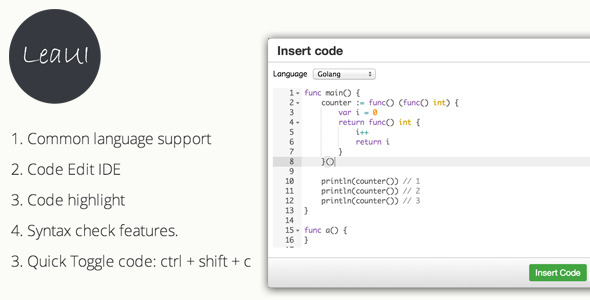
To enhance readability and ease of coding, the TinyMCE4 Code Editor incorporates syntax highlighting. This feature automatically colors different code elements (e.g., keywords, variables, comments) based on their type, making the HTML code more visually appealing and easier to understand. Syntax highlighting helps developers quickly identify code structures, patterns, and potential errors.
Customizable Interface
The TinyMCE4 Code Editor is highly customizable, allowing you to tailor its appearance and functionality to your specific needs. You can adjust settings such as code editor theme, font size, line spacing, and more. Additionally, the plugin supports extensions and integrations, enabling you to add further features and enhance its capabilities.
Lightweight and Efficient
Despite its powerful features, the TinyMCE4 Code Editor remains lightweight and efficient. It's designed to minimize performance impact on your website or application, ensuring a smooth and responsive user experience.
Quick Toggle Code Functionality
The plugin includes a convenient keyboard shortcut "ctrl + shift + c" or "command + shift + c" (Mac) to quickly toggle between the WYSIWYG editor and the code editor. This shortcut allows for rapid switching between modes, enhancing your workflow efficiency.
Easy Installation and Setup
Integrating the TinyMCE4 Code Editor into your project is straightforward. Simply upload the plugin files to your TinyMCE plugins directory and update your TinyMCE configuration settings. Detailed instructions are provided in the plugin documentation.
Open-Source and Transparent
The TinyMCE4 Code Editor is an open-source project, meaning its source code is publicly available. This transparency allows developers to inspect, modify, and contribute to the plugin, fostering a collaborative development environment.
Ideal Use Cases
The TinyMCE4 Code Editor is a valuable tool for a wide range of applications:
- Website Content Management Systems (CMS): Enhance your CMS platform with a powerful code editor, enabling users to create and manage HTML content with greater flexibility.
- Web Development Environments: Integrate the code editor into your development workflow to streamline HTML editing and debugging.
- Online Forums and Communities: Provide users with a dedicated code editor for sharing and discussing code snippets.
- Learning Platforms: Equip students with a user-friendly code editor for learning HTML and web development concepts.
Who Should Use This Product?
The TinyMCE4 Code Editor is suitable for:
- Web Developers
- Content Editors
- Website Administrators
- Bloggers
- Educators
Important Product Information
- Plugin Compatibility: This plugin is compatible with TinyMCE versions 4.x and above.
- License: The TinyMCE4 Code Editor is licensed under the MIT License, allowing for free use, modification, and distribution.
- Support: For support and documentation, please refer to the plugin's official website or the TinyMCE community forum.
Conclusion
The TinyMCE4 Code Editor is a valuable addition to any website or application utilizing the TinyMCE WYSIWYG editor. Its integrated code view, syntax highlighting, and customizable interface empower users to manage HTML content with greater efficiency and control. Whether you're a developer, content creator, or website administrator, this plugin simplifies the editing process and enhances your web development workflow.
Category: Scripts & Code
(Only For Premium Category Products !)
1. All digital products are the most recent version, with no possibility of free updates. After payment, you can request an update to the most recent version for 5 days if a new version is released. We free support within 5 days.
2. If a license is required (Excludes WHMCS license , we provide only method not license), please contact us via email or ticket for assistance with activation. Our license is only valid for activation and does not include support.
3. We provide Mobile, PHP script installation services for $19.90 / ₹1700. Please create a backup after installation as we do not support re-installation. For mobile app source code, we do not offer installation services.
4. If you have any questions, please contact us by email [email protected] or create a ticket on this page
5. Please note that any digital products presented on the website do not contain malicious code, viruses or advertising. You will receive the original files from the developers. We do not sell any products that have been downloaded from other websites.
6. The response time can last up to 6 hours.
(Only For Membership Category Products !)
Benefits of our Membership Plans
- Instant access to all plugins and all themes including all future releases
- Unlimited domain usage
- Regular Updates as of when available. Usually, updates are released daily.
- Before purchasing, please read the Terms and Conditions & Refund Policy.
- If you have any questions, please first read the FAQs.
- If you haven’t found the answer to your question, please contact us, and we will respond ASAP.
- Please note that any digital products on the website do not contain malicious code, viruses, or advertising. We buy the original files from the developers. We do not sell any products downloaded from other sites.
- Buy or download for FREE by subscribing to our VIP Membership Plan. Join the club of more than 1100+ happy members. This is the same theme as sold by the developer.
Updates:
- We offer frequent updates for one year from the date of purchase. After this period, you have to purchase the item again to receive further updates, we also offer lifetime updates as a second option.
- We regularly update products as soon as we are notified about an update, we go and download it from the author and update it on our site, but In case the current version of the product is not the latest, You can request an update for the product by contact form.
- We send regular emails advising when products have been updated so please be sure to provide an active email address when you sign up.
Support:
- Our support team is available 24/7, if you have any questions or need help in installing or configuring digital products purchased on the website, please don’t hesitate to contact form.
- Please note that we are not developers of the provided products, so our technical support capabilities are limited. We do not change product functionality and do not fix developer bugs.
(Only For WHMCS Category Products !)
- We Only provide WHMCS Module, how you can nulled any module step only !
- Instant access to all plugins and all themes
- Unlimited domain usage
- Regular Updates as of when available. Usually, updates are released daily.
- Before purchasing, please read the Terms and Conditions & Refund Policy.
- If you have any questions, please first read the FAQs.
- If you haven’t found the answer to your question, please contact us, and we will respond ASAP.
- Please note that any digital products on the website do not contain malicious code, viruses, or advertising. We buy the original files from the developers. We do not sell any products downloaded from other sites.