
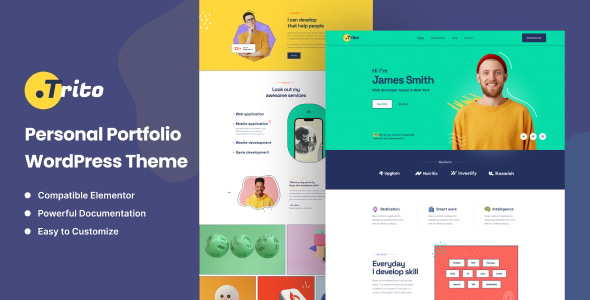
Trito – Personal Portfolio WordPress Theme is a clean, modern, and highly customizable theme designed specifically for professionals and creatives who want to showcase their portfolios. Whether you're a photographer, designer, developer, writer, or freelancer, Trito provides a versatile platform to present your work, achievements, and services in a visually striking way.
Key Features of Trito – Personal Portfolio WordPress Theme:
1. Sleek, Modern Design:
- Trito offers a minimalistic yet stylish design, which allows your content to take center stage. The focus is on displaying your work and skills in the most professional and eye-catching way.
- The theme has a clean layout with smooth animations, ensuring a smooth user experience.
2. Fully Responsive & Retina Ready:
- Trito is designed to be fully responsive, ensuring it looks great on all devices, including desktops, tablets, and smartphones.
- The theme is Retina-ready, meaning images and content will appear sharp and clear, even on high-resolution screens.
3. Multiple Portfolio Layouts:
- The theme comes with several portfolio layouts designed to showcase your work effectively. You can choose from:
- Grid layout
- Masonry layout
- Carousel layout
- Full-width layout
- The portfolio layouts are easy to customize and allow you to showcase your creative projects, from images to videos, in the most impactful way.
4. One-Click Demo Import:
- Trito offers a one-click demo import feature, making it easy to set up your website quickly with the pre-built demo content.
- This saves time and ensures that you can get started with a polished layout without having to start from scratch.
5. Elementor Page Builder Compatibility:
- Trito is fully compatible with Elementor, one of the most popular drag-and-drop page builders for WordPress.
- You can create stunning pages and layouts with no coding experience. Customize every aspect of your site with ease by dragging and dropping widgets and elements.
6. Creative Blog Layouts:
- The theme includes multiple blog layouts, allowing you to share articles, case studies, tutorials, or personal thoughts in a creative and professional manner.
- You can choose between different blog styles such as grid, list, or classic to match your personal brand.
7. Customizable "About Me" Section:
- Trito offers a customizable About Me section where you can introduce yourself, your expertise, and your background.
- You can add a photo, a brief biography, and a list of skills or services you offer, which helps visitors get to know you better.
8. Smooth Scroll and Animations:
- The theme comes with smooth scroll functionality, offering a seamless browsing experience.
- CSS3 animations are included, making interactions with elements on the page feel more dynamic and engaging.
9. Contact Form Integration:
- Trito includes an easy-to-use contact form so that visitors can get in touch with you directly. The form can be customized to collect any necessary information, such as inquiries or project proposals.
- The form is fully integrated with Ajax, which means users won’t need to reload the page when submitting their information.
10. SEO Optimized:
- Trito is designed with SEO best practices in mind, helping your website rank better on search engines like Google.
- The theme’s clean and optimized code, along with its integration with popular SEO plugins like Yoast SEO and Rank Math, ensures your site has the best chance of ranking higher in search engine results.
11. Fast Loading Speed:
- The theme is built to be performance-optimized, ensuring fast loading times for your website.
- A fast-loading website not only improves the user experience but also contributes to better SEO rankings.
12. Customizable Typography and Colors:
- Trito provides full control over your website’s typography and color schemes. You can select from a variety of Google Fonts and adjust font sizes, styles, and weights.
- The color settings allow you to change primary and secondary colors to match your brand’s identity.
13. Social Media Integration:
- The theme includes social media icons that you can link to your profiles on platforms like LinkedIn, Instagram, Twitter, and more.
- You can also display your social media feeds directly on your website to engage visitors and keep them updated with your latest content.
14. Regular Updates & Premium Support:
- Trito offers regular theme updates, ensuring compatibility with the latest WordPress versions and new features.
- You also get premium support to help you with any installation, customization, or technical issues you might face.
How to Set Up and Use Trito – Personal Portfolio WordPress Theme:
1. Install the Theme:
- Go to Appearance > Themes > Add New in your WordPress dashboard.
- Upload the Trito theme ZIP file, click Install Now, and then activate the theme.
2. Install Recommended Plugins:
- The theme will prompt you to install necessary plugins like Elementor and Contact Form 7. Install and activate these plugins to enable the theme’s features.
3. Import Demo Content:
- Use the one-click demo import feature to load the demo content, including layout, typography, and widgets.
- This gives you a ready-to-go starting point, and you can easily replace the demo content with your own.
4. Customize Your Website:
- Use Elementor to customize the design of your site. Drag and drop sections like portfolio grids, image sliders, and text blocks to create your pages.
- You can also edit the website using the WordPress Customizer for changes like colors, fonts, and header settings.
5. Add Portfolio Items:
- To add portfolio items, go to Portfolio and create new portfolio entries with images, descriptions, and links. Organize them into categories, such as photography, design, or development.
- Choose from various portfolio layouts to display your work.
6. Set Up the Blog:
- Set up the blog section where you can share articles or updates. Choose from grid, list, or classic layouts, depending on the look you prefer.
- Create and publish blog posts to engage visitors with your content.
7. Set Up the Contact Form:
- Use the contact form included in the theme to allow visitors to get in touch with you. You can configure the form settings to collect the information you need.
8. Optimize for SEO:
- Install and configure an SEO plugin like Yoast SEO or Rank Math to optimize your content for search engines.
- Ensure you add meta descriptions, keywords, and optimized images to improve your site's visibility.
9. Test Your Website:
- Test the website on different devices and browsers to ensure responsiveness and proper functionality.
- Check that all forms, social media links, and animations work correctly.
10. Launch Your Portfolio:
- Once you are satisfied with your customizations, launch your portfolio website and start sharing it with potential clients, employers, or collaborators.






























