
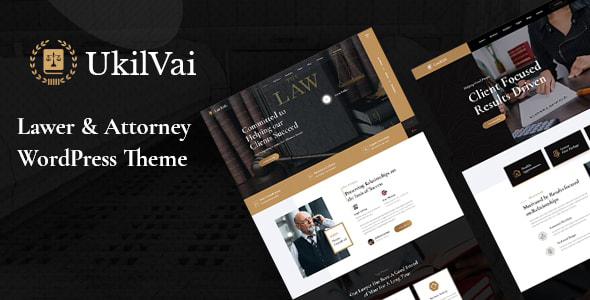


lvai – Lawyer & Attorney WordPress Theme is a sophisticated and professional WordPress theme designed specifically for law firms, lawyers, attorneys, and legal consultants. The theme comes with a modern design and all the essential features required to create a trustworthy and authoritative online presence for legal professionals and law agencies.
Key Features of Ukilvai – Lawyer & Attorney WordPress Theme:
1. Elegant & Professional Design:
- Ukilvai offers a clean, modern, and professional design, reflecting the credibility and authority necessary for a law firm website.
- The theme is designed to create a serious yet approachable look, helping clients feel comfortable and confident in reaching out to your services.
2. Fully Responsive & Mobile-Friendly:
- The theme is fully responsive, meaning your site will adjust seamlessly to different screen sizes and devices. This ensures your website is accessible on desktops, tablets, and smartphones.
- A mobile-friendly design is crucial in today’s digital world, where many users may visit your site on their mobile devices.
3. Multiple Pre-Built Demo Layouts:
- Ukilvai comes with several pre-built demo layouts designed specifically for law firms, legal consultants, and individual attorneys.
- You can import any of these demos with a one-click import feature, which will give you a professional starting point to quickly set up your website.
4. Service Pages to Highlight Legal Expertise:
- The theme includes multiple service page templates to highlight your legal services. You can create pages dedicated to different types of services such as:
- Family Law
- Personal Injury
- Criminal Law
- Corporate Law
- Real Estate Law
- Immigration Law, etc.
- Each service page can include detailed descriptions, images, and relevant information to guide clients toward making informed decisions.
5. Customizable Appointment Booking System:
- Ukilvai includes an appointment booking system, allowing potential clients to book consultations directly from your website.
- The booking system is easy to use and can be customized to suit your specific scheduling preferences. You can accept or reject bookings, manage appointments, and set availability times.
6. Attorney Profiles:
- The theme allows you to showcase your team with attorney profiles. Each attorney can have their own profile page with information about their specialization, qualifications, experience, and contact details.
- Clients can easily find the right attorney based on their needs and expertise, helping increase conversion rates.
7. Blog Layouts for Legal Insights:
- Ukilvai offers multiple blog layouts to help you share legal insights, updates, and news in the form of blog posts. Regularly updating your blog can establish your authority in the field and help attract more visitors to your site.
- The blog can be used to share case studies, industry news, legal advice, or any other content that showcases your expertise.
8. One-Click Demo Import:
- The theme comes with a one-click demo import feature, allowing you to easily import demo content and get your website up and running quickly. This helps you save time by setting up your site with the same layout and content as the demo.
9. Contact Forms & Legal Consultation Forms:
- Ukilvai includes several contact forms, including a legal consultation form for potential clients to submit their inquiries or request a case evaluation.
- The forms are easy to customize and include fields for collecting the necessary details from clients who wish to engage your services.
10. SEO Optimized:
- The theme is built with SEO best practices in mind to help your website rank better on search engines like Google.
- The theme’s clean code, fast loading speeds, and optimized structure ensure that search engines can index your pages more effectively.
11. Fast Loading Speed:
- Ukilvai is optimized for fast loading, ensuring that your website performs well even on slower networks. Fast loading times are critical for user experience and SEO rankings.
12. Social Media Integration:
- Ukilvai comes with built-in social media integration, allowing you to link your law firm’s social media profiles to your website.
- Display social media icons for platforms like LinkedIn, Facebook, Twitter, and others to improve connectivity and engage clients on multiple platforms.
13. Easy Customization Options:
- With Ukilvai, you can easily customize colors, fonts, and layouts to suit your law firm’s branding.
- The theme offers a user-friendly theme options panel where you can modify the appearance and settings without needing coding knowledge.
14. WooCommerce Compatibility:
- If you want to sell legal services or any law-related products directly from your website, Ukilvai is WooCommerce-compatible.
- You can easily set up an online store and offer products like legal guides, books, or even consultation packages.
15. Regular Updates & Premium Support:
- Ukilvai comes with regular updates to ensure compatibility with the latest version of WordPress and to introduce new features.
- The theme also offers premium support, so you can get help whenever you face any setup, customization, or technical issues.
How to Set Up and Use Ukilvai – Lawyer & Attorney WordPress Theme:
1. Install the Theme:
- In your WordPress dashboard, navigate to Appearance > Themes > Add New, then upload the Ukilvai theme ZIP file.
- Click Install Now and then Activate to make the theme live on your site.
2. Install Required Plugins:
- Ukilvai will prompt you to install and activate the required plugins, such as Elementor (for drag-and-drop page building), Contact Form 7 (for creating contact forms), and WooCommerce (if you plan to set up a store).
- Follow the prompts to install and activate the necessary plugins.
3. Import Demo Content:
- Use the one-click demo import feature to load the demo content. This will set up your site with the layout, structure, and sample content, making it easier to get started.
- You can replace the demo content with your own services, team members, and blog posts.
4. Customize Your Website:
- Use Elementor to drag and drop elements onto your pages, customize sections, and adjust the layout to match your law firm’s branding.
- The theme options panel allows you to easily tweak other settings like colors, fonts, and the general design of the website.
5. Add Service Pages & Team Members:
- Go to the Pages section and create detailed service pages explaining the legal services you provide.
- Add your team members’ profiles in the Team section, showcasing their expertise and areas of practice.
6. Set Up the Appointment System:
- Configure the appointment booking system to allow clients to book consultations directly from your website. Set your available hours, consultation fees, and other preferences.
7. Add a Blog Section:
- Set up the blog section where you can publish articles related to legal topics. Choose a layout and start creating content that will help educate your clients and improve your site’s SEO.
8. Set Up Contact Forms:
- Customize the contact forms and legal consultation forms to capture relevant details from clients. You can configure these forms to send submissions to your email or store them in your WordPress dashboard.
9. Optimize for SEO:
- Use an SEO plugin like Yoast SEO to optimize your website for search engines. Ensure that your pages have proper metadata, titles, and descriptions for better visibility on Google.
10. Launch Your Website:
- Once you’ve added all the content, images, and customizations, test your site on various devices and browsers to ensure everything works properly.
- When you’re satisfied, launch your website and start promoting your services to attract new clients.






























