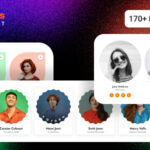
Ultimate Member User Tags v2.3.0

Version :

v2.3.0
Multipurpose Team Member Show Case Layout HTML Template - Pro Team
Multipurpose Team Member Show Case Layout HTML Template - Pro Team Original price was: Rs435.00.Current price is: Rs145.00.
Back to products
Ultimate Member Instagram
Ultimate Member Instagram v2.0.6 Original price was: Rs2,977.00.Current price is: Rs249.00.

Ultimate Member User Tags v2.3.0

Membership Category Products

Original price was: Rs2,126.00.Current price is: Rs249.00.

Ultimate Member User Tags v2.3.0

Live Demo: Ultimate Member User Tags v2.3.0 Live Demo

Ultimate Member User Tags are a powerful feature that allows you to categorize and label users on your WordPress site. This is incredibly useful for member-based websites, online communities, or any platform where organizing users into groups is essential.

What are Ultimate Member User Tags?

User Tags in Ultimate Member can be used for several purposes:

  • Categorizing users: Assign tags based on user roles, activity levels, membership tiers, or any custom attributes you define.

  • Displaying personalized content: Use tags to show specific content tailored to individual users based on their tags.

  • Customizing user experiences: Tagging users enables you to create personalized user experiences or target specific groups with messages, notifications, or relevant content.

  • Filtering users: Tags make it easier to search and filter users within your site's backend, allowing for efficient management of members based on specific characteristics or behaviors.

Key Features of Ultimate Member User Tags:

  • Tagging users: Add tags to users manually or automatically through specific actions (e.g., user registration, profile completion, or achieving milestones).

  • Custom tags: Create your own custom tags to suit your website's needs, such as "VIP Member," "Completed Profile," or "Active User."

  • Displaying tags on user profiles: Show these tags publicly on user profiles, allowing other users or admins to easily see the tags associated with a particular user.

  • Targeted notifications or content: Use tags to send notifications or display specific content to tagged users, ensuring they receive relevant information.

  • Search and Filter: On the admin side, filter users by their tags, streamlining the process of managing members based on certain characteristics or behaviors.

How to Use User Tags in Ultimate Member:

  1. Installing Ultimate Member: Install and activate the Ultimate Member plugin from the WordPress plugin repository if you haven't already.

  2. Adding Tags to Users:

    • The free version of Ultimate Member doesn't have a built-in "tags" feature.
    • With a Plugin Extension: Ultimate Member offers various extensions that can expand functionality. Search for a related add-on or use a third-party plugin like "User Tags" for adding custom user tags.
  3. Tagging Users Automatically:

    • Use Ultimate Member hooks and actions to add tags to users when specific conditions are met. For example, automatically add a "Premium Member" tag to users when they subscribe to a paid plan or complete a certain action.
    • This can be achieved through custom coding or using an Ultimate Member add-on if available.
  4. Displaying Tags on User Profiles:

    • Once tags are applied, choose to display them on user profiles. This might require modifying the profile template or using a short code provided by Ultimate Member or your tag-related add-on.
    • Example: Include a section in the user profile where tags appear, similar to a list of interests or badges.
  5. Filtering Users by Tags:

    • In the admin dashboard, Ultimate Member's User Directory can be enhanced with custom tags. Filter and search for users who have a specific tag.
    • You can also create a searchable directory based on tags, allowing users to find others with similar interests or categories.

Example Use Cases for User Tags:

  • Membership Levels: Tag users based on their membership level (e.g., "Gold Member," "Silver Member," "Free Member").

  • Profile Completion: Tag users who have completed their profile with a "Profile Complete" tag to encourage others to finish theirs.

  • Event Participation: Tag users who have attended a specific event or webinar (e.g., "Event Attendee" or "Webinar Attendee").

  • Activity Status: Tags like "Active," "Inactive," or "New User" can help track user engagement levels.

Advanced Features (Using Add-ons or Custom Code):

  • If you require more advanced control over user tags, such as integrating them with user roles or custom actions, consider writing custom code or installing extensions. Ultimate Member has several add-ons, including:
    • Private Messaging: Combine tags with messaging systems to target specific groups.
    • Conditional Content: Show different content to users based on their tags.
    • Email Notifications: Set up email triggers for users based on their tags.

Let me know if you need more detailed instructions or assistance with adding user tags in your Ultimate Member setup, or if you'd like help with coding examples.

Category: Membership

(Only For Premium Category Products !)

1. All digital products are the most recent version, with no possibility of free updates. After payment, you can request an update to the most recent version for 5 days if a new version is released. We free support within 5 days.

2. If a license is required (Excludes WHMCS license , we provide only method not license), please contact us via email or ticket for assistance with activation. Our license is only valid for activation and does not include support.

3. We provide Mobile, PHP script installation services for $19.90 / ₹1700. Please create a backup after installation as we do not support re-installation. For mobile app source code, we do not offer installation services.

4. If you have any questions, please contact us by email  or create a ticket on this page

5. Please note that any digital products presented on the website do not contain malicious code, viruses or advertising. You will receive the original files from the developers. We do not sell any products that have been downloaded from other websites.

6. The response time can last up to 6 hours.

(Only For Membership Category Products !)

Benefits of our Membership Plans

  • Instant access to all plugins and all themes including all future releases
  • Unlimited domain usage
  • Regular Updates as of when available. Usually, updates are released daily.
  • Before purchasing, please read the Terms and Conditions & Refund Policy.
  • If you have any questions, please first read the FAQs.
  • If you haven’t found the answer to your question, please contact us, and we will respond ASAP.
  • Please note that any digital products on the website do not contain malicious code, viruses, or advertising. We buy the original files from the developers. We do not sell any products downloaded from other sites.
  • Buy or download for FREE by subscribing to our VIP Membership Plan. Join the club of more than 1100+ happy members. This is the same theme as sold by the developer.

Updates:

  • We offer frequent updates for one year from the date of purchase. After this period, you have to purchase the item again to receive further updates, we also offer lifetime updates as a second option.
  • We regularly update products as soon as we are notified about an update, we go and download it from the author and update it on our site, but In case the current version of the product is not the latest, You can request an update for the product by contact form.
  • We send regular emails advising when products have been updated so please be sure to provide an active email address when you sign up.

Support:

  • Our support team is available 24/7, if you have any questions or need help in installing or configuring digital products purchased on the website, please don’t hesitate to contact form.
  • Please note that we are not developers of the provided products, so our technical support capabilities are limited. We do not change product functionality and do not fix developer bugs.

For more information please read FAQs & About Us.

(Only For WHMCS Category Products !)

  • We Only provide WHMCS Module, how you can  nulled any module step only !
  • Instant access to all plugins and all themes 
  • Unlimited domain usage
  • Regular Updates as of when available. Usually, updates are released daily.
  • Before purchasing, please read the Terms and Conditions & Refund Policy.
  • If you have any questions, please first read the FAQs.
  • If you haven’t found the answer to your question, please contact us, and we will respond ASAP.
  • Please note that any digital products on the website do not contain malicious code, viruses, or advertising. We buy the original files from the developers. We do not sell any products downloaded from other sites.

More Like This Products