
Premium Category Products
Velok – Bootstrap & FastAPI Admin Dashboard Template
✨ Latest Version
- Safety, Guarantees Files
- Malware-Free (Clean) Files
- License: GPL Preactivated
- Unlimited Site & Domain Usage
Velok - Bootstrap & FastAPI Admin Dashboard Template
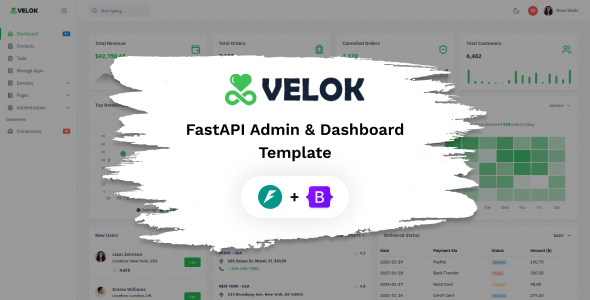
Velok - Bootstrap & FastAPI Admin Dashboard Template is a premium, fully responsive admin dashboard UI kit designed to help developers, designers, startups, and businesses build modern web applications with a professional and well-organized interface. Built with Bootstrap v5.3.8, FastAPI, SCSS, and JavaScript, Velok provides a flexible foundation for creating administrative panels, SaaS platforms, CRM systems, analytics dashboards, and custom business management applications.
Combining a clean visual design with an extensive collection of ready-to-use pages and reusable UI components, Velok helps streamline the frontend development process while maintaining a consistent user experience. Whether you are developing a new web application from scratch or improving an existing project, this admin dashboard template provides a structured starting point for building attractive and functional application interfaces.
With more than 99 pages, 400+ UI components, multiple chart options, advanced form elements, authentication layouts, and light and dark appearance options, Velok offers a comprehensive collection of interface resources for different development requirements.
Product Overview
Velok is designed for modern web application development, where a well-organized administrative interface plays an important role in usability and productivity. Its combination of Bootstrap 5.3.8 and FastAPI provides a foundation that can support projects requiring a modern frontend presentation alongside a Python-based backend framework.
The template focuses on providing developers with reusable interface elements, pre-designed layouts, and commonly required dashboard pages. Instead of spending considerable time designing every individual screen, developers can use the available components and layouts as a starting point and customize them according to their application requirements.
Velok can be adapted for different industries and project types, including business administration, customer relationship management, financial reporting, project management, inventory interfaces, and SaaS application dashboards.
Furthermore, its SCSS-based customization approach makes it easier to adjust the visual appearance, maintain consistent styling, and adapt the interface to different branding requirements.
Modern Design and User Experience
A professional dashboard should make information easy to understand while allowing users to navigate different sections without unnecessary complexity. Velok follows a clean and modern design approach that emphasizes visual consistency, organized content, and practical interface layouts.
The dashboard pages are structured to help developers create administrative experiences with clearly arranged sections and reusable elements. Typography, buttons, cards, tabs, accordions, modals, and notification components provide a consistent visual language throughout the interface.
Additionally, the template includes different interface elements for displaying information, organizing content, and presenting application controls. These components can help create a more intuitive experience for administrators and application users.
The availability of light and dark versions also provides flexibility when choosing the visual appearance of an application. Both appearance options are CSS-based, allowing developers to work with the supplied styling rather than relying on a separate interface framework.
Main Features and Capabilities
Velok includes a broad collection of features designed to support different dashboard development requirements.
Bootstrap v5.3.8 Framework: Built using Bootstrap 5.3.8, the template benefits from a widely used frontend framework and its responsive layout system. Developers familiar with Bootstrap can customize the interface using established classes and development practices.
FastAPI Foundation: Velok is built with FastAPI, providing a Python-based framework foundation for application development. Developers can adapt the project structure and connect the interface to their required backend functionality, depending on the included implementation and documentation.
99+ Ready-Made Pages: The template provides more than 99 pages covering dashboards, interface elements, forms, tables, charts, authentication screens, and other commonly required administrative layouts.
400+ UI Components: A large collection of reusable interface components helps developers create consistent layouts without designing every element independently.
Light and Dark Versions: Velok includes light and dark appearance options implemented through CSS. These variations provide additional flexibility for different application branding and user interface preferences.
SCSS-Based Customization: Extensive use of SCSS variables makes it easier to adjust colors, typography, spacing, and other visual properties across the interface.
Responsive Layout: The dashboard is designed to adapt to different screen sizes, helping maintain usability across desktop computers, tablets, and mobile devices.
Rich Form Elements: Multiple form components, validation layouts, advanced forms, and wizard interfaces provide useful starting points for applications that collect and manage user information.
Chart Library: Included chart pages and visualization components offer a foundation for presenting business statistics, reports, and analytical information.
Error Pages: Dedicated 404 and 500 error pages help developers create a more consistent interface when handling common application error states.
Fully Documented: Product documentation helps developers understand the template structure and customization workflow.
Extensive Collection of Dashboard Pages
One of the major advantages of Velok is its extensive collection of ready-made pages. With more than 99 pages, the template offers different layouts and interface examples that can be adapted to various administrative applications.
The available page collection includes:
Dashboard: A starting point for building administrative overview screens and presenting important application information.
Typography: Examples of text styles and typography elements for consistent content presentation.
Buttons: Different button styles and interface controls for application interactions.
Icons: Icon-related interface elements for improving visual communication.
Cards: Reusable card layouts for organizing information and dashboard content.
Tabs & Accordions: Components for presenting related information in structured sections.
Modals: Popup interface layouts for displaying additional content and application dialogs.
Notifications: Notification interface examples for communicating application messages.
Grid: Layout examples for organizing content into structured sections.
Form Elements: Common input fields and controls for creating application forms.
Form Validation: Interface layouts for presenting form validation states.
Advanced Forms: Additional form components for more complex data entry requirements.
Form Wizard: Multi-step form layouts for organizing longer input workflows.
Multiple File Upload: Interface examples for file-upload functionality.
Basic Table: Standard table layouts for presenting structured information.
Gridjs Table: Table interface examples using Grid.js.
Apex Chart: Chart pages for presenting analytical information and visual reports.
Google Map & Vector Map: Map-related interface examples for location-based application screens.
Timeline: A structured layout for displaying chronological information and activities.
Invoice: Invoice-related page layouts for business and administrative applications.
Blank Page: A clean starting layout for creating additional custom pages.
These pages provide a practical foundation for different application requirements. Developers can reuse existing layouts, modify their content, and build additional sections that match their project structure.
Authentication and Error Page Layouts
Authentication screens are essential components of many web applications. Velok includes several authentication-related page layouts that provide a consistent starting point for designing user access interfaces.
The included authentication pages are:
Log In
Register
Recover Password
Lock Screen
These layouts can be customized to match the branding and visual requirements of a particular application.
However, the presence of authentication page designs does not automatically mean that a complete authentication system is configured. Features such as user registration processing, password recovery, session management, authorization, and database connectivity depend on the backend implementation.
Velok also provides dedicated error page layouts, including 404 and 500 pages. These designs can help developers maintain a consistent user experience when users encounter unavailable pages or server-related errors.
Charts and Data Visualization
Modern administrative applications often require visual representations of business information, operational statistics, and performance indicators. Velok includes chart-related pages that provide a starting point for building data visualization interfaces.
Its Apex Chart collection can be adapted for displaying different types of analytical information, including business trends, reporting data, and application statistics.
Developers can connect chart components to their own data sources and customize the displayed information according to project requirements.
Additionally, the included Google Map and Vector Map pages provide interface examples for applications that require location-oriented information.
Keep in mind that live chart updates, real-time analytics, external map services, and dynamic data processing require the appropriate configuration and data integrations.
Customization and Developer-Friendly Structure
Velok is designed to provide flexibility during the development and customization process. Its Bootstrap foundation allows developers to work with familiar frontend conventions, while SCSS variables provide additional control over the visual appearance.
You can customize various interface properties, including:
Primary and secondary color schemes.
Typography and text styling.
Button appearance and component styling.
Card layouts and dashboard sections.
Form elements and input presentation.
Spacing and layout configurations.
Light and dark appearance settings.
Individual page layouts and interface components.
JavaScript can also be used to customize supported frontend interactions and extend the interface according to application requirements.
Moreover, the reusable component collection can help maintain visual consistency when developing multiple sections of a larger application.
For more advanced customization, developers can adapt the available layouts, connect their own application logic, and extend the project according to their preferred architecture.
Responsive Design and Browser Compatibility
Velok features a fully responsive layout designed to work across different screen sizes and modern supported browsers.
Its responsive structure helps administrative interfaces remain accessible on desktop computers, tablets, and mobile devices. This is particularly useful for applications where administrators and team members may need to access information from different devices.
The Bootstrap responsive grid system provides a familiar foundation for adjusting layouts according to available screen space.
Furthermore, the interface is designed with modern browser compatibility in mind. However, actual compatibility should be evaluated against the browsers and versions supported by the product documentation and the requirements of your application.
FastAPI and Backend Development Possibilities
FastAPI is a modern Python framework commonly used to develop APIs and backend services. Its presence in Velok provides developers with a foundation for building applications that require communication between frontend interfaces and backend functionality.
Depending on the included implementation, developers can extend the project by connecting dashboard pages to application endpoints, processing submitted form data, retrieving information, and displaying dynamic content.
For example, a CRM application could use dashboard layouts to present customer information, while backend services handle data storage and business operations.
Similarly, a SaaS platform could use the provided interface components for administrative pages while implementing its own user management, subscription logic, and reporting functionality.
However, the availability of an admin interface and a FastAPI foundation should not be confused with a fully configured business application. Database models, API endpoints, authentication logic, authorization rules, payment processing, and other application-specific features should be verified in the included package or developed separately where necessary.
Ideal Use Cases
The flexible design and extensive component collection make Velok suitable for a variety of web application projects.
Some potential use cases include:
SaaS Applications: Build administrative interfaces for software-as-a-service platforms.
CRM Systems: Create structured dashboards for customer relationship management applications.
Analytics Dashboards: Develop reporting interfaces with charts and organized data presentation.
Business Administration: Build internal administrative panels for managing business information.
Project Management Systems: Create interfaces for organizing project-related information and workflows.
Financial Dashboards: Design financial reporting and invoice-related application interfaces.
Inventory Management: Develop administrative screens for product and inventory-related systems.
Custom Web Applications: Use reusable components and layouts as the foundation for specialized application interfaces.
Developer Projects: Accelerate the interface development process for client projects and commercial applications.
These are potential applications rather than guaranteed built-in business modules. Additional development may be necessary to implement the required functionality.
Who Should Use Velok?
Velok is suitable for developers, designers, agencies, startups, and businesses looking for a modern admin dashboard template.
Web Developers: Developers working with Bootstrap and FastAPI can use the available pages and components as a starting point for custom web application interfaces.
Python Developers: Developers building Python-based backend applications can use the FastAPI foundation and adapt the dashboard interface to their application requirements.
UI/UX Designers: Designers can use the existing layouts and components as references when creating consistent administrative experiences.
Startups and SaaS Teams: Early-stage teams can benefit from ready-made interface elements when developing administrative panels for their products.
Freelancers and Agencies: Development professionals can adapt the template for different client projects and reduce the time spent creating common dashboard layouts.
Business Owners: Businesses planning custom web applications can use the template as a visual foundation for their administrative interfaces, with additional development as required.
Installation and Setup Guide
Getting started with Velok generally involves preparing the required development environment, configuring the project, and customizing the available dashboard layouts.
A typical setup workflow includes:
Download the Velok package and extract its contents.
Review the included documentation to understand the project structure and requirements.
Install the necessary dependencies according to the provided setup instructions.
Configure the FastAPI application environment where applicable.
Review the Bootstrap, SCSS, and JavaScript files used by the interface.
Run the project using the documented development commands.
Customize the available dashboard pages, colors, typography, and components.
Connect the interface to your own backend endpoints and data sources where required.
Test the application across supported browsers and different screen sizes.
Prepare the customized project for deployment according to your hosting environment.
The exact installation commands, dependency requirements, configuration steps, and deployment process may vary depending on the included package structure. Always follow the official product documentation for accurate setup instructions.
SEO, Performance, and Maintainability Considerations
Although an admin dashboard is primarily designed for application management rather than public search engine visibility, its underlying code organization and frontend structure remain important.
Velok provides a Bootstrap-based interface and SCSS customization options that can help developers maintain consistent styling across different application pages.
The reusable components and predefined layouts can also make future interface updates more manageable. For example, developers can adjust shared styling variables rather than manually modifying every individual component.
For production applications, performance will depend on how the template is customized, which assets and dependencies are loaded, how backend requests are handled, and how application data is processed.
Developers should optimize JavaScript and CSS assets, configure appropriate caching, avoid unnecessary dependencies, and implement efficient API communication where applicable.
Additionally, public-facing SEO requirements should be handled separately if the application includes pages intended to be indexed by search engines.
Important Product Information
Before purchasing Velok - Bootstrap & FastAPI Admin Dashboard Template, consider the following information:
Velok is an admin dashboard UI kit and development foundation built with Bootstrap v5.3.8 and FastAPI.
The package features more than 99 pages and 400+ UI components.
Light and dark appearance options are CSS-based.
SCSS and JavaScript are used for customization and interface development.
The template includes form elements, validation layouts, wizard pages, charts, tables, maps, authentication layouts, and error pages.
A fully functional production application may require additional backend development and configuration.
Database connectivity, business-specific APIs, payment processing, and other advanced application features should not be assumed unless explicitly included.
Review the product documentation for exact installation instructions, dependencies, supported versions, and package contents.
Verify the included source files and licensing terms before using the product in commercial projects.
Final Conclusion
Velok - Bootstrap & FastAPI Admin Dashboard Template is a comprehensive solution for developers and businesses looking for a modern, responsive, and customizable admin dashboard foundation. With Bootstrap v5.3.8, FastAPI, SCSS, JavaScript, more than 99 pages, and 400+ reusable UI components, it offers a versatile collection of interface resources for building different types of web applications.
From SaaS dashboards and CRM interfaces to analytics panels and custom business administration systems, Velok provides ready-made layouts and components that can simplify the frontend development workflow. Its light and dark versions, extensive form elements, chart pages, authentication layouts, and responsive design make it a practical starting point for a wide range of development projects.
If you are looking for a professional Bootstrap and FastAPI admin dashboard template that combines modern design, extensive customization possibilities, and a large collection of reusable interface elements, Velok is a valuable addition to your web development toolkit.
(Only For Premium Category Products !)
1. All digital products are the most recent version, with no possibility of free updates. After payment, you can request an update to the most recent version for 5 days if a new version is released. We free support within 5 days.
2. If a license is required (Excludes WHMCS license , we provide only method not license), please contact us via email or ticket for assistance with activation. Our license is only valid for activation and does not include support.
3. We provide Mobile, PHP script installation services for $19.90 / ₹1700. Please create a backup after installation as we do not support re-installation. For mobile app source code, we do not offer installation services.
4. If you have any questions, please contact us by email [email protected] or create a ticket on this page
5. Please note that any digital products presented on the website do not contain malicious code, viruses or advertising. You will receive the original files from the developers. We do not sell any products that have been downloaded from other websites.
6. The response time can last up to 6 hours.
(Only For Membership Category Products !)
Benefits of our Membership Plans
- Instant access to all plugins and all themes including all future releases
- Unlimited domain usage
- Regular Updates as of when available. Usually, updates are released daily.
- Before purchasing, please read the Terms and Conditions & Refund Policy.
- If you have any questions, please first read the FAQs.
- If you haven’t found the answer to your question, please contact us, and we will respond ASAP.
- Please note that any digital products on the website do not contain malicious code, viruses, or advertising. We buy the original files from the developers. We do not sell any products downloaded from other sites.
- Buy or download for FREE by subscribing to our VIP Membership Plan. Join the club of more than 1100+ happy members. This is the same theme as sold by the developer.
Updates:
- We offer frequent updates for one year from the date of purchase. After this period, you have to purchase the item again to receive further updates, we also offer lifetime updates as a second option.
- We regularly update products as soon as we are notified about an update, we go and download it from the author and update it on our site, but In case the current version of the product is not the latest, You can request an update for the product by contact form.
- We send regular emails advising when products have been updated so please be sure to provide an active email address when you sign up.
Support:
- Our support team is available 24/7, if you have any questions or need help in installing or configuring digital products purchased on the website, please don’t hesitate to contact form.
- Please note that we are not developers of the provided products, so our technical support capabilities are limited. We do not change product functionality and do not fix developer bugs.
(Only For WHMCS Category Products !)
- We Only provide WHMCS Module, how you can nulled any module step only !
- Instant access to all plugins and all themes
- Unlimited domain usage
- Regular Updates as of when available. Usually, updates are released daily.
- Before purchasing, please read the Terms and Conditions & Refund Policy.
- If you have any questions, please first read the FAQs.
- If you haven’t found the answer to your question, please contact us, and we will respond ASAP.
- Please note that any digital products on the website do not contain malicious code, viruses, or advertising. We buy the original files from the developers. We do not sell any products downloaded from other sites.