Premium Category Products

WiFi Master Pro: Speed Test

Last Updated :

Current Version :

WiFi Master Pro: Speed Test

WiFi Master Pro: Speed Test

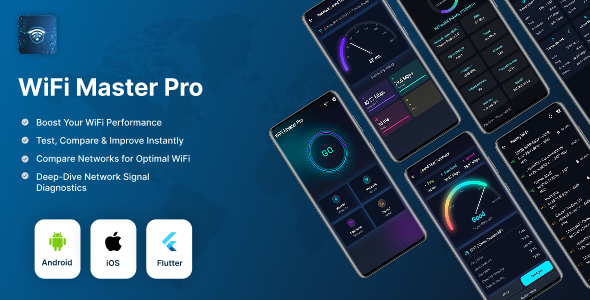
WiFi Master Pro – WiFi Speed Test App (Ping/Jitter/Download/Upload) + WiFi Analyzer + History Export (Flutter 3.35.7 | Android & iOS) WiFi Master Pro is a premium Flutter application to test internet speed with Ping, Jitter, Download & Upload, scan nearby Wi‑Fi networks, view full network details, compare networks, and export history to CSV/PDF. Includes Android APK and full Flutter source code. Runs perfectly on Flutter 3.35.7. Quick Info (Buyer Friendly)
  • Flutter Version: 3.35.7 (recommended/compatible)
  • Platforms: Android + iOS (source included)
  • APK Included: Yes (Android demo/testing)
  • Backend Required: No
  • Monetization: AdMob integrated (Banner + Interstitial + App Open)
  • Analytics/Crashes: Firebase Analytics + Crashlytics integrated
  • Web Support: Not supported by default (uses dart:io networking)
Table of Contents
  • Key Features
  • Complete Feature List
  • Included Screens
  • Tech Stack
  • Installation Guide
  • AdMob Setup
  • Firebase Setup (Optional)
  • Troubleshooting
  • FAQ
  • Support / Contact
Key Features (Highlights)
  • Speed Test: Ping + Jitter + Download + Upload
  • Live gauge, smooth animations, and progress phases
  • Network Analyzer: SSID, BSSID, IP, RSSI, Link Speed, Frequency, Channel, Gateway, Subnet, Public IP
  • Nearby Wi‑Fi scanner with auto refresh
  • Compare networks (grouping + sorting + trends)
  • History + Export CSV/PDF
  • Share results + share exported files
  • Local notifications on test completion
  • Offline banner + network lost handling
  • AdMob Ready: Banner + Interstitial + App Open
  • Firebase Ready: Analytics + Crashlytics
  • Clean, scalable Flutter codebase (screens/services/models)
Complete Feature List A) Speed Test Module (Real-time)
  • Measures:
    • Ping / Latency (ms)
    • Jitter (ms) (ping variability)
    • Download speed (Mbps)
    • Upload speed (Mbps)
  • Real-time UI:
    • Animated Speed Gauge
    • Live values during test (instant speed)
    • Phase progress indicators (Ping/Download/Upload)
    • “Preparing test…” state for better UX
  • Result processing:
    • Data Received / Data Sent
    • Download Stability / Upload Stability (%)
    • Overall quality label (Excellent / Good / Fair / Weak)
  • Reliability:
    • Stops safely if connectivity drops during test
    • Works over HTTPS endpoints (no backend required)
Result Summary Screen
  • Summary UI for Ping/Download/Upload
  • Signal/quality indicator
  • Extra metrics: jitter, data sent/received, stability
  • Actions: Share results, Test again, Back to Home
C) History Module
  • Local history storage (saved on device)
  • Grid layout for previous results
  • Actions: Open details, Delete single record, Clear all history
  • Share/Export menu: Share latest, Export CSV, Export PDF
D) Export Features
  • Export all history as CSV
  • Export all history as PDF
  • Share exported files via system share sheet
E) Sharing
  • Share speed test summary (Ping/Download/Upload + connection label + timestamp)
F) Network Details (Wi‑Fi Analyzer)
  • SSID (Wi‑Fi name)
  • BSSID (AP MAC address)
  • Local IP
  • RSSI (dBm) (device/platform dependent)
  • Link speed (Mbps) (device/platform dependent)
  • Frequency (MHz) (device/platform dependent)
  • Channel detection from frequency
  • Gateway IP
  • Subnet mask
  • Public IP (via HTTPS lookup)
G) Nearby Wi‑Fi Scanner
  • Scan nearby Wi‑Fi access points
  • Auto refresh mode ON/OFF
  • Manual scan button
  • Shows:
    • SSID (or hidden SSID indicator)
    • BSSID
    • Frequency
    • Signal strength bars
    • Security lock icon for secured networks
  • Friendly handling:
    • Missing permissions
    • Device settings restrictions
    • No networks found
H) Compare Networks
  • Groups results by Wi‑Fi name/connection label
  • Search by network name
  • Sort by: Download, Upload, Ping, Samples count
  • Trend visualization (sparkline)
  • Expandable cards for more details
I) Local Notifications
  • Notification when speed test completes
  • Tap notification to open results/history flow
J) Offline Handling
  • Offline banner overlay in the app
  • Stops test if internet connection is lost
K) Ads & Monetization (AdMob)
  • Adaptive Banner Ads
  • Interstitial Ads
  • App Open Ads
  • Buyer-friendly integration: mostly replace Ad Unit IDs for production publishing
L) Firebase
  • Firebase Core
  • Firebase Analytics
  • Firebase Crashlytics
M) UI/UX & Navigation
  • Animated Splash Screen
  • Onboarding (How to Use)
  • Smooth page transitions
  • Premium neon/dark theme styling
Included Screens
  • Splash Screen (Animated)
  • Onboarding Screen (How to Use)
  • Home / GO Screen (Neon ring UI)
  • Speed Test Screen (Live gauge + metrics)
  • Speed Result Screen (Summary + share + retest)
  • History Screen (Share + CSV/PDF export)
  • Network Details Screen
  • Nearby Wi‑Fi Screen
  • Compare Networks Screen
  • Settings Screen (Privacy policy, Rate us, Share app, Version)
Tech Stack / Packages
  • Flutter (Dart): Flutter 3.35.7 (recommended)
  • Networking: dart:io HttpClient (mobile/desktop)
  • Storage: shared_preferences
  • Connectivity: connectivity_plus
  • Network info: network_info_plus
  • Wi‑Fi scanning: wifi_scan
  • Export: pdf
  • Sharing: share_plus
  • Notifications: flutter_local_notifications
  • Ads: google_mobile_ads
  • Firebase: firebase_core, firebase_analytics, firebase_crashlytics
  • Utilities: url_launcher, app_settings, permission_handler, package_info_plus
Installation Guide (Step-by-Step) A) Requirements
  1. Install Flutter SDK 3.35.7
  2. Install Android Studio (Android SDK + Emulator)
  3. Install VS Code (optional)
  4. For iOS (macOS only): Install Xcode + CocoaPods
Setup Project
  1. Extract the downloaded zip file
  2. Open project in Android Studio / VS Code
  3. Open terminal in the project root
  4. Verify Flutter version:
flutter --version
  1. Install dependencies:
flutter pub get
  1. Recommended clean run:
flutter clean flutter pub get C) Run (Android) flutter run D) Build Release (Android) APK: flutter build apk --release Output: build/app/outputs/flutter-apk/app-release.apk AAB (Google Play recommended): flutter build appbundle --release Output: build/app/outputs/bundle/release/app-release.aab E) Run (iOS) Install pods: cd ios pod install cd .. Run: flutter run Build iOS Release: flutter build ios --release Then open ios/Runner.xcworkspace in Xcode → Archive → Upload. AdMob Setup (Production) Ads are already integrated (Banner + Interstitial + App Open). For production publishing:
  1. Create Ad Units in AdMob
  2. Replace Ad Unit IDs in:
  • lib/ad_services/banner_ad_service.dart
  • lib/ad_services/interstitial_ad_service.dart
  • lib/ad_services/app_open_ad_service.dart
Firebase Setup (Optional) Firebase is included (Analytics + Crashlytics). Buyers can keep it or configure their own Firebase project.
  1. Create Firebase project
  2. Add Android + iOS apps
  3. Download and place:
  • google-services.json → android/app/
  • GoogleService-Info.plist → ios/Runner/
flutter pub get flutter run Troubleshooting Dependencies issue: flutter clean flutter pub get iOS pods issue: cd ios pod deintegrate pod install cd .. flutter clean flutter pub get Wi‑Fi scan / SSID not showing on Android:
  • Turn ON Wi‑Fi and Location
  • Grant Location permission
  • Try on a real device
SEO / ASO Keywords (Tags) wifi speed test, internet speed test, ping test, jitter test, download upload test, wifi analyzer flutter, network analyzer, nearby wifi scanner, ssid bssid rssi, gateway subnet, public ip checker, speed test history, csv export, pdf export, admob flutter app, firebase crashlytics analytics, android ios flutter template  

(Only For Premium Category Products !)

1. All digital products are the most recent version, with no possibility of free updates. After payment, you can request an update to the most recent version for 5 days if a new version is released. We free support within 5 days.

2. If a license is required (Excludes WHMCS license , we provide only method not license), please contact us via email or ticket for assistance with activation. Our license is only valid for activation and does not include support.

3. We provide Mobile, PHP script installation services for $19.90 / ₹1700. Please create a backup after installation as we do not support re-installation. For mobile app source code, we do not offer installation services.

4. If you have any questions, please contact us by email  or create a ticket on this page

5. Please note that any digital products presented on the website do not contain malicious code, viruses or advertising. You will receive the original files from the developers. We do not sell any products that have been downloaded from other websites.

6. The response time can last up to 6 hours.

(Only For Membership Category Products !)

Benefits of our Membership Plans

  • Instant access to all plugins and all themes including all future releases
  • Unlimited domain usage
  • Regular Updates as of when available. Usually, updates are released daily.
  • Before purchasing, please read the Terms and Conditions & Refund Policy.
  • If you have any questions, please first read the FAQs.
  • If you haven’t found the answer to your question, please contact us, and we will respond ASAP.
  • Please note that any digital products on the website do not contain malicious code, viruses, or advertising. We buy the original files from the developers. We do not sell any products downloaded from other sites.
  • Buy or download for FREE by subscribing to our VIP Membership Plan. Join the club of more than 1100+ happy members. This is the same theme as sold by the developer.

Updates:

  • We offer frequent updates for one year from the date of purchase. After this period, you have to purchase the item again to receive further updates, we also offer lifetime updates as a second option.
  • We regularly update products as soon as we are notified about an update, we go and download it from the author and update it on our site, but In case the current version of the product is not the latest, You can request an update for the product by contact form.
  • We send regular emails advising when products have been updated so please be sure to provide an active email address when you sign up.

Support:

  • Our support team is available 24/7, if you have any questions or need help in installing or configuring digital products purchased on the website, please don’t hesitate to contact form.
  • Please note that we are not developers of the provided products, so our technical support capabilities are limited. We do not change product functionality and do not fix developer bugs.

For more information please read FAQs & About Us.

(Only For WHMCS Category Products !)

  • We Only provide WHMCS Module, how you can  nulled any module step only !
  • Instant access to all plugins and all themes 
  • Unlimited domain usage
  • Regular Updates as of when available. Usually, updates are released daily.
  • Before purchasing, please read the Terms and Conditions & Refund Policy.
  • If you have any questions, please first read the FAQs.
  • If you haven’t found the answer to your question, please contact us, and we will respond ASAP.
  • Please note that any digital products on the website do not contain malicious code, viruses, or advertising. We buy the original files from the developers. We do not sell any products downloaded from other sites.

More Like This Products