
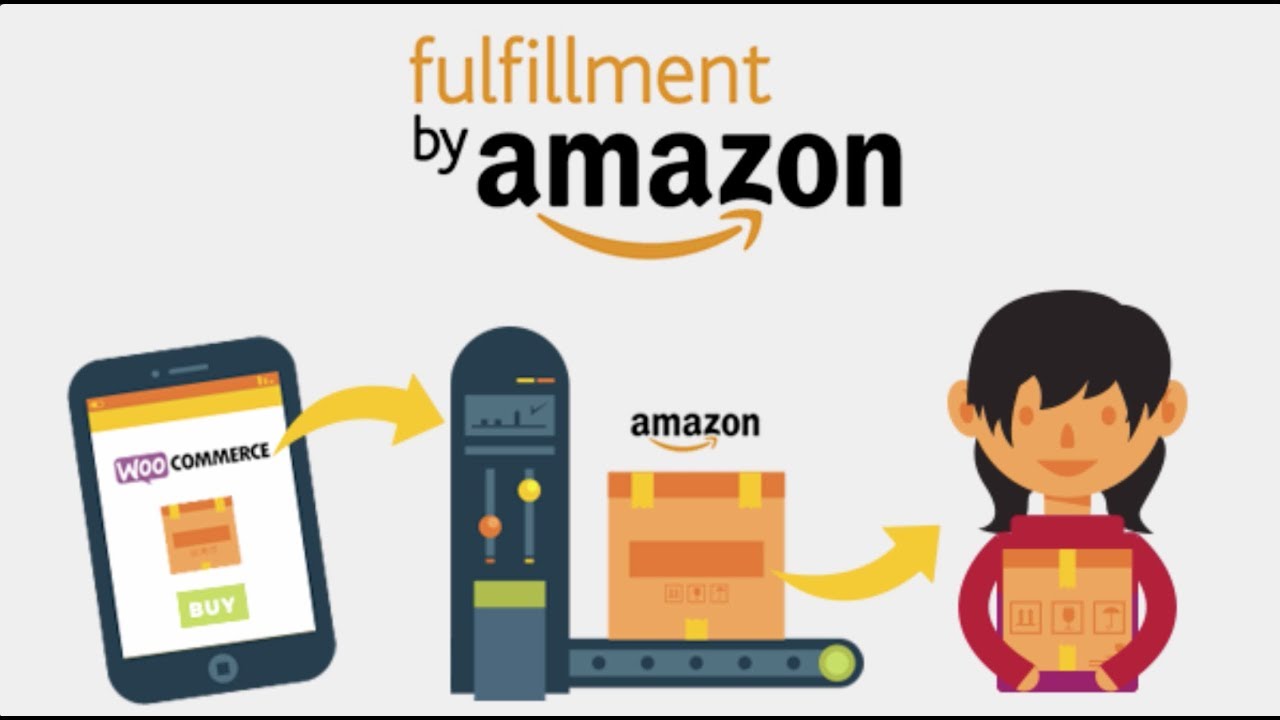
WooCommerce Amazon Fulfillment (also known as WooCommerce Amazon FBA Integration) is a system that allows store owners to use Amazon's powerful fulfillment network to store, pack, and ship their products. By integrating Amazon’s Fulfillment by Amazon (FBA) with , you can streamline your fulfillment process, reduce the burden of managing inventory, and leverage Amazon’s logistics capabilities to fulfill orders directly for your store.
When you integrate Amazon FBA with , it lets you offload many of the logistics tasks (like inventory storage, packaging, and shipping) to Amazon, while still managing your WooCommerce store for sales and customer interactions.
Key Features of WooCommerce Amazon Fulfillment:
1. Seamless Amazon FBA Integration:
- Automated Order Fulfillment: When a customer places an order on your WooCommerce store, the order details are automatically sent to Amazon's FBA system for fulfillment. Amazon will pick, pack, and ship the product to the customer on your behalf.
- FBA Integration with WooCommerce: You can easily link your WooCommerce store to your Amazon Seller Central account. This allows WooCommerce to sync with your FBA inventory and orders.
2. Inventory Management:
- Amazon FBA Inventory Sync: Your product inventory in Amazon FBA will be reflected in your WooCommerce store. The stock levels are updated automatically as Amazon fulfills orders, ensuring accurate product availability is displayed on your website.
- Real-Time Inventory Updates: When Amazon ships products from your FBA warehouse, your WooCommerce store will show the updated stock levels. This helps prevent overselling and ensures that your customers can only purchase products that are available.
- Multi-Channel Fulfillment (MCF): If you sell on multiple platforms, Amazon’s Multi-Channel Fulfillment service allows you to use the same FBA inventory to fulfill orders from WooCommerce, Amazon, eBay, and other online marketplaces.
3. Shipping and Logistics:
- Amazon’s Shipping Network: Amazon will handle the shipping process for you, ensuring that products are packed, shipped, and delivered quickly to customers. You can take advantage of Amazon’s well-established shipping network to reduce shipping costs and delivery times.
- Global Fulfillment: Amazon’s global fulfillment network allows you to store products in different warehouses across the world. This reduces shipping times for international customers, and you can easily expand to global markets.
4. Order Tracking and Customer Service:
- Automatic Tracking Updates: After Amazon ships your product, tracking information is sent automatically to your WooCommerce store, and customers will be notified with the tracking details.
- Customer Service by Amazon: If you use FBA, Amazon handles the customer service for fulfillment-related issues, such as returns and refunds, which can help save time for store owners.
5. Branding and Packaging:
- Amazon FBA Branding Options: Even though Amazon handles packaging, you can still maintain your branding. For example, you can use FBA’s “Stickerless, Commingled Inventory” or “Stickered Inventory” for private labeling.
- Custom Packaging: FBA offers options for custom packaging for your products, allowing you to maintain consistent branding and customer experience, even though Amazon is fulfilling your orders.
6. Tax and Compliance Management:
- Sales Tax Calculation: By integrating Amazon FBA with WooCommerce, sales tax calculations can be automated, and you can be compliant with tax requirements in different states or regions, depending on where your inventory is stored.
- International Expansion: With Amazon’s FBA network, you can expand to global markets. Amazon will handle the logistics and compliance with international shipping rules, customs, and taxes.
7. Returns Management:
- Automated Returns Processing: FBA allows you to set up automated returns for products, so customers can return their purchases easily. Amazon will process returns and restock items in your inventory if they meet your return policies.
- Returns in WooCommerce: You can set up WooCommerce to handle returns seamlessly while coordinating with Amazon to restock returned products if needed.
8. Reporting and Analytics:
- Sales and Fulfillment Reports: WooCommerce will sync with your Amazon FBA reports to provide you with data on sales, inventory, returns, and shipping performance. You can access detailed reports to help make informed business decisions.
- Real-Time Metrics: Monitor real-time data on sales, order statuses, stock levels, and fulfillment progress from your WooCommerce dashboard.
9. Streamlined Order Management:
- Automatic Order Routing: When an order is placed, it will be automatically routed to Amazon FBA for fulfillment based on inventory availability. This reduces the need for manual intervention and streamlines your order fulfillment process.
Benefits of Using WooCommerce Amazon Fulfillment:
- Efficiency in Fulfillment:
- Amazon's FBA program is well-known for its fast and reliable fulfillment process. By using FBA with WooCommerce, you can focus on growing your business without worrying about logistics, inventory management, or shipping.
- Global Reach:
- Using FBA gives you access to Amazon’s global fulfillment network. This can help you expand your business internationally with minimal effort, as Amazon handles storage and shipping to customers worldwide.
- Time and Cost Savings:
- Automated Fulfillment: With FBA managing your inventory and shipping, you save time on packing, labeling, and logistics, allowing you to focus on other aspects of your business.
- Lower Shipping Costs: Amazon’s shipping rates are typically lower than traditional shipping services, which can help reduce shipping costs for you and your customers.
- Improved Customer Experience:
- Fast Delivery: FBA’s fast shipping ensures quicker delivery times, helping to increase customer satisfaction and reduce cart abandonment due to slow shipping.
- Reliable Customer Service: Amazon handles customer service for fulfillment-related issues, providing quick solutions to your customers’ shipping problems.
- Scalability:
- Whether you are selling 10 products or 10,000, Amazon’s fulfillment infrastructure can easily scale to accommodate your business growth without needing you to manage warehousing, staffing, or logistics.
- Comprehensive Reporting:
- Integrating FBA with WooCommerce gives you access to detailed data on your sales, inventory levels, returns, and fulfillment performance. This helps you make better decisions and optimize your operations.
- Enhanced Focus on Marketing and Sales:
- By outsourcing fulfillment to Amazon, you can dedicate more time and energy to marketing, sales strategies, and customer relationships while Amazon handles the backend logistics.
How to Set Up WooCommerce Amazon Fulfillment:
- Sign Up for an Amazon Seller Account: To use Amazon FBA, you’ll first need to create an Amazon Seller Central account if you haven’t done so already. From there, you can enroll in the FBA program and start sending your products to Amazon’s warehouses.
- Install the Amazon FBA Integration Plugin for WooCommerce: There are several plugins and extensions available for integrating FBA with WooCommerce, such as the WooCommerce Amazon Fulfillment extension. Install the plugin and configure it by linking your Amazon Seller Central account with your WooCommerce store.
- Sync Your Products: After setting up the integration, sync your product listings from WooCommerce to Amazon FBA. You’ll need to ensure that the products you want to fulfill through Amazon FBA are listed on both platforms.
- Send Your Inventory to Amazon FBA: Ship your products to Amazon’s fulfillment centers. Amazon will store your inventory in their warehouses, and the system will automatically manage your stock.
- Set Up Your WooCommerce Store to Use FBA: Once your products are in Amazon’s warehouses, configure your WooCommerce store to use FBA for order fulfillment. The integration will automatically send orders to Amazon for shipping when a customer places an order.
- Monitor Orders and Inventory: Once everything is set up, you can monitor your orders and inventory from the WooCommerce dashboard. FBA will take care of packing, shipping, and tracking, and WooCommerce will keep you updated on the status of your orders.





![Booknetic - Appointment Booking & Appointment Scheduling & Calendar reservation [SaaS]](https://gplpixel.com/wp-content/uploads/2024/06/Booknetic-Appointment-Booking-Appointment-Scheduling-Calendar-reservation-SaaS-400x203.jpg)
























