
WooCommerce Back In Stock Notifications v3.0.0

Version :

v3.0.0
Sushi Matching - HTML5 Matching Game
Sushi Matching - HTML5 Matching Game Original price was: Rs2,523.00.Current price is: Rs554.60.
Back to products
Connect A Way - HTML5 Game
Connect A Way - HTML5 Game Original price was: Rs1,392.00.Current price is: Rs348.00.

WooCommerce Back In Stock Notifications v3.0.0

Membership Category Products

Original price was: Rs4,973.00.Current price is: Rs249.00.

WooCommerce Back In Stock Notifications v3.0.0

Live Demo: WooCommerce Back In Stock Notifications v3.0.0 Live Demo

WooCommerce Back In Stock Notifications is a powerful plugin designed to help eCommerce store owners manage and engage customers who are interested in products that are temporarily out of stock. When a product that was previously unavailable comes back in stock, this plugin automatically notifies customers, which can help increase sales, enhance customer experience, and recover potential lost revenue.

Product Overview

This plugin seamlessly integrates with your WooCommerce store, offering a user-friendly solution to keep customers informed about product availability. It empowers you to create a more personalized and engaging shopping experience, ultimately driving higher sales and customer satisfaction.

Modern Design and User Experience

The plugin is designed with a modern and intuitive interface that is easy to navigate and configure.

Main Features and Capabilities

  • Automatic Customer Notifications: When a product is restocked, the plugin automatically sends email notifications to customers who have previously expressed interest in the item. This ensures that customers don't miss out on products they're interested in, increasing the chances of converting them into buyers.

  • Customizable Notification Email Templates: The plugin comes with customizable email templates that you can modify to match your store's branding. You can personalize messages, include special offers or discounts, and enhance the overall customer experience.

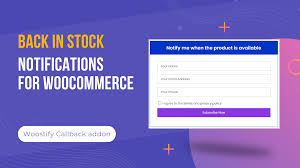
  • Easy Subscription Process: Customers can easily subscribe to back-in-stock notifications directly on the product page. A clear and intuitive sign-up form is displayed, making it simple for customers to opt in.

  • SMS Notifications (Optional): Some versions or add-ons of the plugin offer the option to send SMS notifications in addition to email alerts. This provides an extra layer of convenience for customers who prefer receiving updates via text message.

  • Tracking and Analytics: WooCommerce Back In Stock Notifications typically includes features for tracking the number of customers who have subscribed to notifications for each product. It may also offer analytics on how many people clicked through to the product page after receiving a notification, providing valuable insights into customer behavior and product demand.

  • Product Management: You can manage which products allow for back-in-stock notifications. Choose specific products or product categories to enable notifications, tailoring the system to your store's inventory and sales strategy.

  • Customizable Subscription Form: You can modify the appearance of the subscription form, including its position on the product page (e.g., above or below product details, or within a pop-up). Some plugins also allow for custom fields in the sign-up form to gather additional information from subscribers.

  • Automated Stock Monitoring: The plugin integrates with your store's inventory system to automatically monitor product stock levels. When the stock is replenished to a predefined level, the system sends notifications to the subscribed customers. This automation reduces the manual effort required to stay on top of inventory.

  • Restock Alerts for Admin: Store administrators can receive alerts about the restocking of certain products. This helps them stay on top of popular items that may be in high demand once they're available again.

  • Compliance with GDPR: Most WooCommerce back-in-stock notification plugins are designed to comply with GDPR regulations by offering customers the option to consent to receiving notifications. This helps ensure your website is legally compliant when collecting customer data.

  • Custom Notifications for Variations: If your products have variations (e.g., sizes, colors, styles), the plugin can manage back-in-stock alerts for each variation. This ensures customers are notified when the specific variation they want is available again.

Benefits of Using WooCommerce Back In Stock Notifications

  • Increased Sales: By notifying customers when a product they wanted is back in stock, you increase the likelihood of them completing their purchase. This can help recover potential sales from customers who might have otherwise moved on to a competitor.

  • Enhanced Customer Experience: Providing an easy way for customers to sign up for notifications improves the overall user experience. It demonstrates that you're attentive to their needs and helps keep them engaged with your brand.

  • Recover Lost Opportunities: Out-of-stock products can lead to missed sales opportunities. Back-in-stock notifications allow you to reconnect with interested customers, which can be particularly important for popular or seasonal products.

  • Efficient Inventory Management: The plugin works seamlessly with WooCommerce’s inventory management system, keeping track of stock levels and automatically sending notifications when products are restocked. This automation reduces the manual effort required to stay on top of inventory.

  • Drive Repeat Traffic: Customers who sign up for back-in-stock notifications are likely to return to your site when notified, which drives repeat traffic to your store. This can lead to more conversions and a higher customer retention rate.

  • Customizable to Your Needs: The plugin is designed to be highly customizable, so you can adjust settings to match your store’s specific needs. Whether it's customizing the email design or choosing which products to track, you have full control.

  • Customer Retention: Keeping customers informed and engaged, even when the products they want are unavailable, fosters better relationships and increases customer loyalty. Providing notifications ensures they don’t forget about your store when products are back in stock.

How to Use WooCommerce Back In Stock Notifications

  1. Install and Activate the Plugin: Purchase the plugin from the official WooCommerce store or a third-party marketplace. After purchasing, upload and install the plugin from your WordPress dashboard under Plugins > Add New > Upload Plugin.

  2. Configure Plugin Settings: After activation, configure the settings via the plugin’s settings page. This includes deciding whether to enable email, SMS, or both notifications, customizing the email content, and adjusting form appearance. You can also configure who receives notifications (admin, customers, etc.) and how the notifications are triggered.

  3. Add Back In Stock Notification Form to Products: The subscription form is usually automatically added to product pages for out-of-stock items. If not, you can manually insert it using shortcodes or widget options provided by the plugin.

  4. Monitor and Track Notifications: Monitor your stock levels and the number of customers who have subscribed to notifications. This can usually be tracked from the plugin dashboard or WooCommerce reports. Once an item is restocked, the plugin will automatically send notifications to the subscribed customers.

  5. Analyze Results: Use analytics tools available in the plugin to track the effectiveness of your notifications. Review how many notifications lead to sales, which products are the most requested, and how your customers are engaging with your restocked products.

Conclusion

The WooCommerce Back In Stock Notifications plugin is an essential tool for eCommerce businesses that want to boost customer engagement, recover sales, and enhance user experience by keeping customers informed about product availability. By automating the process of notifying customers when out-of-stock products are restocked, you not only improve customer satisfaction but also drive more conversions and repeat visits to your store. It’s a simple yet effective way to retain customers and grow your business.

Category: Membership

(Only For Premium Category Products !)

1. All digital products are the most recent version, with no possibility of free updates. After payment, you can request an update to the most recent version for 5 days if a new version is released. We free support within 5 days.

2. If a license is required (Excludes WHMCS license , we provide only method not license), please contact us via email or ticket for assistance with activation. Our license is only valid for activation and does not include support.

3. We provide Mobile, PHP script installation services for $19.90 / ₹1700. Please create a backup after installation as we do not support re-installation. For mobile app source code, we do not offer installation services.

4. If you have any questions, please contact us by email  or create a ticket on this page

5. Please note that any digital products presented on the website do not contain malicious code, viruses or advertising. You will receive the original files from the developers. We do not sell any products that have been downloaded from other websites.

6. The response time can last up to 6 hours.

(Only For Membership Category Products !)

Benefits of our Membership Plans

  • Instant access to all plugins and all themes including all future releases
  • Unlimited domain usage
  • Regular Updates as of when available. Usually, updates are released daily.
  • Before purchasing, please read the Terms and Conditions & Refund Policy.
  • If you have any questions, please first read the FAQs.
  • If you haven’t found the answer to your question, please contact us, and we will respond ASAP.
  • Please note that any digital products on the website do not contain malicious code, viruses, or advertising. We buy the original files from the developers. We do not sell any products downloaded from other sites.
  • Buy or download for FREE by subscribing to our VIP Membership Plan. Join the club of more than 1100+ happy members. This is the same theme as sold by the developer.

Updates:

  • We offer frequent updates for one year from the date of purchase. After this period, you have to purchase the item again to receive further updates, we also offer lifetime updates as a second option.
  • We regularly update products as soon as we are notified about an update, we go and download it from the author and update it on our site, but In case the current version of the product is not the latest, You can request an update for the product by contact form.
  • We send regular emails advising when products have been updated so please be sure to provide an active email address when you sign up.

Support:

  • Our support team is available 24/7, if you have any questions or need help in installing or configuring digital products purchased on the website, please don’t hesitate to contact form.
  • Please note that we are not developers of the provided products, so our technical support capabilities are limited. We do not change product functionality and do not fix developer bugs.

For more information please read FAQs & About Us.

(Only For WHMCS Category Products !)

  • We Only provide WHMCS Module, how you can  nulled any module step only !
  • Instant access to all plugins and all themes 
  • Unlimited domain usage
  • Regular Updates as of when available. Usually, updates are released daily.
  • Before purchasing, please read the Terms and Conditions & Refund Policy.
  • If you have any questions, please first read the FAQs.
  • If you haven’t found the answer to your question, please contact us, and we will respond ASAP.
  • Please note that any digital products on the website do not contain malicious code, viruses, or advertising. We buy the original files from the developers. We do not sell any products downloaded from other sites.

More Like This Products