
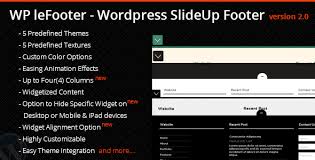

The WP leFooter WordPress SlideUp Footer Plugin is a plugin designed to enhance the footer section of your WordPress website by adding a dynamic, interactive slide-up footer. It allows you to display important content or calls-to-action (CTAs) that "slide up" when users scroll down the page or when they are about to leave the page, helping to engage visitors without disrupting their browsing experience.
Key Features of the WP leFooter WordPress SlideUp Footer Plugin:
- Slide-Up Footer:
- The plugin provides a slide-up footer that appears at the bottom of the page when triggered. This can help increase engagement by displaying important information or CTAs, such as newsletter signups, special offers, or promotional messages.
- Customizable Content:
- You can add various types of content to the footer, including text, HTML, forms, or shortcodes. This allows you to display customized messages, promotions, or sign-up forms that align with your site's goals.
- Trigger Options:
- The slide-up footer can be triggered by different actions or events:
- Scroll trigger: The footer can slide up when the user scrolls a certain percentage down the page.
- Exit-intent trigger: The footer can also appear when the user shows intent to exit the page, which is useful for capturing visitors before they leave.
- Timed trigger: The footer can be set to appear after a certain time has passed, encouraging users to engage after spending some time on the page.
- The slide-up footer can be triggered by different actions or events:
- Customizable Animation and Style:
- You can customize the animation effects (e.g., slide-up, fade-in, etc.) and the styling (such as background colors, text size, padding, etc.) to match the overall design of your website. This ensures the footer blends seamlessly with the rest of your site's aesthetics.
- Mobile Responsiveness:
- The footer is fully responsive, meaning it will adjust its layout and appearance to work on mobile devices and tablets, ensuring a consistent user experience across all screen sizes.
- Display Control:
- You can control where and when the footer appears:
- On specific pages: Show the slide-up footer only on specific pages, posts, or post types.
- On certain devices: You can choose to display the footer on desktop, tablet, or mobile devices only, or show it across all devices.
- Frequency settings: Control how often the footer appears to the same user (e.g., show it once per session, after a certain number of visits, or every time).
- You can control where and when the footer appears:
- Integration with Forms:
- The plugin can be used to display contact forms, newsletter sign-ups, or any form with a call-to-action, which can increase conversion rates by encouraging visitors to take action directly from the footer.
- Exit Intent Detection:
- Using exit-intent technology, the footer can appear when the user moves their cursor towards the top of the page, indicating they are about to leave the site. This feature helps to capture attention just before the user exits, offering a last chance for engagement.
- Analytics and Tracking:
- You can track how well the footer is performing by monitoring metrics like click-through rates (CTR) and user interaction with the footer. Some versions of the plugin integrate with Google Analytics or other analytics tools to provide insights.
- Easy Installation and Configuration:
- The plugin is easy to install and configure, with a user-friendly interface for setting up the slide-up footer's content, triggers, and appearance. No coding skills are required to get started.
Use Cases for WP leFooter WordPress SlideUp Footer Plugin:
- Lead Generation:
- Use the slide-up footer to promote newsletter sign-ups, special offers, or discounts. Displaying a lead capture form in the footer can significantly increase the chances of collecting email addresses or other contact information from visitors.
- Exit Intent Promotions:
- Implement exit-intent pop-ups to display an offer or discount when the user is about to leave the site. This can help retain visitors and reduce bounce rates.
- Promote Sales or Events:
- The footer can be used to highlight seasonal sales, limited-time offers, or upcoming events to visitors as they navigate through the website, providing them with timely information.
- Important Announcements:
- Use the footer for announcements, such as updates on your store’s operating hours, new product releases, or any other important information that you want to share with your visitors.
- Increase User Engagement:
- The plugin can be used to encourage user interaction by promoting social media links, offering surveys or feedback forms, or asking for product reviews, making your site more interactive and engaging for users.
Benefits of Using WP leFooter WordPress SlideUp Footer Plugin:
- Non-Intrusive Engagement: The slide-up footer appears in a way that doesn't disrupt the user's browsing experience. It’s less intrusive than pop-ups and provides an alternative way to present important content.
- Customizable and Flexible: The plugin offers a wide range of customization options for both the appearance and behavior of the footer, allowing you to tailor it to your site’s branding and goals.
- Increased Conversion Rates: By presenting visitors with key information, forms, or calls-to-action when they are most likely to engage, you can boost conversions, whether it's capturing emails, encouraging social media follows, or promoting offers.
- Improved User Experience: The slide-up footer can offer helpful information or a reminder to users in a way that’s easy to dismiss if they’re not interested. This makes it less annoying and more user-friendly compared to traditional pop-ups.
- Mobile-Friendly: The fully responsive design ensures the slide-up footer works well on mobile devices, which is crucial as mobile traffic continues to rise.
- Capture Exit Traffic: The exit-intent feature helps prevent visitors from leaving without interacting, giving you one last chance to convert them before they exit your site.
- Easy to Implement: With its user-friendly settings and no need for coding, the plugin is quick to set up and integrates easily into your existing WordPress site.
How to Use WP leFooter WordPress SlideUp Footer Plugin:
- Install the Plugin:
- Install the WP leFooter WordPress SlideUp Footer Plugin from the WordPress plugin repository or upload the plugin manually via your WordPress admin dashboard.
- Configure General Settings:
- Once activated, configure the basic settings such as trigger actions (scroll, exit-intent, or time-based), appearance settings (background color, text size, etc.), and where to display the footer (on all pages or specific ones).
- Add Content:
- Add the content you want to display in the footer, such as text, HTML, forms, or shortcodes. This can include promotional offers, contact forms, or announcements.
- Customize Styling:
- Customize the design of the footer to match your site’s look and feel. Adjust the size, colors, fonts, and other visual elements to align with your brand.
- Set Frequency and Display Rules:
- Set how often the footer appears for each user and define conditions such as mobile vs. desktop views or specific pages where the footer should be shown.
- Monitor Performance:
- After the footer has been live on your site, track its performance through built-in analytics or integration with tools like Google Analytics to see how effective the footer is in achieving your desired outcomes.






![Booknetic - Appointment Booking & Appointment Scheduling & Calendar reservation [SaaS]](https://gplpixel.com/wp-content/uploads/2024/06/Booknetic-Appointment-Booking-Appointment-Scheduling-Calendar-reservation-SaaS-400x203.jpg)























