WP OS Desktop Backend – More than a WordPress Admin Theme v.1.160

Version :

v.1.160
Night Mode for WordPress
Night Mode for WordPress v6.1.0 Original price was: Rs1,899.00.Current price is: Rs249.00.
Back to products
HTML5 Audio Player WP Plugin
HTML5 Audio Player WP Plugin v3.3.0 Original price was: Rs1,899.00.Current price is: Rs249.00.

WP OS Desktop Backend – More than a WordPress Admin Theme v.1.160

Membership Category Products

Original price was: Rs1,899.00.Current price is: Rs249.00.

WP OS Desktop Backend - More than a Wordpress Admin Theme v.1.160

Live Demo: WP OS Desktop Backend - More than a Wordpress Admin Theme v.1.160 Live Demo

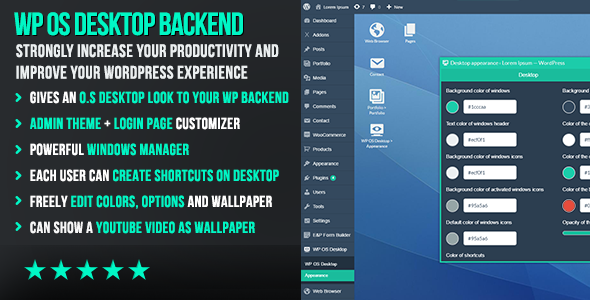
WP OS Desktop Backend - More than a Wordpress Admin Theme v.1.160 is a unique WordPress plugin that transforms your WordPress backend into a visually appealing and highly functional desktop-like interface. Designed to streamline your website management experience, this plugin offers a user-friendly environment that mimics the familiar look and feel of a traditional operating system. Say goodbye to cluttered dashboards and endless tabs; WP OS Desktop Backend empowers you to manage your website efficiently and intuitively.

Product Overview

Tired of the standard WordPress admin interface? WP OS Desktop Backend provides a modern and engaging alternative, giving you a more organized and productive workflow. This innovative plugin allows you to customize your backend with features like resizable, movable, and customizable windows, just like a real desktop environment. Each user can personalize their workspace by creating shortcuts, setting backgrounds, and adjusting window effects. The result is a streamlined and intuitive experience that significantly enhances website management.

Modern Design and User Experience

WP OS Desktop Backend boasts a sleek and modern design that visually separates various admin functionalities into distinct windows. This approach eliminates the clutter of a traditional dashboard, making it easier to focus on specific tasks. The plugin's intuitive interface is designed with user-friendliness in mind, ensuring a smooth and enjoyable experience even for users unfamiliar with WordPress administration.

Main Features and Capabilities

  • Desktop-Style Interface: Experience a familiar and intuitive desktop-like environment within your WordPress backend.

  • Customizable Windows: Resize, maximize, minimize, and arrange windows to suit your workflow and preferences.

  • User-Defined Shortcuts: Create shortcuts for frequently accessed pages and functionalities, directly on your desktop.

  • Personalized Backgrounds: Set custom backgrounds for your desktop and individual windows to enhance visual appeal and branding.

  • Color Schemes: Adjust color palettes to match your website's design and create a cohesive aesthetic.

  • Window Effects: Apply various window effects to add a touch of personality and dynamism to your workspace.

Customization Options

WP OS Desktop Backend offers extensive customization options, allowing you to tailor the plugin to your specific needs and preferences.

  • Themes: Choose from pre-designed themes or create your own to match your website's branding.
  • Colors: Select from a range of color options to personalize the appearance of your desktop and windows.
  • Backgrounds: Set custom backgrounds for your desktop and individual windows.
  • Icons: Customize icons for shortcuts and menus to enhance visual clarity.
  • Layout: Adjust the layout of windows and elements to optimize your workspace.

Responsive Design

WP OS Desktop Backend is fully responsive, ensuring a seamless experience across various devices, including desktops, laptops, tablets, and smartphones. The plugin automatically adapts to different screen sizes, providing a consistent and user-friendly interface regardless of the device being used.

Pages, Components, or Modules

WP OS Desktop Backend focuses on enhancing the overall WordPress admin experience rather than offering pre-built pages or modules. Its core functionality revolves around creating a customizable desktop-like interface within the existing WordPress admin area.

Integration and Compatibility

WP OS Desktop Backend is seamlessly compatible with WordPress versions 5.0 and above. It integrates smoothly with your existing WordPress theme and plugins, ensuring a harmonious and functional website management experience.

SEO and Performance Considerations

WP OS Desktop Backend is designed to be lightweight and efficient, minimizing its impact on website performance. Its core functionality primarily focuses on improving the user interface, without introducing complex features that could potentially affect SEO.

Ideal Use Cases

WP OS Desktop Backend is ideal for:

  • Website Owners: Streamline website management and enhance productivity with a customized desktop-like interface.
  • Developers: Simplify WordPress development workflows with a more organized and intuitive admin environment.
  • Agencies: Offer clients a unique and user-friendly backend experience to improve website management efficiency.

Who Should Use This Product?

WP OS Desktop Backend is perfect for anyone who manages a WordPress website and wants to:

  • Improve their website administration experience
  • Enhance productivity and workflow efficiency
  • Personalize their WordPress backend
  • Create a more visually appealing and engaging admin interface

Installation and Setup Guide

Installing and setting up WP OS Desktop Backend is a straightforward process. Simply download the plugin, upload it to your WordPress site, and activate it through the Plugins menu. The plugin comes with a comprehensive documentation and support system to guide you through the setup process.

Important Product Information

  • Version: v.1.160
  • WordPress Compatibility: 5.0 and above
  • Support: Active support is provided by the developer.
  • Licensing: Commercial license allows for use on multiple websites.

Category: Membership

(Only For Premium Category Products !)

1. All digital products are the most recent version, with no possibility of free updates. After payment, you can request an update to the most recent version for 5 days if a new version is released. We free support within 5 days.

2. If a license is required (Excludes WHMCS license , we provide only method not license), please contact us via email or ticket for assistance with activation. Our license is only valid for activation and does not include support.

3. We provide Mobile, PHP script installation services for $19.90 / ₹1700. Please create a backup after installation as we do not support re-installation. For mobile app source code, we do not offer installation services.

4. If you have any questions, please contact us by email  or create a ticket on this page

5. Please note that any digital products presented on the website do not contain malicious code, viruses or advertising. You will receive the original files from the developers. We do not sell any products that have been downloaded from other websites.

6. The response time can last up to 6 hours.

(Only For Membership Category Products !)

Benefits of our Membership Plans

  • Instant access to all plugins and all themes including all future releases
  • Unlimited domain usage
  • Regular Updates as of when available. Usually, updates are released daily.
  • Before purchasing, please read the Terms and Conditions & Refund Policy.
  • If you have any questions, please first read the FAQs.
  • If you haven’t found the answer to your question, please contact us, and we will respond ASAP.
  • Please note that any digital products on the website do not contain malicious code, viruses, or advertising. We buy the original files from the developers. We do not sell any products downloaded from other sites.
  • Buy or download for FREE by subscribing to our VIP Membership Plan. Join the club of more than 1100+ happy members. This is the same theme as sold by the developer.

Updates:

  • We offer frequent updates for one year from the date of purchase. After this period, you have to purchase the item again to receive further updates, we also offer lifetime updates as a second option.
  • We regularly update products as soon as we are notified about an update, we go and download it from the author and update it on our site, but In case the current version of the product is not the latest, You can request an update for the product by contact form.
  • We send regular emails advising when products have been updated so please be sure to provide an active email address when you sign up.

Support:

  • Our support team is available 24/7, if you have any questions or need help in installing or configuring digital products purchased on the website, please don’t hesitate to contact form.
  • Please note that we are not developers of the provided products, so our technical support capabilities are limited. We do not change product functionality and do not fix developer bugs.

For more information please read FAQs & About Us.

(Only For WHMCS Category Products !)

  • We Only provide WHMCS Module, how you can  nulled any module step only !
  • Instant access to all plugins and all themes 
  • Unlimited domain usage
  • Regular Updates as of when available. Usually, updates are released daily.
  • Before purchasing, please read the Terms and Conditions & Refund Policy.
  • If you have any questions, please first read the FAQs.
  • If you haven’t found the answer to your question, please contact us, and we will respond ASAP.
  • Please note that any digital products on the website do not contain malicious code, viruses, or advertising. We buy the original files from the developers. We do not sell any products downloaded from other sites.

More Like This Products