
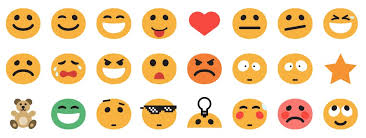

WPForo – Emoticons is an add-on for the WPForo forum plugin that allows forum users to insert emoticons (also known as emojis) into their posts, comments, and private messages. Emoticons are small, expressive icons that convey emotions, reactions, or facial expressions, making online communication more engaging, fun, and visually appealing.
This add-on enhances the user experience by allowing members of the forum to better express their feelings, reactions, and intentions through visual representations. It can also help lighten the atmosphere, create a more relaxed environment, and foster better interaction between users.
Key Features of WPForo – Emoticons:
- Emoticon Picker:
- The add-on integrates an emoticon picker into the forum’s text editor, allowing users to easily select and insert emoticons into their posts, comments, or messages.
- The emoticon picker is intuitive and user-friendly, enabling users to click on an icon and insert it into their content.
- Wide Selection of Emoticons:
- WPForo – Emoticons comes with a wide variety of emoticons (including faces, animals, objects, and more) to help users express a range of emotions, reactions, and thoughts.
- It includes popular emoticons such as and more, covering various categories like happy, sad, love, surprise, and others.
- Custom Emoticons:
- Administrators can add custom emoticons to the default set, allowing for unique, site-specific symbols that may be tailored to the community or topic of the forum.
- Custom emoticons could include specific icons related to the forum’s niche, such as gaming, tech, or community-specific themes.
- Emoji and Text-Based Emoticons:
- Users can insert both emoji-style emoticons (graphical icons) and text-based emoticons (such as “:)” or “:D”), offering flexibility in how users communicate their emotions.
- The text-based emoticons are automatically converted into graphic emoji representations when the post is submitted.
- Easy Access from the Text Editor:
- The emoticon picker is integrated into the forum's post editor as a small button or icon, making it easy to access and use while composing posts.
- Users can quickly browse through the available emoticons or use a search function to find the exact one they want.
- Mobile and Desktop Compatibility:
- The emoticons feature works seamlessly across both desktop and mobile platforms, allowing users to easily access and insert emoticons regardless of the device they are using.
- User Control Over Emoticons:
- Forum admins can control whether emoticons are allowed in all types of posts, or if their use is restricted to certain sections, categories, or user roles.
- Administrators also have the ability to configure the number of emoticons available, the size, and the general settings of the emoticon picker.
- Emoticon Categories:
- Emoticons can be organized into categories for easy browsing, such as smileys, gestures, animals, objects, and more.
- Users can either browse through all emoticons or search by category, making it easier to find the right emoticon for the occasion.
- Increased User Engagement:
- The use of emoticons can increase the engagement and interaction among users, as it encourages more expressive and friendly communication.
- Emoticons can help convey tone and emotion that text alone might not capture, leading to better understanding between users.
- Emoticons for Private Messages:
- Users can also use emoticons in private messages (if enabled), enhancing personal communication within the forum.
- Improved Forum Atmosphere:
- The addition of emoticons helps make the forum more friendly and welcoming, especially in discussions where tone or emotions can be misinterpreted through plain text alone.
- It contributes to a more social and interactive forum environment, encouraging users to participate and engage more actively.
How to Use WPForo – Emoticons:
- Installation:
- First, install and activate both the WPForo plugin and the WPForo – Emoticons add-on. After activation, the emoticon functionality will be added to the forum’s post editor automatically.
- Accessing Emoticons:
- When creating a new post or comment, you’ll see an emoticon button or icon within the text editor. Clicking on this button will open the emoticon picker where you can search for and select your desired emoticons.
- Once selected, the emoticon will be inserted into your post wherever the cursor is positioned.
- Customizing Emoticons:
- Forum administrators can add custom emoticons by uploading images and integrating them into the emoticon list. This can be done through the plugin’s settings in the WordPress dashboard.
- Admins can also organize emoticons into custom categories to make them easier for users to navigate.
- Moderation:
- Admins have the option to configure or limit the use of emoticons in certain areas of the forum. For example, emoticons could be restricted in serious discussions or sensitive forums while being enabled in more casual or social categories.
- Some forums may choose to allow only certain user roles to use emoticons, while others may provide full access to all users.
- Customizing Emoticon Display:
- WPForo allows administrators to set the size and style of emoticons within posts. Custom settings may allow for different display sizes based on your theme or personal preference.
Benefits of WPForo – Emoticons:
- Enhanced Communication:
- Emoticons allow users to convey emotions more clearly than text alone, which is particularly useful for expressing feelings, reactions, and nuances in a conversation.
- Increased User Engagement:
- The visual appeal of emoticons can help to create a more interactive and engaging community. They make posts more interesting and fun, encouraging more participation.
- Expressive Posts:
- Users can easily add a bit of humor, emotion, or creativity to their posts, helping to break the monotony of text-heavy content and fostering a more dynamic conversation.
- Improved Atmosphere:
- Emoticons help lighten the mood and add a sense of playfulness to the forum. It makes interactions feel less formal and more welcoming, particularly in community-driven spaces.
- Attracting New Users:
- A forum that supports emoticons is often more appealing to a wider range of users, especially those who are younger or accustomed to using emojis in their everyday online conversations.
- Better Tone and Clarity:
- Emoticons can clarify tone in discussions, reducing misunderstandings that might arise from the ambiguity of plain text.
- Mobile-Friendly:
- Emoticons are fully optimized for mobile use, ensuring that users on both mobile and desktop devices have a consistent and enjoyable experience.
- Increased Personalization:
- The ability to customize and add unique emoticons can help give your forum its own personality and branding, making the environment feel more unique and tailored to your community.






























